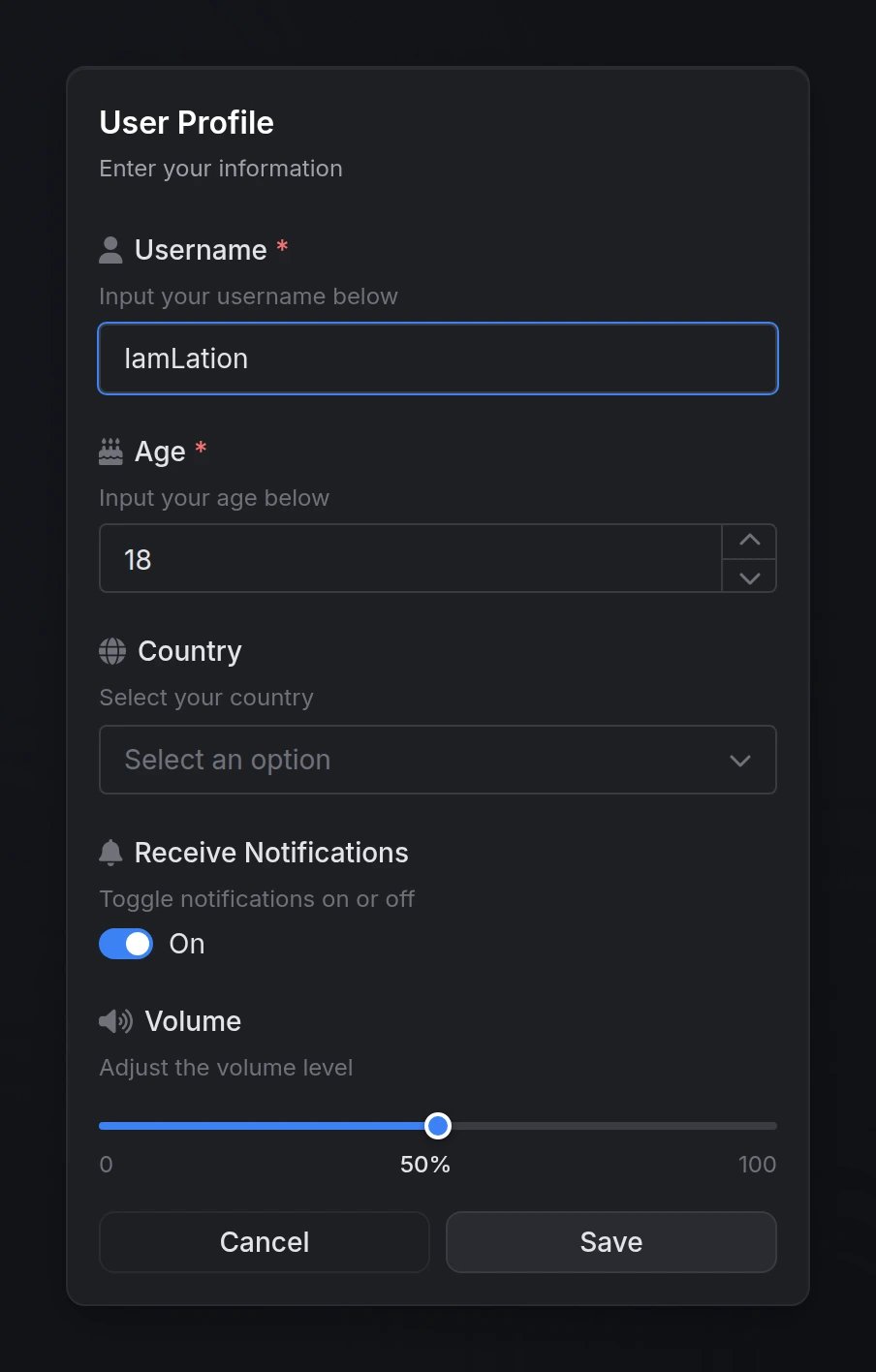
Quick Start
Functions
input(data) → table | nil
input(data) → table | nil
Opens an input dialog and waits for user submission.Returns:
table- Array of values indexed by field order (e.g.,result[1],result[2])nil- User cancelled or closed the dialog
closeInput()
closeInput()
Programmatically closes any currently open input dialog.
Configuration
Dialog Options
table
required
Array of field objects that define the form inputs. Each field type supports specific configuration options.See Field Types below for available types and their options.
string
Main dialog title displayed at the top.
string
Optional subtitle providing additional context or instructions.
string
default:"Submit"
Custom text for the submit button.
string
default:"Cancel"
Custom text for the cancel button.
boolean
default:"true"
Whether to show the cancel button.
string
default:"default"
Dialog styling type to indicate context or severity.Options:
'default', 'info', 'success', 'warning', 'error'Field Types
input
Standard single-line text input field.
string
required
Must be
'input'string
required
Field label displayed above the input
string
Helper text displayed below the label
string
Placeholder text shown when empty
string
FontAwesome icon class (e.g.,
'fas fa-user')string
default:"#71717A"
Icon color (hex code or CSS color name)
string
Default text value
boolean
default:"false"
Whether the field must be filled
boolean
default:"false"
Whether the field is disabled
boolean
default:"false"
Enable password field with visibility toggle
number
Minimum character length
number
Maximum character length
number
Numeric input with increment/decrement controls.
string
required
Must be
'number'string
required
Field label displayed above the input
string
Helper text displayed below the label
string
FontAwesome icon class
string
default:"#71717A"
Icon color (hex code or CSS color name)
number
Default numeric value
boolean
default:"false"
Whether the field must be filled
boolean
default:"false"
Whether the field is disabled
number
Minimum numeric value
number
Maximum numeric value
number
default:1
Step increment (e.g.,
0.5, 5, 10)textarea
Multi-line text input for longer content.
string
required
Must be
'textarea'string
required
Field label displayed above the input
string
Helper text displayed below the label
string
Placeholder text shown when empty
string
FontAwesome icon class
string
default:"#71717A"
Icon color (hex code or CSS color name)
string
Default text value
boolean
default:"false"
Whether the field must be filled
boolean
default:"false"
Whether the field is disabled
number
Minimum character length
number
Maximum character length
toggle / checkbox
Toggle switch or checkbox for boolean values.
'toggle' and 'checkbox' are aliases - both render the same component.string
required
Must be
'toggle' or 'checkbox'string
required
Field label displayed next to the toggle
string
Helper text displayed below the label
string
FontAwesome icon class
string
default:"#71717A"
Icon color (hex code or CSS color name)
boolean
Default checked state (
true or false)You can also use
checked as an alias for default.boolean
default:"false"
Whether the field is disabled
select
Single-select dropdown menu.
string
required
Must be
'select'string
required
Field label displayed above the dropdown
string
Helper text displayed below the label
string
FontAwesome icon class
string
default:"#71717A"
Icon color (hex code or CSS color name)
table
required
Array of option objects (see Select Options below)
any
Default selected value (must match an option’s
value)boolean
default:"false"
Whether a selection is required
boolean
default:"false"
Whether the field is disabled
boolean
default:"true"
Enable search/filter functionality
multi-select
Multi-select dropdown menu allowing multiple selections.
string
required
Must be
'multi-select'string
required
Field label displayed above the dropdown
string
Helper text displayed below the label
string
FontAwesome icon class
string
default:"#71717A"
Icon color (hex code or CSS color name)
table
required
Array of option objects (see Select Options below)
table
Array of default selected values
boolean
default:"false"
Whether at least one selection is required
boolean
default:"false"
Whether the field is disabled
boolean
default:"true"
Enable search/filter functionality
number
Maximum number of selections allowed
slider
Range slider for numeric value selection.
string
required
Must be
'slider'string
required
Field label displayed above the slider
string
Helper text displayed below the label
string
FontAwesome icon class
string
default:"#71717A"
Icon color (hex code or CSS color name)
number
required
Minimum slider value
number
required
Maximum slider value
number
default:1
Step increment between values
string
Unit label displayed next to value (e.g.,
'%', 'mph', 'px')number
Default slider value
boolean
default:"false"
Whether the field is disabled
color
Color picker with multiple format support.
string
required
Must be
'color'string
required
Field label displayed above the picker
string
Helper text displayed below the label
string
Placeholder text shown when empty
string
FontAwesome icon class
string
default:"#71717A"
Icon color (hex code or CSS color name)
string
default:"hex"
Color format for the returned valueOptions:
'hex'-#RRGGBB'hexa'-#RRGGBBAA'rgb'-rgb(r, g, b)'rgba'-rgba(r, g, b, a)'hsl'-hsl(h, s%, l%)'hsla'-hsla(h, s%, l%, a)
string
Default color value (must match specified format)
boolean
default:"false"
Whether a color must be selected
boolean
default:"false"
Whether the field is disabled
date
Date picker with customizable format and range constraints.
string
required
Must be
'date'string
required
Field label displayed above the picker
string
Helper text displayed below the label
string
Placeholder text shown when empty
string
FontAwesome icon class
string
default:"#71717A"
Icon color (hex code or CSS color name)
string
default:"MM/dd/yyyy"
Date format for display and return valueOptions:
'MM/dd/yyyy'- 01/15/2025'dd/MM/yyyy'- 15/01/2025'yyyy-MM-dd'- 2025-01-15'dd.MM.yyyy'- 15.01.2025
string
Default date value (must match specified format)
string
Earliest selectable date (must match specified format)
string
Latest selectable date (must match specified format)
boolean
default:"true"
Show clear button to remove selected date
boolean
default:"false"
Whether a date must be selected
boolean
default:"false"
Whether the field is disabled
date-range
Date range picker for selecting start and end dates.
string
required
Must be
'date-range'string
required
Field label displayed above the picker
string
Helper text displayed below the label
string
Placeholder text shown when empty
string
FontAwesome icon class
string
default:"#71717A"
Icon color (hex code or CSS color name)
string
default:"MM/dd/yyyy"
Date format for display and return valuesOptions:
'MM/dd/yyyy'- 01/15/2025'dd/MM/yyyy'- 15/01/2025'yyyy-MM-dd'- 2025-01-15'dd.MM.yyyy'- 15.01.2025
table
Default date range as array:
{ startDate, endDate }string
Earliest selectable date (must match specified format)
string
Latest selectable date (must match specified format)
boolean
default:"true"
Show clear button to remove selected range
boolean
default:"false"
Whether a date range must be selected
boolean
default:"false"
Whether the field is disabled
Select Options
For'select' and 'multi-select' field types, each option in the options array supports:
any
required
The value returned when this option is selected
string
Display text shown to the user (uses
value if omitted)boolean
default:"false"
Whether the option is disabled and cannot be selected
Preview