Timeline
Show a lation ui timeline of tasks on screen, then update task status, add tasks or change its header while it's showing.
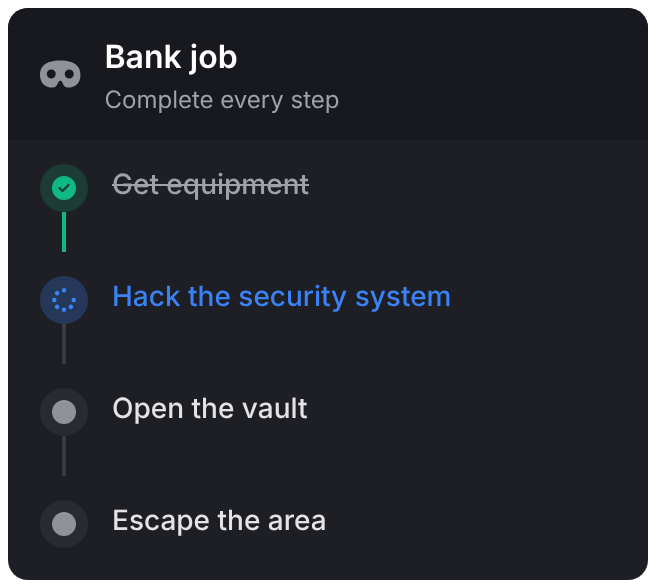
A timeline is a panel that lists a sequence of tasks with their status, such as the steps of a heist or a delivery route. It doesn't take focus. One timeline shows at a time; showing a new one replaces the old one.
showTimeline
Client export
exports.lation_ui:showTimeline(data)Parameters
data.idstring- The timeline's id, used by the other exports
data.titlestring- The header's title
data.taskstable- The list of tasks
data.descriptionstringoptional- A line under the title
data.iconstringoptional- The header's icon
data.iconColorstringoptional- The header icon's color. The theme's muted text by default.
data.iconAnimationstringoptional- See icon animations
data.positionstringoptionaldefault'right-center'- See positions
data.opacitynumberoptional- The panel's opacity, 0 to 1, for this timeline. The theme's panel opacity by default.
It raises an error if id, title or tasks is missing. The title, description and task text take text formatting.
Tasks
| Field | Type | Default | Description |
|---|---|---|---|
id | string | Required. The task's id. | |
label | string | Required. The task's text. | |
description | string | Smaller text under the label. | |
status | string | Required. 'pending', 'active', 'completed' or 'failed'. | |
icon | string | The status's icon | Replaces the status's icon. |
iconColor | string | The status's color | The icon's color. |
iconAnimation | string | See icon animations. |
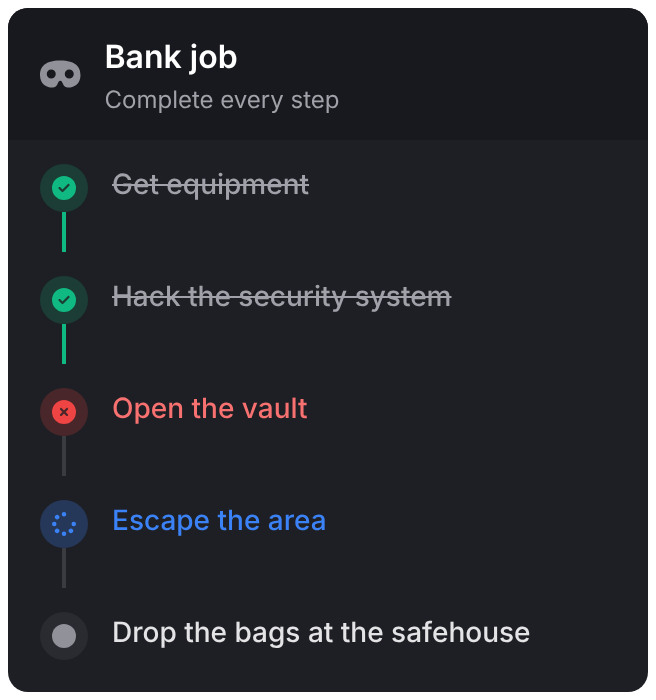
Each status has its own icon and color. An active task with the default icon spins in the accent color. A completed task gets a green check and is struck through in the theme's secondary text, and the line down to the next task turns green. A failed task gets a red cross and red text.
hideTimeline
Client export
exports.lation_ui:hideTimeline(id)Parameters
idstring- The timeline's id
updateTimelineTask
Client export
exports.lation_ui:updateTimelineTask(timelineId, taskId, status)
exports.lation_ui:updateTimelineTask(timelineId, tasks)
Parameters
timelineIdstring- The timeline to update
taskIdstring- One task to update, with
status statusstring- That task's new status
taskstable- In place of
taskIdandstatus: a list of tables, each with anidand any task fields to change
Changes one task's status, or several tasks at once.
exports.lation_ui:updateTimelineTask('bank_job', 'hack', 'completed')addTimelineTask
Client export
exports.lation_ui:addTimelineTask(timelineId, task)Parameters
timelineIdstring- The timeline to add to
tasktable- A task
Adds the task at the end of the timeline.
updateTimeline
Client export
exports.lation_ui:updateTimeline(timelineId, updates)Parameters
timelineIdstring- The timeline to change
updatestable- The timeline's own fields to change, such as
title,description,icon,positionoropacity. Only the fields you pass change.
exports.lation_ui:updateTimeline('bank_job', { description = 'Get out before the police arrive' })getActiveTimeline
Client export
local id = exports.lation_ui:getActiveTimeline()Returns
string | nil- The id of the timeline on screen, or
nil
-- Don't cover another script's timeline
if not exports.lation_ui:getActiveTimeline() then
    exports.lation_ui:showTimeline(deliveryTimeline)
end
Example
exports.lation_ui:showTimeline({
    id = 'bank_job',
    title = 'Bank job',
    description = 'Complete every step',
    icon = 'fas fa-mask',
    tasks = {
        { id = 'gear', label = 'Get equipment', status = 'completed' },
        { id = 'hack', label = 'Hack the security system', status = 'active' },
        { id = 'vault', label = 'Open the vault', status = 'pending' },
        { id = 'escape', label = 'Escape the area', status = 'pending' }
    }
})

-- later
exports.lation_ui:updateTimelineTask('bank_job', {
    { id = 'hack', status = 'completed' },
    { id = 'vault', status = 'active' }
})

exports.lation_ui:addTimelineTask('bank_job', {
    id = 'drop',
    label = 'Drop the bags at the safehouse',
    status = 'pending'
})

-- when the job ends
exports.lation_ui:hideTimeline('bank_job')
Still stuck? Ask in our Discord: the people who write the scripts answer.
Last updated