Drawer
Slide a lation ui drawer in from the side or bottom of the screen with text, callouts, key-value rows, images and action buttons, then update or close it.
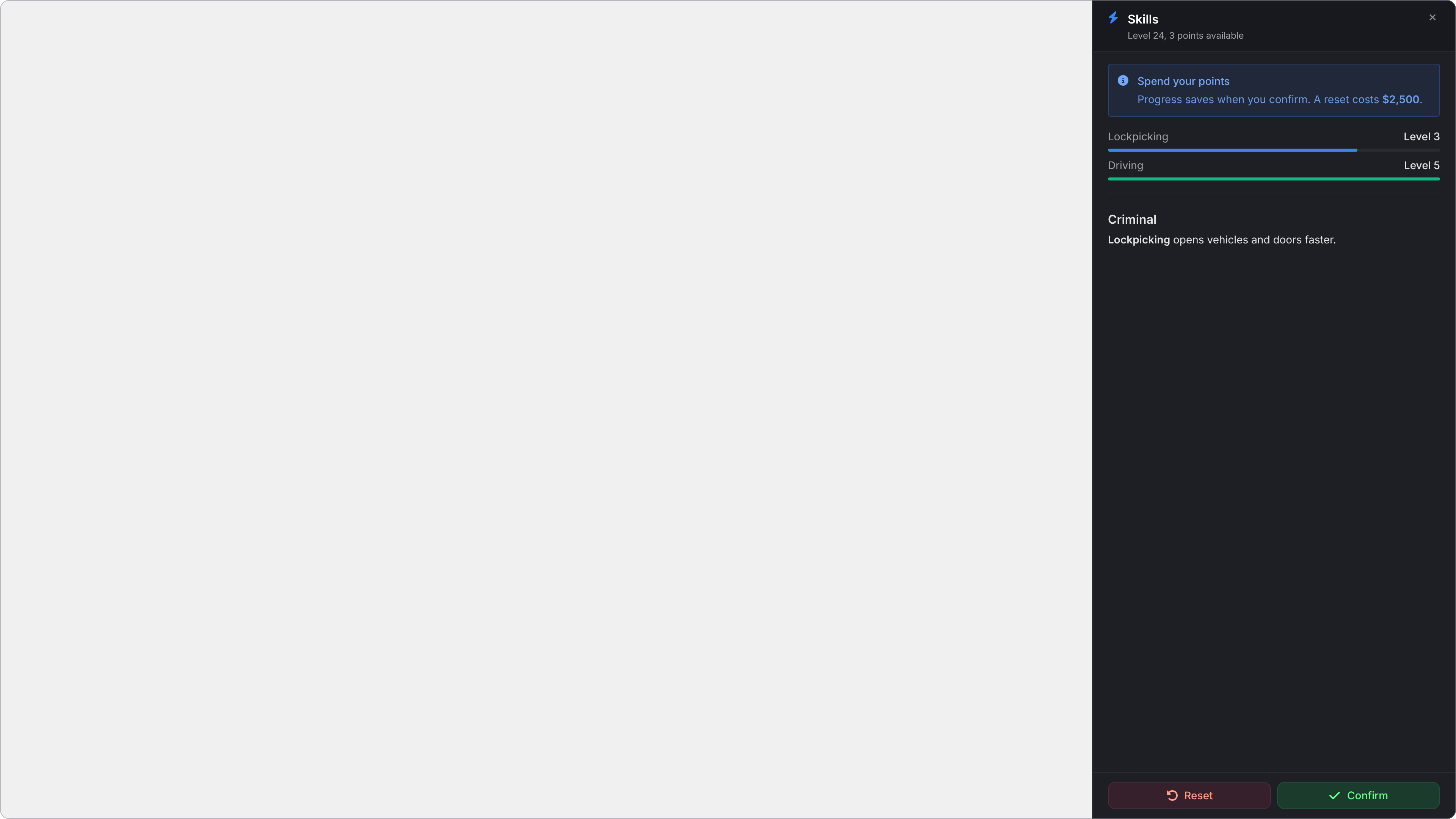
A drawer is a panel that slides in from the left, right or bottom edge. It holds Markdown text and sections (callouts, key-value rows with bars, images and dividers), plus action buttons that trigger events. One drawer shows at a time; showing a different id replaces it.
An interactive drawer (the default) shows the cursor for its buttons while the player keeps moving, with the camera, firing, melee and the pause menu blocked. A drawer with canClose = false takes no focus at all, so it can sit on screen beside other UI.
showDrawer
Client export
local shown = exports.lation_ui:showDrawer(data)Parameters
data.idstring- The drawer's id, used by the other exports
data.titlestringoptional- The header's title
data.subtitlestringoptional- A line under the title
data.iconstringoptional- The header's icon
data.iconColorstringoptional- The header icon's color. The theme's icon color by default.
data.iconAnimationstringoptional- See icon animations
data.contentstringoptional- Markdown text shown above the sections
data.sectionstableoptional- The list of sections
data.positionstringoptionaldefault'right''left','right'or'bottom'. Side drawers are full height; a bottom drawer is full width and up to half the screen tall.data.sizestringoptionaldefault'md'- A side drawer's width:
'sm','md'or'lg' data.backdropbooleanoptionaldefaultfalse- Darkens the screen behind the drawer
data.canClosebooleanoptionaldefaulttrue- Shows the close button and the actions, and lets Escape close it. When
false, only your script can close it, and actions aren't shown. data.actionstableoptional- Buttons in the footer. See actions.
Returns
booleantruewhen shown;falseif there's noid, or none oftitle,subtitle,contentandsectionsis set
title, subtitle, content, text sections, callouts and image captions take text formatting.
Sections
Each section is a table with a type:
| Type | Fields | Shows |
|---|---|---|
text | content | A block of Markdown text. |
callout | description (required), label, calloutType ('info', 'success', 'warning' or 'error', default 'info'), icon | A highlighted note, like the alert dialog's callouts. |
keyValue | items: a list of { label, value, progress, progressColor } | Label and value rows. progress (0 to 100) adds a bar under the row; colorScheme works in place of progressColor. |
image | src (required), alt, caption | A full-width image with an optional caption. |
divider | A horizontal line. |
Actions
| Field | Type | Default | Description |
|---|---|---|---|
label | string | Required. The button's text. | |
icon | string | An icon before the text. | |
variant | string | 'default' | 'default', 'primary' (success colors) or 'destructive' (error colors). |
event | string | A client event to trigger, with args. | |
serverEvent | string | A server event to trigger, with args. | |
args | any | Passed to the events. | |
close | boolean | true | false keeps the drawer open after the button is pressed. |
With one or two actions the buttons sit side by side; with three or more they stack.
hideDrawer
Client export
local hidden = exports.lation_ui:hideDrawer(id)Parameters
idstringoptional- Close only if this drawer is the one showing. Without it, closes whichever drawer is open.
Returns
booleantrueif it closed one
updateDrawer
Client export
local updated = exports.lation_ui:updateDrawer(id, data)Parameters
idstring- The id of the drawer on screen
datatable- The fields to change. Only the fields you pass change.
Returns
booleanfalseif the drawer with thatidisn't showing
isDrawerOpen
Client export
local open = exports.lation_ui:isDrawerOpen(id)Parameters
idstringoptional- A drawer's id
Returns
boolean- With an
id, whether that drawer is showing; without one, whether any drawer is showing
-- /skills opens the drawer, or closes it when it's already open
RegisterCommand('skills', function()
    if exports.lation_ui:isDrawerOpen('skills') then
        exports.lation_ui:hideDrawer('skills')
    else
        OpenSkillsDrawer()
    end
end, false)
Example
exports.lation_ui:showDrawer({
    id = 'skills',
    title = 'Skills',
    subtitle = 'Level 24, 3 points available',
    icon = 'fas fa-bolt',
    iconColor = '#3B82F6',
    position = 'right',
    size = 'lg',
    backdrop = true,
    sections = {
        {
            type = 'callout',
            calloutType = 'info',
            label = 'Spend your points',
            description = 'Progress saves when you confirm. A reset costs **$2,500**.'
        },
        {
            type = 'keyValue',
            items = {
                { label = 'Lockpicking', value = 'Level 3', progress = 75, progressColor = '#3B82F6' },
                { label = 'Driving', value = 'Level 5', progress = 100, progressColor = '#10B981' }
            }
        },
        { type = 'divider' },
        { type = 'text', content = '### Criminal\n**Lockpicking** opens vehicles and doors faster.' }
    },
    actions = {
        {
            label = 'Reset',
            icon = 'fas fa-rotate-left',
            variant = 'destructive',
            event = 'my_skills:reset',
            close = false
        },
        {
            label = 'Confirm',
            icon = 'fas fa-check',
            variant = 'primary',
            serverEvent = 'my_skills:save',
            args = { lockpicking = 3, driving = 5 }
        }
    }
})

AddEventHandler('my_skills:reset', function()
    exports.lation_ui:updateDrawer('skills', { subtitle = 'Level 24, 5 points available' })
end)
Still stuck? Ask in our Discord: the people who write the scripts answer.
Last updated