Radial menu
Add items and submenus to the lation ui radial menu that players open with a key, with badges, progress rings, icon animations and select callbacks.
The radial menu is a wheel of items the player opens with the Open Radial Menu key (Config.radial.default_key, Z by default, and players can rebind it). Scripts add items to the main wheel and register submenus that items open. The player keeps moving while it's open; the camera, firing, melee and the pause menu are blocked.
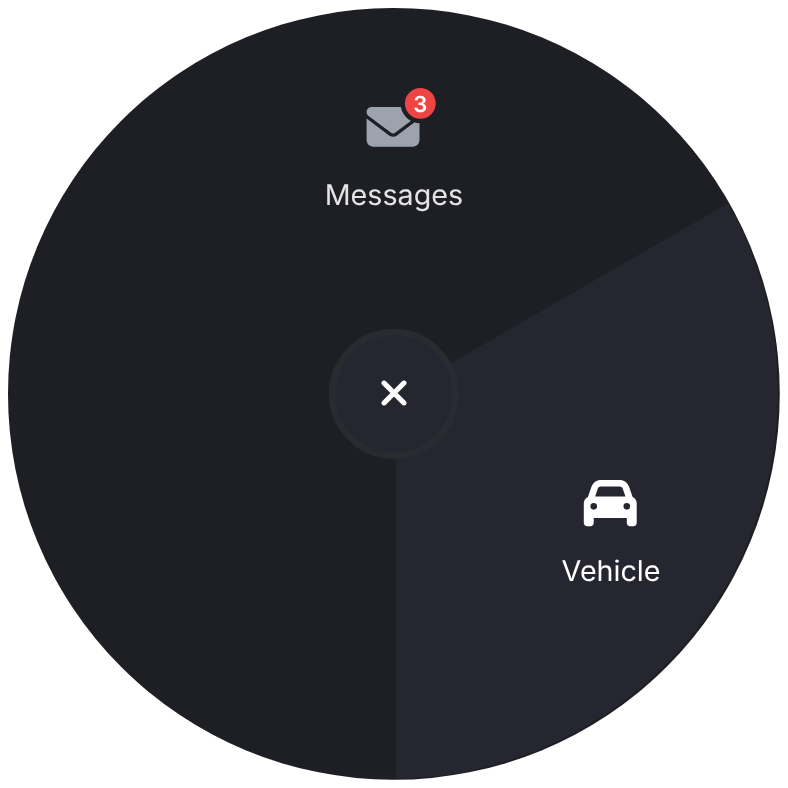
Pressed while the wheel is open, the key closes it, from the main wheel or a submenu. The center button closes it too, on the main page, and so does selecting an item. The key doesn't open the wheel while it has no items, while another lation ui window or any other NUI has focus (an open dialog or menu, for example), while the pause menu is open, or after disableRadial(true).
addRadialItem
Client export
exports.lation_ui:addRadialItem(items)Parameters
itemstable- One item, or a list of items
Adds items to the main wheel. An item with the same id as one already there replaces it. If the wheel is open on the main page, it updates at once.
Items stay in the wheel until something removes them, even after the resource that added them stops. Remove yours when your resource stops:
AddEventHandler('onResourceStop', function(resource)
    if resource == GetCurrentResourceName() then
        exports.lation_ui:removeRadialItem('vehicle')
    end
end)
removeRadialItem
Client export
exports.lation_ui:removeRadialItem(id)Parameters
idstring- The
idof a main wheel item
clearRadialItems
Client export
exports.lation_ui:clearRadialItems()Removes every item from the main wheel, including the items other resources added. Prefer removeRadialItem for your own.
exports.lation_ui:clearRadialItems()registerRadial
Client export
exports.lation_ui:registerRadial(radial)Parameters
radial.idstring- The submenu's id, used by an item's
menu radial.itemstable- The list of items in the submenu
Registers a submenu. Registering an id again replaces it, and if that submenu is open, it updates at once.
hideRadial
Client export
exports.lation_ui:hideRadial()Closes the wheel.
-- Close the wheel before a cutscene starts
exports.lation_ui:hideRadial()
StartCutscene(0)
disableRadial
Client export
exports.lation_ui:disableRadial(state)Parameters
statebooleantruestops players opening the wheel and closes it if it's open;falseallows it again
-- No wheel while handcuffed
exports.lation_ui:disableRadial(true)
getCurrentRadialId
Client export
local id = exports.lation_ui:getCurrentRadialId()Returns
string | nil- The id of the open submenu, or
nilon the main wheel or when it's closed
if exports.lation_ui:getCurrentRadialId() == 'vehicle_radial' then
    exports.lation_ui:registerRadial({ id = 'vehicle_radial', items = BuildVehicleItems() }) -- refresh it in place
end
Items
| Field | Type | Default | Description |
|---|---|---|---|
id | string | For main wheel items: used by removeRadialItem and to replace the item. | |
label | string | Required. The item's text. Long labels wrap. | |
icon | string | An icon or image URL. | |
iconColor | string | Theme icon color | The icon's color. The hovered item uses the heading color. |
iconAnimation | string | See icon animations. | |
iconAnimateOnHover | boolean | false | Animate the icon only while the item is hovered or selected. |
menu | string | The id of a submenu registered with registerRadial to open. | |
onSelect | function or string | Runs when the item is selected. See onSelect. | |
keepOpen | boolean | false | Keep the wheel open after the item is selected. |
progress | number | 0 to 100. Draws a ring around the icon. Needs an icon. | |
progressColor | string | Theme accent | The ring's color. |
badge | number or string | A small badge on the icon. Numbers above 99 show as 99. | |
badgeColor | string | Theme error color | The badge's color. Its number is white, or the theme's heading color where that reads better on it. |
readOnly | boolean | false | No hover effect and can't be selected. |
The wheel shows up to six items. With more, the sixth wedge becomes More and opens the next page. One or two items keep the three-wedge layout, with the third wedge left empty, as ox_lib's wheel does.
onSelect
Callback
onSelect = function(menuId, index) endParameters
menuIdstring | nil- The submenu's id, or
nilon the main wheel indexnumber- The item's place in that menu, starting at 1
Runs when the player clicks the item or presses Enter on it. The wheel closes first, unless the item has keepOpen or opens a submenu. A string instead of a function names an export of the resource that added the item (for a submenu item, the resource that registered the submenu), called with the same arguments.
-- onSelect = 'openMessages' calls this export of your own resource
exports('openMessages', function(menuId, index)
    print('Messages opened from', menuId or 'the main wheel')
end)
Controls
| Input | Action |
|---|---|
| Mouse | Hover and click items. |
| Arrow Left and Right | Move the selection clockwise or counter-clockwise, skipping read-only items. |
| Enter | Select the highlighted item. |
| Backspace or right-click | Go to the previous page, or back to the parent menu. Nothing on the main page. |
| Center button | Back from a page or submenu, or close the wheel on the main page. |
| Open Radial Menu key | Close the wheel, from any page. |
Example
exports.lation_ui:registerRadial({
    id = 'vehicle_radial',
    items = {
        {
            label = 'Engine',
            icon = 'fas fa-power-off',
            onSelect = function(menuId, index)
                local vehicle = GetVehiclePedIsIn(PlayerPedId(), false)
                SetVehicleEngineOn(vehicle, not GetIsVehicleEngineRunning(vehicle), false, true)
            end
        },
        {
            label = 'Fuel',
            icon = 'fas fa-gas-pump',
            progress = 64,
            progressColor = '#10B981',
            readOnly = true
        }
    }
})

exports.lation_ui:addRadialItem({
    {
        id = 'vehicle',
        label = 'Vehicle',
        icon = 'fas fa-car',
        menu = 'vehicle_radial'
    },
    {
        id = 'messages',
        label = 'Messages',
        icon = 'fas fa-envelope',
        badge = 3,
        keepOpen = true,
        onSelect = 'openMessages' -- calls exports[this resource]:openMessages(menuId, index)
    }
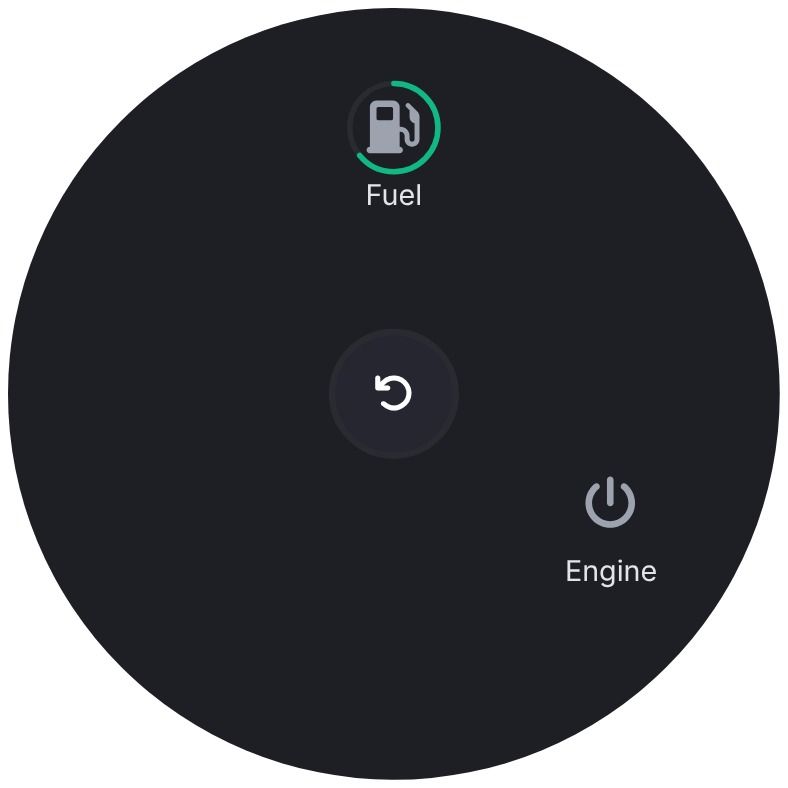
})
Still stuck? Ask in our Discord: the people who write the scripts answer.
Last updated