Text UI
Show a lation ui text UI prompt with a key, or a list of controls, and hide or check it from your script.
Text UI is a small panel for prompts like "Press E to open", or a list of controls. It doesn't take focus, so the player keeps playing. One text UI shows at a time; showing a new one replaces it.
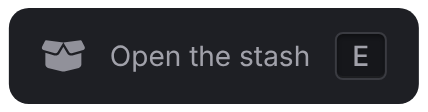
showText
Client export
local shown = exports.lation_ui:showText(data)Parameters
data.titlestringoptional- A bold first line
data.descriptionstringoptional- Text under the title, or the only line when there's no title
data.keybindstringoptional- A key shown beside the title, or beside the description when there's no title
data.iconstringoptional- An icon on the left
data.iconColorstringoptional- The icon's color. The theme's muted text by default.
data.iconAnimationstringoptional- See icon animations
data.positionstringoptionaldefault'right-center'- See positions
data.optionstableoptional- Shows a list of controls instead. See options.
data.bgColorstringoptional- The background, any CSS color, drawn exactly as passed. The theme's surface by default.
data.txtColorstringoptional- The text and key color, any CSS color. The theme's text color by default.
Returns
booleantruewhen shown,falseifdatahas notitle,descriptionoroptions
showText compares the data with what's on screen and skips the update when nothing changed, so it's safe to call every frame. title, description and option labels take text formatting.
exports.lation_ui:showText({
    description = 'Open the stash',
    keybind = 'E',
    icon = 'fas fa-box-open'
})
Options
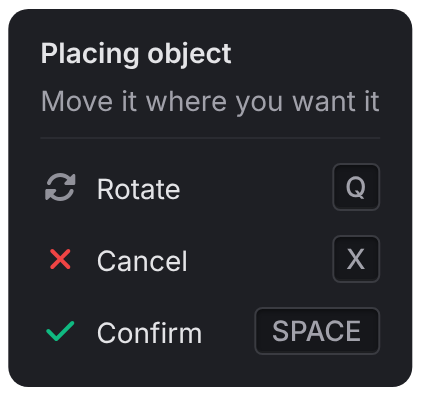
With options, the panel shows title and description as a header, then one row per option. The top-level icon and keybind aren't shown this way.
| Field | Type | Description |
|---|---|---|
label | string | Required. The row's text. |
keybind | string | A key shown on the right. |
icon | string | An icon on the left. |
iconColor | string | The icon's color. Falls back to the panel's iconColor. |
iconAnimation | string | See icon animations. |
exports.lation_ui:showText({
    title = 'Placing object',
    description = 'Move it where you want it',
    options = {
        { label = 'Rotate', icon = 'fas fa-rotate', keybind = 'Q' },
        { label = 'Cancel', icon = 'fas fa-xmark', iconColor = '#EF4444', keybind = 'X' },
        { label = 'Confirm', icon = 'fas fa-check', iconColor = '#10B981', keybind = 'SPACE' }
    }
})
hideText
Client export
local hidden = exports.lation_ui:hideText()Returns
booleantrueif a text UI was showing,falseotherwise
isOpen
Client export
local open, text = exports.lation_ui:isOpen()Returns
boolean, string | niltrueand the showndescriptionwhile a text UI is showing, orfalseandnil
local open, text = exports.lation_ui:isOpen()
if open and text == 'Open the stash' then
    -- our prompt is on screen
end
A prompt near a point
A typical prompt shows while the player is near something and hides when they walk away. showText skips repeats, so the loop can call it every frame:
CreateThread(function()
    local shown = false
    while true do
        local near = #(GetEntityCoords(PlayerPedId()) - stashCoords) < 2.0
        if near then
            shown = exports.lation_ui:showText({ description = 'Open the stash', keybind = 'E', icon = 'fas fa-box-open' })
        elseif shown then
            exports.lation_ui:hideText()
            shown = false
        end
        Wait(near and 0 or 500)
    end
end)
Still stuck? Ask in our Discord: the people who write the scripts answer.
Last updated