List menu
Register and show keyboard-driven lation ui list menus with side-scroll values, checkboxes, progress bars and callbacks for every change.
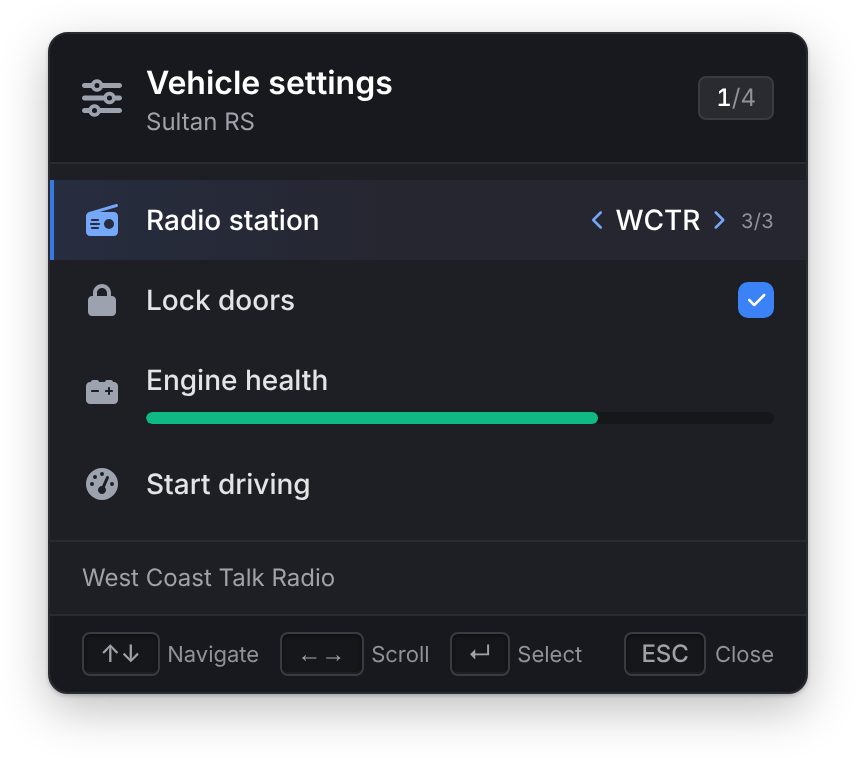
A list menu is driven by the keyboard alone: the cursor stays hidden and the player keeps moving while it's open, unless you turn game input off. Rows can be plain, side-scrollable through a list of values, or checkboxes. It takes the shape of ox_lib's lib.registerMenu and lib.showMenu, with onSelect, event and serverEvent on each row as well.
While a list menu is open, firing, the weapon wheel and melee are blocked.
registerListMenu
Client export
exports.lation_ui:registerListMenu(data, cb)Parameters
data.idstring- A unique menu id
data.titlestring- The header's title
data.optionstable- The list of options
data.subtitlestringoptional- A line under the title
data.iconstringoptional- An icon or image URL in the header
data.iconColorstringoptional- The header icon's color. The theme's icon color by default.
data.iconAnimationstringoptional- See icon animations
data.positionstringoptionaldefault'top-left''top-left','top-right','bottom-left'or'bottom-right'data.canClosebooleanoptionaldefaulttrue- Lets Escape and Backspace close the menu
data.disableInputbooleanoptionaldefaultfalse- Blocks all game input while the menu is open
data.onClosefunctionoptional- See onClose
data.onSelectedfunctionoptional- See onSelected
data.onSideScrollfunctionoptional- See onSideScroll
data.onCheckfunctionoptional- See onCheck
cbfunctionoptional- Runs when the player presses Enter on a plain or side-scroll row. See cb.
Registering an id again replaces the old menu. It raises an error when id, title or options is missing, position isn't one of the four, an option has no label, or an option's args isn't a table.
title, subtitle and each option's label and description take text formatting.
The menu remembers its state between shows: the last highlighted row, each side-scroll value and each checkbox state are kept when you show it again.
Options
| Field | Type | Default | Description |
|---|---|---|---|
label | string | Required. The row's text. | |
description | string | Shown in a panel under the list while the row is highlighted. | |
icon | string | An icon or image URL. | |
iconColor | string | Theme icon color | The icon's color. Without it, the highlighted row's icon takes the theme's soft accent. |
iconAnimation | string | See icon animations. | |
values | table | Makes the row side-scrollable with Arrow Left and Right. Each entry is a string, or { label = '...', description = '...' } whose description replaces the row's while it's chosen. | |
defaultIndex | number | 1 | The starting value of a values row. |
checked | boolean | Makes the row a checkbox, toggled with Enter. Ignored on a row with values. | |
progress | number | 0 to 100. Shows a bar under the label. | |
progressColor | string | Theme accent | The bar's color. colorScheme works too. |
disabled | boolean | false | Dimmed and skipped by the arrow keys. |
args | table | Passed to every callback for this row. | |
close | boolean | true | false keeps the menu open after Enter. |
onSelect | function | Runs on Enter. See onSelect. | |
event | string | A client event to trigger on Enter, with args. | |
serverEvent | string | A server event to trigger on Enter, with args. |
Enter on a checkbox row toggles it and runs onCheck; it doesn't run cb, onSelect or the events.
Callbacks
Every index passed to a callback starts at 1. onSelected, onSideScroll and onCheck wait 100 ms after the last change before they run, so fast scrolling reports only where the player stopped.
cb
Callback
function(selected, scrollIndex, args, checked) endParameters
selectednumber- The row the player pressed Enter on
scrollIndexnumber | nil- The chosen value of a side-scroll row;
nilon a plain row argstable | nil- The row's
args checkedboolean | nil- The row's checked state, when it has
checked
The second argument of registerListMenu. It runs before the row's own onSelect and events.
onSelect
Callback
onSelect = function(selected, scrollIndex, args) endParameters
selectednumber- The row's index
scrollIndexnumber | nil- The chosen value of a side-scroll row
argstable | nil- The row's
args
A row's own handler, run on Enter after cb. Then its event and serverEvent fire, with args.
onClose
Callback
onClose = function(keyPressed) endParameters
keyPressedstring | nil'Escape'or'Backspace', ornilwhen your script closed it withhideListMenu(true)
Runs when the menu closes, except when it closes because a row was selected.
onSelected
Callback
onSelected = function(selected, secondary, args) endParameters
selectednumber- The row now highlighted
secondarynumber | boolean | nil- The scroll index on a side-scroll row, the checked state on a checkbox row,
nilon a plain row argstable | nil- The row's
args. On a side-scroll row it getsisScroll = true, on a checkbox rowisCheck = true.
Runs when the highlight moves to another row. The row highlighted when the menu opens doesn't count as a move.
onSideScroll
Callback
onSideScroll = function(selected, scrollIndex, args) endParameters
selectednumber- The row that changed
scrollIndexnumber- Its new value
argstable | nil- The row's
args
onCheck
Callback
onCheck = function(selected, checked, args) endParameters
selectednumber- The row that was toggled
checkedboolean- Its new state
argstable | nil- The row's
args
showListMenu
Client export
exports.lation_ui:showListMenu(id, startIndex)Parameters
idstring- A registered list menu's id
startIndexnumberoptional- The row to highlight when it opens, starting at 1. The last highlighted row by default. Disabled rows are skipped.
Opens the menu. It raises an error if no list menu has that id. The list shows seven rows at a time and scrolls past that.
hideListMenu
Client export
exports.lation_ui:hideListMenu(onExit)Parameters
onExitbooleanoptionaldefaultfalsetruealso runs the menu'sonClose, with no key
Closes the open list menu. Without true, its onClose doesn't run.
exports.lation_ui:hideListMenu(true)setListMenuOptions
Client export
exports.lation_ui:setListMenuOptions(id, options, index)Parameters
idstring- A registered list menu's id
optionstable- One option when
indexis set, otherwise the full list indexnumberoptional- The row to replace, starting at 1
Replaces one option or all of them. If the menu is open, the change shows at once. It raises an error if no list menu has that id or an option is invalid.
-- Update the engine bar while the menu is open
exports.lation_ui:setListMenuOptions('vehicle_settings', {
    label = 'Engine health',
    icon = 'fas fa-car-battery',
    progress = GetVehicleEngineHealth(vehicle) / 10
}, 3)
getOpenListMenu
Client export
local id = exports.lation_ui:getOpenListMenu()Returns
string | nil- The id of the open list menu, or
nil
-- Close the settings menu when the player leaves the vehicle
if exports.lation_ui:getOpenListMenu() == 'vehicle_settings' and not IsPedInAnyVehicle(PlayerPedId(), false) then
    exports.lation_ui:hideListMenu()
end
Controls
| Key | Action |
|---|---|
| Arrow Up and Down | Move the highlight, skipping disabled rows. Wraps at the ends. |
| Home and End | Jump to the first or last row. |
| Arrow Left and Right | Change the value of a side-scroll row. Wraps at the ends. |
| Enter | Select the row, or toggle a checkbox row. |
| Escape or Backspace | Close the menu, unless canClose is false. |
Example
exports.lation_ui:registerListMenu({
    id = 'vehicle_settings',
    title = 'Vehicle settings',
    subtitle = 'Sultan RS',
    icon = 'fas fa-sliders',
    position = 'top-left',
    onClose = function(keyPressed)
        print('Closed with', keyPressed or 'script')
    end,
    onSideScroll = function(selected, scrollIndex, args)
        print('Row', selected, 'is now on value', scrollIndex)
    end,
    onCheck = function(selected, checked, args)
        print('Row', selected, 'checked:', checked)
    end,
    options = {
        {
            label = 'Radio station',
            icon = 'fas fa-radio',
            values = {
                'Non-Stop-Pop',
                'Los Santos Rock',
                { label = 'WCTR', description = 'West Coast Talk Radio' }
            },
            defaultIndex = 2
        },
        {
            label = 'Lock doors',
            icon = 'fas fa-lock',
            checked = true
        },
        {
            label = 'Engine health',
            icon = 'fas fa-car-battery',
            progress = 72,
            progressColor = '#10B981'
        },
        {
            label = 'Start driving',
            icon = 'fas fa-gauge-high',
            description = 'Head to the first waypoint',
            args = { waypoint = 1 }
        }
    }
}, function(selected, scrollIndex, args)
    print('Confirmed row', selected, scrollIndex, args and args.waypoint)
end)

exports.lation_ui:showListMenu('vehicle_settings')
Still stuck? Ask in our Discord: the people who write the scripts answer.
Last updated