lation shops
lation shops is a FiveM shop system built in game, for shops that sell to players, buy from them or both, run by the server or sold to players who run them.
lation shops (lation_shops) builds every shop on your server from an in-game admin panel. A shop sells to players, buys from them, or does both in one screen, and it opens from a point, a shopkeeper ped or every prop of a model. It stays the server's until you put it up for sale; the player who buys it runs it from a management menu with stock orders, timed sales, staff on commission and its own balance. There is no config file: every server-wide option lives in the database and is edited in game.
Works on Qbox, QBCore and ESX.
Requirements
| Resource | Needed | What for |
|---|---|---|
ox_lib | Required | Callbacks, points, dialogs |
oxmysql | Required | The tables and the live configuration |
qbx_core, qb-core or es_extended | Required | Players, jobs and money. ox_core is not supported: it prints an error and the shops don't work. |
lation_interact, ox_target or qb-target | Required | Every prompt at a shop. lation interact is picked first when it runs. |
| An inventory | Required on Qbox | ox_inventory, qb-inventory, qs-inventory, ps-inventory, origen_inventory, codem-inventory, core_inventory, tgiann-inventory or jaksam_inventory. On QBCore and ESX the framework's own items work without one. |
| A bank (below) | For job accounts | Paying from a job's account, revenue shares, and selling paid by a job |
lation_ui | Optional | Every screen follows your lation ui theme, and it can show the notifications |
lation_banking 1.1.0 or newer | Optional | Each shop's balance is a business account at the bank. See bank accounts. |
m-TruckerSimulator | Optional | Stock orders delivered as trucking jobs a player drives |
esx_license | ESX, for item licenses | Where ESX keeps licenses |
fmsdk | Optional | Logging to fivemanage |
The bank
A shop keeps its own balance. A bank is only needed for job (society) accounts: a payment method that charges a job's account, a revenue share paid to one, or a sell shop paid by one. lation shops uses the first bank it finds running, in this order, unless Config > General > Society banking names one:
| Bank | Resource | Frameworks |
|---|---|---|
| lation banking | lation_banking | All |
| okokBanking | okokBanking | All |
| Renewed-Banking | Renewed-Banking | All |
| fd_banking | fd_banking | All |
| tgg-banking | tgg-banking | All |
| wasabi_banking | wasabi_banking | All |
| qb-banking | qb-banking 2.0 or newer | Qbox, QBCore |
| qb-management | qb-management | Qbox, QBCore |
| ESX society accounts | esx_addonaccount, with esx_society or with lation jobs standing in for it | ESX |
With no bank found, the server console prints No banking system auto-detected. Paying from a job's account and selling paid by a job are then refused, and revenue shares stay with the shop.
Install
Follow the install guide, then:
Keep the folder name lation_shops. A renamed folder prints an error on start and again every 15 minutes.
Ensure it after its dependencies. The framework and inventory are detected once, when lation_shops starts, so they must already be running. If you run lation ui, it goes first, above ox_lib, because the lation ox_lib fork looks for it when ox_lib starts.
ensure lation_ui         # optional
ensure ox_lib
ensure oxmysql
ensure qbx_core          # your framework
ensure lation_interact   # or ox_target / qb-target
ensure ox_inventory      # your inventory
ensure lation_banking    # your bank
ensure lation_shopsensure lation_ui # optional
ensure ox_lib
ensure oxmysql
ensure qb-core # your framework
ensure lation_interact # or ox_target / qb-target
ensure qb-inventory # your inventory, optional on QBCore
ensure lation_banking # your bank
ensure lation_shopsensure lation_ui # optional
ensure ox_lib
ensure oxmysql
ensure es_extended # your framework
ensure lation_interact # or ox_target / qb-target
ensure ox_inventory # your inventory, optional on ESX
ensure esx_license # for item licenses
ensure lation_banking # your bank
ensure lation_shopsGive admins the panel. Add this to server.cfg:
add_ace group.admin lation_shops.admin allowRestart the server.
There is no SQL to import and no items to add. Every table is created on start, and an older install is upgraded in place.
First start
On the first start lation shops creates its tables (lation_shops and the lation_shops_* tables) and seeds every Config section from its default. No shops exist yet. To build the first one:
Run /shopadmin and select Create Shop.
On Setup, give it a Shop ID (24_7_store) and a Shop Name, then select Create. From here on, every change saves itself a moment after you stop and reaches players at once.
Open Locations and select Add Location. Pick Ped, choose a model, select Use my position and Save.
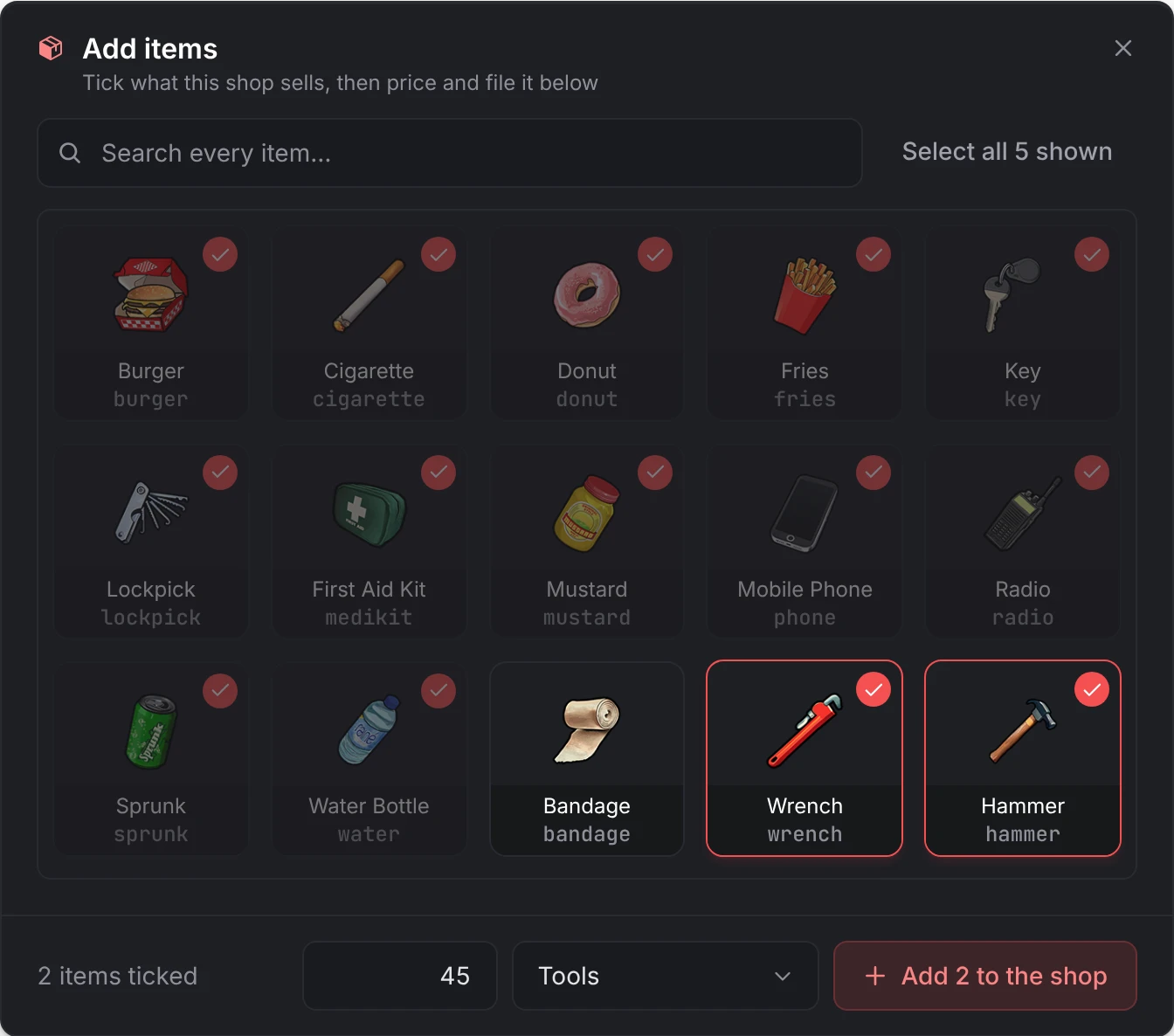
Open Inventory and select Import Items. Tick what the shop sells, give them a price and a category, and add them.
Walk up to the ped and pick Open with the shop's name.
A new shop is run by the server, sells to players, and takes cash. To make it buy from players, lock it to a job or sell it to a player, see kinds of shop.
Troubleshooting
/shopadmin does nothing
Without the permission, the command prints the add_ace line to add in the server console. Add it to server.cfg and restart. Who counts as an admin is decided in server/utils/perms.lua, which ships open.
There is no prompt at a shop
The client console (F8) prints No interaction system was auto-detected when none of lation_interact, ox_target or qb-target is running. Start one before lation_shops, or pick yours under Config > General > Interaction system. A shop with operating hours also removes its points and peds while it is closed, and the prompt shows only within Config > General > Interaction distance (2 metres by default).
Players are told their shop session expired
A purchase or a sale has to follow an open of the same shop within 10 minutes; each checkout starts the 10 minutes again. A shop left open longer asks the player to reopen it.
The sell tab is empty
Check the shop's mode under Finance: Buy Only buys nothing. An item is on the sell tab only when it is Sellable (in a Buy & Sell shop, not Buy only) and has a sell price: its own, the shop's Default Sell Price (%) of its price, or Config > Selling > Fallback sell-back price. With that fallback at 0, or an item priced 0, only items with a sell price of their own are listed. See selling.
Limited stock doesn't refill after a restart
Only a server-run shop refills, to the quantity last set in the item editor or with Set Stock Limit. A listing whose editor shows Player-driven has no cap and never refills: before 1.11.1, listings added with Import Items and limited later were saved that way. Turn Player-driven off in its editor to give it one. See inventory.
An item is missing from the shop
In a Buy & Sell shop, an item set to Sell only is only on the Sell tab, and one set to Buy only only on the Buy tab. A Buy Only shop doesn't list Sell only items at all: open the item's editor and pick Buy and sell or Buy only under Customers can. See one way only.
Nobody can buy an item that needs a license
A buyer needs any one of the item's licenses, under the name the framework stores it by (the editor saves names in lowercase): the key in PlayerData.metadata.licences on Qbox and QBCore, the license type in esx_license on ESX. See licenses.
Paying from a job's account always says there isn't enough money
No bank was found, so every job account reads 0. The server console says No banking system auto-detected. Start your bank before lation_shops or name it under Config > General > Society banking. See the bank.
An owner can't withdraw, though the balance shows money
With bank accounts turned off while the shop's account was frozen at the bank, the money is still in that account. Nothing can be taken out of the shop until the account is unfrozen; then the shop's next balance move, a withdrawal included, brings the money back.
Bought items never arrive on Qbox
Qbox has no item fallback of its own: run one of the supported inventories.
An owner can't add items or order stock
The shop has no catalog. Assign one on its Ownership page. See catalogs.
The console prints an error every 15 minutes
The folder is not named lation_shops. Rename it and restart.
The console says the database initialization failed
The tables could not be created or upgraded, and the resource stays off until they are. The lines that follow name the statement or the connection that failed. Check that oxmysql is running and connected, then restart lation_shops.
Kinds of shop
Run by the server, owned by a player, buying from players, locked to jobs, hours or an item.
Creating shops
The admin panel: locations, items, payment, access, catalogs and analytics.
Player ownership
Putting a shop up for sale, buying, transfers, abandoning and bank accounts.
Management menu
What owners and staff do: stock, orders, sales, employees and money.
Storefront
What players see when they buy, sell and look back at their purchases.
Configuration
Every server-wide option and its default.
Developers
Exports, events, hooks and custom deliveries.
Still stuck? Ask in our Discord: the people who write the scripts answer.
Last updated