Progress bar
Run a lation ui progress bar with an animation, props other players see, steps, blocked controls and cancel handling, and check or cancel it from your script.
The progress bar shows a timed action at the bottom center of the screen. It can play an animation or scenario, attach props that other players see, block controls, and split the bar into steps. The call waits until the bar ends and tells you whether it completed.
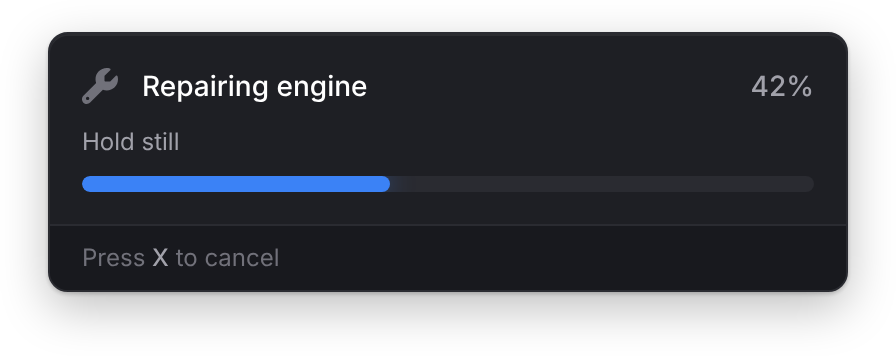
progressBar
Client export
local completed = exports.lation_ui:progressBar(data)Parameters
data.durationnumber- How long it runs, in milliseconds. Above 0, or the call returns
falseat once. data.labelstringoptionaldefault'Progress'- The text above the bar.
titleworks too. data.descriptionstringoptional- Smaller text under the label
data.iconstringoptional- An icon before the label
data.iconColorstringoptional- The icon's color. The theme's muted text by default.
data.iconAnimationstringoptional- See icon animations
data.colorstringoptional- The bar's fill color. The theme's accent by default.
data.stepstableoptional- A list of
{ description = '...' }. The duration is split evenly between them, the current step's description takes the place ofdescription, and dots beside the percentage show the step. data.canCancelbooleanoptionaldefaulttrue- Lets the player cancel with the Cancel Progress key (
Xby default) data.useWhileDeadbooleanoptionaldefaultfalse- Keep running while the player is dead
data.allowRagdollbooleanoptionaldefaultfalse- Keep running while ragdolled
data.allowCuffedbooleanoptionaldefaultfalse- Keep running while cuffed
data.allowFallingbooleanoptionaldefaultfalse- Keep running while falling
data.allowSwimmingbooleanoptionaldefaultfalse- Keep running while swimming
data.animtableoptional- An animation or scenario to play. See anim.
data.proptableoptional- One prop, or a list of props, to attach. See prop.
data.disabletableoptional- Controls to block while the bar runs. See disable.
Returns
booleantruewhen the bar completes;falsewhen it's cancelled or interrupted, or the data is invalid
The call waits for the bar, so run it from a thread, command or event handler. If another bar is already running, it waits for that one to end before it starts.
The bar is interrupted, and returns false, as soon as the player is dead, ragdolled, cuffed, falling or swimming, unless the matching option above allows it. If one of those is already true when you call it, it returns false without showing the bar.
While a bar runs, lation ui sets LocalPlayer.state.invBusy and LocalPlayer.state.inv_busy to true, and back to false when it ends, so inventories that read them stay closed during the action.
local done = exports.lation_ui:progressBar({
    label = 'Repairing engine',
    description = 'Hold still',
    duration = 8000,
    icon = 'fas fa-wrench',
    canCancel = true,
    disable = { move = true, car = true, combat = true },
    anim = { dict = 'mini@repair', clip = 'fixing_a_ped' }
})

if done then
    -- give the reward
else
    -- the player cancelled or was interrupted
end
With steps:
if exports.lation_ui:progressBar({
    label = 'Initializing hack',
    duration = 10000,
    icon = 'fas fa-crosshairs',
    iconColor = '#EF4444',
    color = '#EF4444',
    steps = {
        { description = 'Connecting to server...' },
        { description = 'Bypassing security protocols...' },
        { description = 'Establishing secure connection...' },
        { description = 'Hack in progress...' }
    }
}) then
    print('Success')
end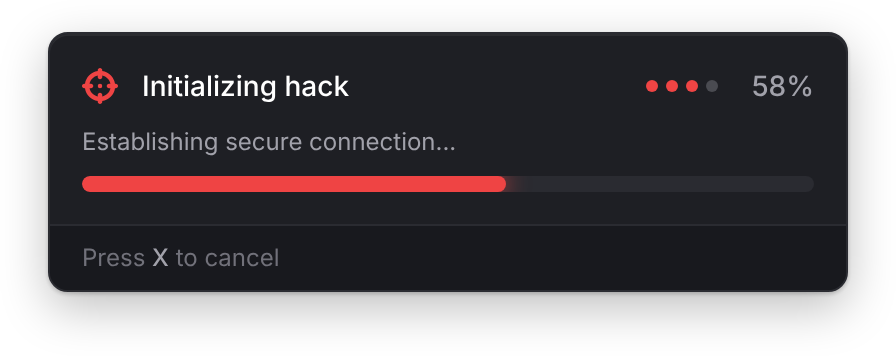
With a prop:
exports.lation_ui:progressBar({
    label = 'Drinking coffee',
    duration = 5000,
    anim = { dict = 'mp_player_intdrink', clip = 'loop_bottle' },
    prop = {
        model = 'p_amb_coffeecup_01',
        bone = 28422,
        pos = { x = 0.0, y = 0.0, z = 0.0 },
        rot = { x = 0.0, y = 0.0, z = 0.0 }
    }
})
anim
| Field | Type | Default | Description |
|---|---|---|---|
dict | string | The animation dictionary. Loaded for you. | |
clip | string | The animation's name in dict. | |
flag | number | 49 | The animation flag. |
blendIn | number | 3.0 | Blend-in speed. |
blendOut | number | 1.0 | Blend-out speed. |
duration | number | -1 | The animation's length in milliseconds. -1 plays until stopped. |
playbackRate | number | 0 | The playback rate. |
lockX, lockY, lockZ | boolean | Lock the ped's position on that axis. | |
scenario | string | A scenario to play instead of dict and clip. Used only when dict isn't set. | |
playEnter | boolean | true | Play the scenario's enter animation. |
When the bar ends, an animation from dict is stopped; for a scenario, the ped's tasks are cleared.
prop
| Field | Type | Default | Description |
|---|---|---|---|
model | string or number | Required. The model name or hash. | |
bone | number | 60309 | The ped bone to attach to. |
pos | table | Required. The offset, { x = 0.0, y = 0.0, z = 0.0 }. | |
rot | table | Required. The rotation, { x = 0.0, y = 0.0, z = 0.0 }. | |
rotOrder | number | 0 | The rotation order. |
Pass a list of these tables to attach more than one; the lation_ui:progressPropLimit convar (default 2) caps how many. Props are removed when the bar ends.
Other players see the props too. The server checks each one before sharing it: model must be a string or number, and pos and rot plain tables with numeric x, y and z (not vector3). A prop that fails the check shows only for the player running the bar. Each new bar's props replace the last ones for everyone, and they go the moment the bar ends, even one cancelled as it starts. The server shares one set of props per player every 100 ms; a bar that starts sooner gets its props a moment later, so back-to-back bars both show theirs.
disable
Set any of these to true to block it:
| Field | Blocks |
|---|---|
move | Walking, sprinting and crouching |
sprint | Sprinting only |
car | Steering, accelerating, braking and leaving the vehicle |
combat | Aiming and firing |
mouse | Looking around with the camera |
cancelProgress
Client export
local cancelled = exports.lation_ui:cancelProgress()Returns
booleantrueif a bar was running,falseotherwise
Cancels the running bar from your script, even when its canCancel is false. Its progressBar call returns false.
-- Stop the repair if the vehicle explodes
if IsEntityDead(vehicle) then exports.lation_ui:cancelProgress() end
progressActive
Client export
local active = exports.lation_ui:progressActive()Returns
booleantruewhile a progress bar runs
if exports.lation_ui:progressActive() then return end -- busy, try again laterStill stuck? Ask in our Discord: the people who write the scripts answer.
Last updated
Notifications
Show, update and style lation ui notifications from client or server scripts with the notify export and the lation_ui:notify event.
Alert dialog
Ask the player to confirm or cancel with a lation ui alert dialog, with optional callouts, button text, sizes and styles, and close it from your script.