Context menu
Register and show lation ui context menus with submenus, icons, images, metadata, progress bars, keybinds and select callbacks.
A context menu is a clickable list of options in a panel. Options can run a function, trigger an event, open a submenu, show a progress bar, or show an image and details when highlighted. While a context menu is open it takes the mouse and keyboard.
You register a menu once with an id, then show it by that id.
registerMenu
Client export
exports.lation_ui:registerMenu(menu)Parameters
menu.idstring- A unique menu id
menu.titlestringoptional- The header's title
menu.subtitlestringoptional- A line under the title
menu.headerIconstringoptional- An icon or image URL on the right of the header
menu.headerIconColorstringoptional- The header icon's color. The theme's icon color by default.
menu.headerIconAnimationstringoptional- See icon animations
menu.menustringoptional- The id of the parent menu. Adds a back button to the header and lets Backspace go back.
menu.positionstringoptionaldefault'top-right''top-left','top-right','offcenter-left'or'offcenter-right'. A submenu without one uses its parent's.menu.canClosebooleanoptionaldefaulttrue- Lets Escape close the menu. When
false, the footer asks the player to pick an option. menu.onExitfunctionoptional- Runs when the menu is closed. See onExit.
menu.onBackfunctionoptional- Runs when the player goes back to the parent. See onBack.
menu.optionstableoptional- The list of options
Pass a list of menus to register several in one call. Registering an id again replaces the old menu. It raises an error when menu isn't a table or has no id.
The header, with the back button and the header icon, shows only when the menu has a title or subtitle; Backspace goes back either way. title, subtitle and each option's title and description take text formatting.
options can also be a table keyed by option title, as ox_lib takes it. lation ui turns it into a list, but Lua doesn't keep the order of a keyed table, so use a list when the order matters.
Options
| Field | Type | Default | Description |
|---|---|---|---|
title | string | The option's title. | |
description | string | Smaller text under the title. | |
icon | string | An icon or image URL. | |
iconColor | string | Theme icon color | The icon's color. |
iconAnimation | string | See icon animations. | |
onSelect | function | Runs when the option is selected. See onSelect. | |
event | string | A client event to trigger when selected, with args. | |
serverEvent | string | A server event to trigger when selected, with args. | |
args | any | Passed to onSelect, event and serverEvent. | |
menu | string | The id of a registered menu to open when selected. Shows an arrow. | |
shouldClose | boolean | true | false keeps the menu open after the option runs. |
disabled | boolean | false | Greyed out and can't be selected. |
readOnly | boolean | false | Shown normally but can't be selected. |
keybind | string | A key shown on the option. Pressing it while the menu is open selects the option. Not shown on an option with menu. | |
progress | number | 0 to 100. Shows a bar under the title. | |
progressColor | string | Theme icon color | The bar's color. colorScheme works too. |
image | string | An image URL shown in a card beside the menu while the option is highlighted. | |
metadata | table | Lines shown in the same card. See metadata. |
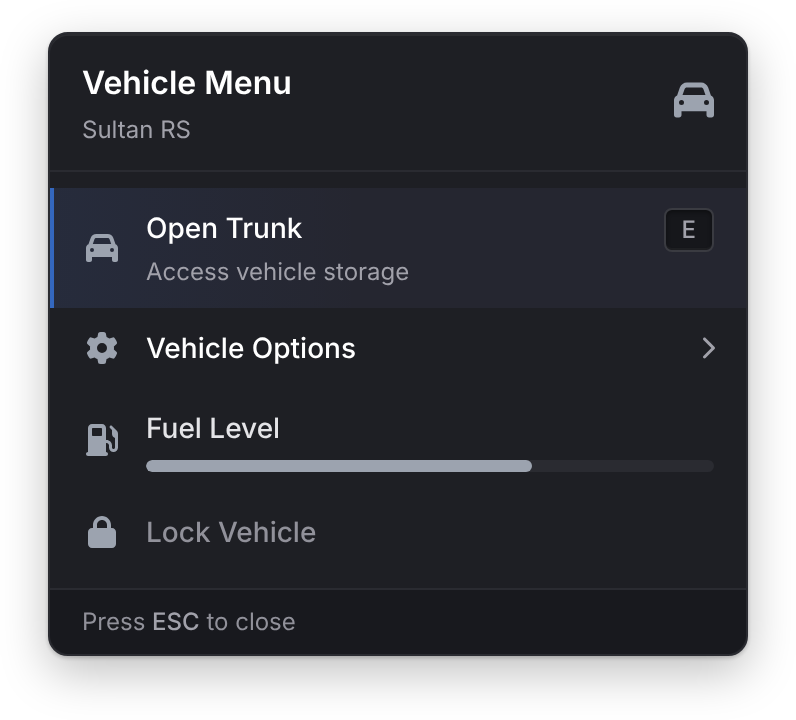
An option can use onSelect, event and serverEvent together; they run in that order. An option with menu opens that menu and runs none of them. An option with none of them and no menu does nothing when selected.
Metadata
metadata takes any of these shapes:
-- Plain lines
metadata = { 'Owner: Lation', 'Plate: LATN 01' }

-- Label and value pairs, each with an optional bar
metadata = {
    { label = 'Fuel', value = '64%', progress = 64, progressColor = '#10B981' },
    { label = 'Mileage', value = 12840 }
}

-- A keyed table, shown as "key: value"
metadata = { Owner = 'Lation', Plate = 'LATN 01' }
Callbacks
onSelect
Callback
onSelect = function(args) endParameters
argsany- The option's
args
Runs when the player clicks the option, presses Enter on it or presses its keybind. The menu closes first, unless the option has shouldClose = false.
onExit
Callback
onExit = function() endRuns when the player closes the menu with Escape, or when your script calls hideMenu(true). It doesn't run when the menu closes because an option was selected.
onBack
Callback
onBack = function() endRuns when the player goes back to the parent menu with the back button or Backspace, just before the parent opens.
showMenu
Client export
exports.lation_ui:showMenu(id)Parameters
idstring- A registered menu's id
Opens the menu, in place of any context menu already open. It raises an error if no menu has that id.
hideMenu
Client export
exports.lation_ui:hideMenu(onExit)Parameters
onExitbooleanoptionaldefaultfalsetruealso runs the open menu'sonExit
Closes the open menu and gives the mouse and keyboard back.
exports.lation_ui:hideMenu(true)getOpenMenu
Client export
local id = exports.lation_ui:getOpenMenu()Returns
string | nil- The id of the open menu, or
nil
if exports.lation_ui:getOpenMenu() == 'garage_menu' then
    exports.lation_ui:hideMenu()
end
Controls
| Input | Action |
|---|---|
| Mouse | Hover and click options. |
| Arrow Up and Down | Move the highlight, skipping disabled and read-only options. Wraps at the ends. |
| Home and End | Jump to the first or last option. |
| Enter | Select the highlighted option. |
| Backspace | Go back to the parent menu. |
| Escape | Close the menu, unless canClose is false. |
An option's keybind | Select that option. |
Example
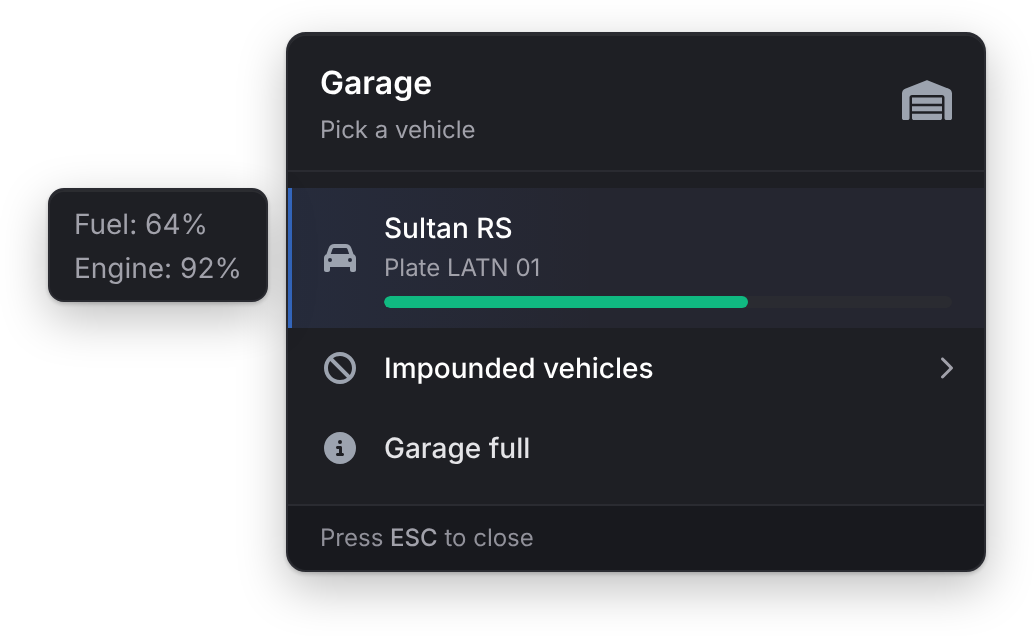
exports.lation_ui:registerMenu({
    id = 'garage_menu',
    title = 'Garage',
    subtitle = 'Pick a vehicle',
    headerIcon = 'fas fa-warehouse',
    options = {
        {
            title = 'Sultan RS',
            description = 'Plate LATN 01',
            icon = 'fas fa-car',
            progress = 64,
            progressColor = '#10B981',
            metadata = {
                { label = 'Fuel', value = '64%' },
                { label = 'Engine', value = '92%' }
            },
            serverEvent = 'my_garage:takeOut',
            args = { plate = 'LATN 01' }
        },
        {
            title = 'Impounded vehicles',
            icon = 'fas fa-ban',
            menu = 'garage_impound'
        },
        {
            title = 'Garage full',
            icon = 'fas fa-circle-info',
            readOnly = true
        }
    }
})

exports.lation_ui:registerMenu({
    id = 'garage_impound',
    title = 'Impound',
    menu = 'garage_menu',
    options = {
        {
            title = 'Pay release fee',
            description = '$500',
            icon = 'fas fa-dollar-sign',
            keybind = 'E',
            onSelect = function(args)
                print('Paying fee for', args.plate)
            end,
            args = { plate = 'LATN 02' }
        }
    }
})

exports.lation_ui:showMenu('garage_menu')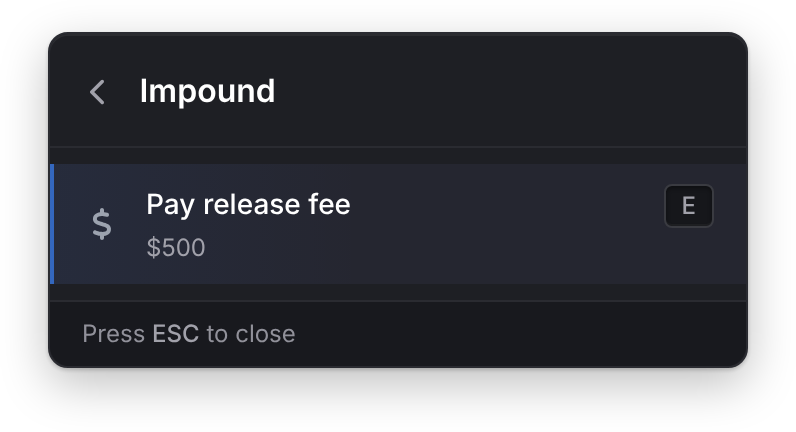
Still stuck? Ask in our Discord: the people who write the scripts answer.
Last updated
Input dialog
Collect values from the player with a lation ui input dialog, with text, number, toggle, select, slider, color, date and date range fields and checks on submit.
List menu
Register and show keyboard-driven lation ui list menus with side-scroll values, checkboxes, progress bars and callbacks for every change.