Player ownership
How lation shops sells a shop to a player, what changes hands on a purchase, transfer, abandon or repossession, and how shop balances become accounts at lation banking.
Any shop can be sold to a player. The owner then runs it from the management menu, and you keep control of what they may stock, and at what prices, through the catalogs you assign.
Put a shop up for sale
Make a catalog of what the owner may stock, with a wholesale cost and a price range for each item. Without one, an owner can't list items or order stock. See catalogs.
Save the shop, then open its Ownership page. Turn on For Sale, set a Sale Price above 0, and tick the catalogs under Item Catalogs.
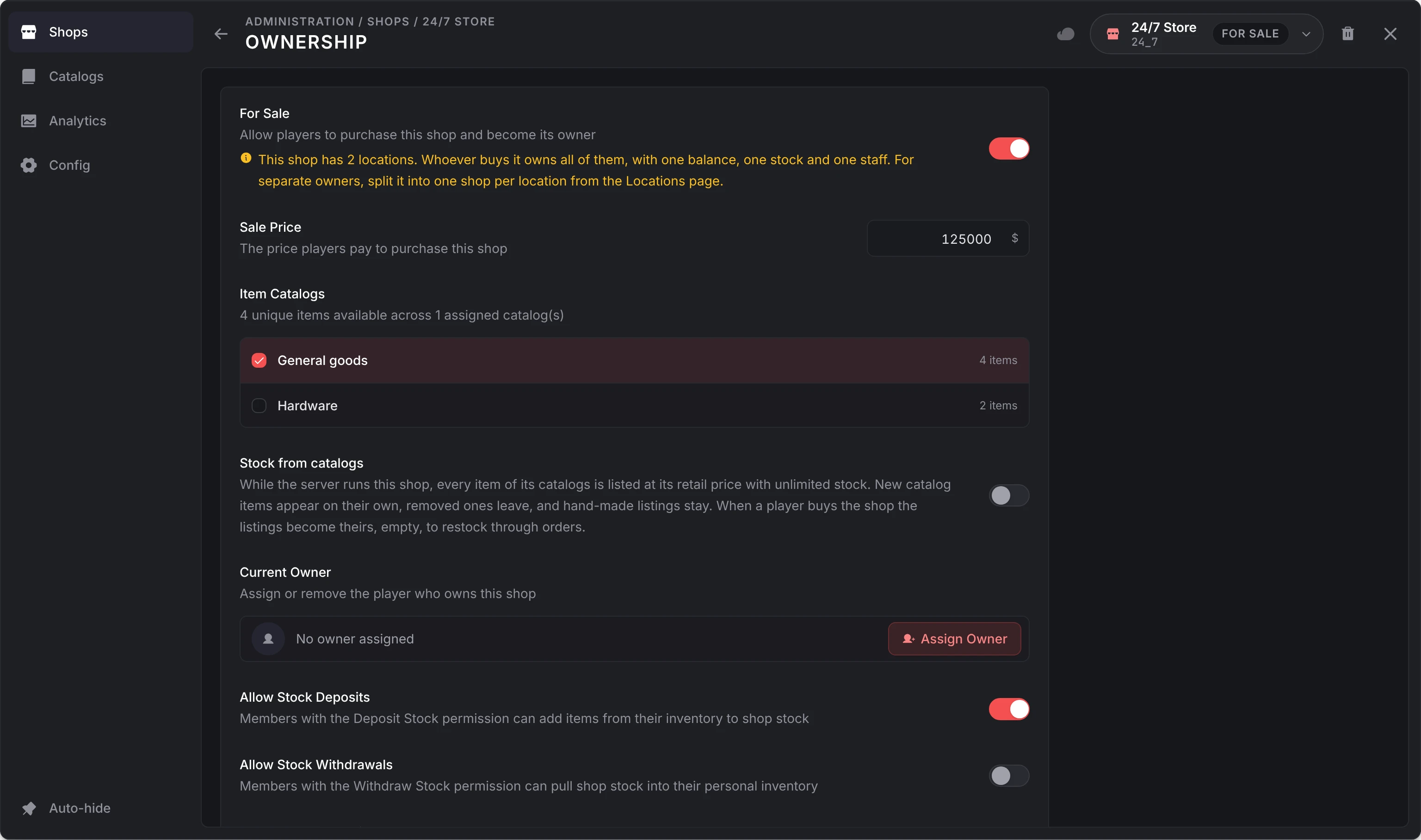
Choose what staff may do with stock: Allow Stock Deposits (on by default) lets members with the Deposit Stock permission put items from their inventory into stock; Allow Stock Withdrawals (off by default) lets members with the Withdraw Stock permission take stock out.
Optionally, set a Management Location where the owner and staff open their menu, and a Delivery drop-off where trucks unload orders.
Every customer at the shop now sees that it is for sale. The Ownership page:
| Setting | What it does |
|---|---|
| For Sale | Lets players buy the shop. It can't be switched while the shop has an owner. |
| Sale Price | What a player pays for it. |
| Item Catalogs | The catalogs the owner may list and order from, merged in the order you tick them. With none, the owner can't add items or order stock, and the buyer is warned before paying. |
| Stock from catalogs | For a server-run shop. See stock from catalogs. |
| Current Owner | Assign Owner or Remove Owner. See admin controls. |
| Allow Stock Deposits, Allow Stock Withdrawals | Whether staff may move items between their inventory and the shop's stock. |
| Management Location | Where the owner and staff open the management menu. It works at any hour, even while the shop is closed. Not set, the Manage option sits on the shop's own prompt, which is gone while the shop is closed. |
| Delivery drop-off | Where a delivery system drives the shop's orders. See delivery. |
A shop with several locations is sold as one: one owner, one balance, one stock and one staff. To sell branches separately, use Split into shops on its Locations page.
Buying a shop
A customer at a shop for sale sees a banner with its price. Dismissing it folds it into a For sale chip in the header, remembered for that shop. Learn More opens the purchase card:
- the price, and the payment methods allowed by Config > Ownership > Purchase payment methods (cash and bank), each with the player's balance
- what owning it brings, with the employee limit and the abandon refund
- every revenue share you set, so the buyer knows what leaves each sale
- a warning when the shop has no catalog
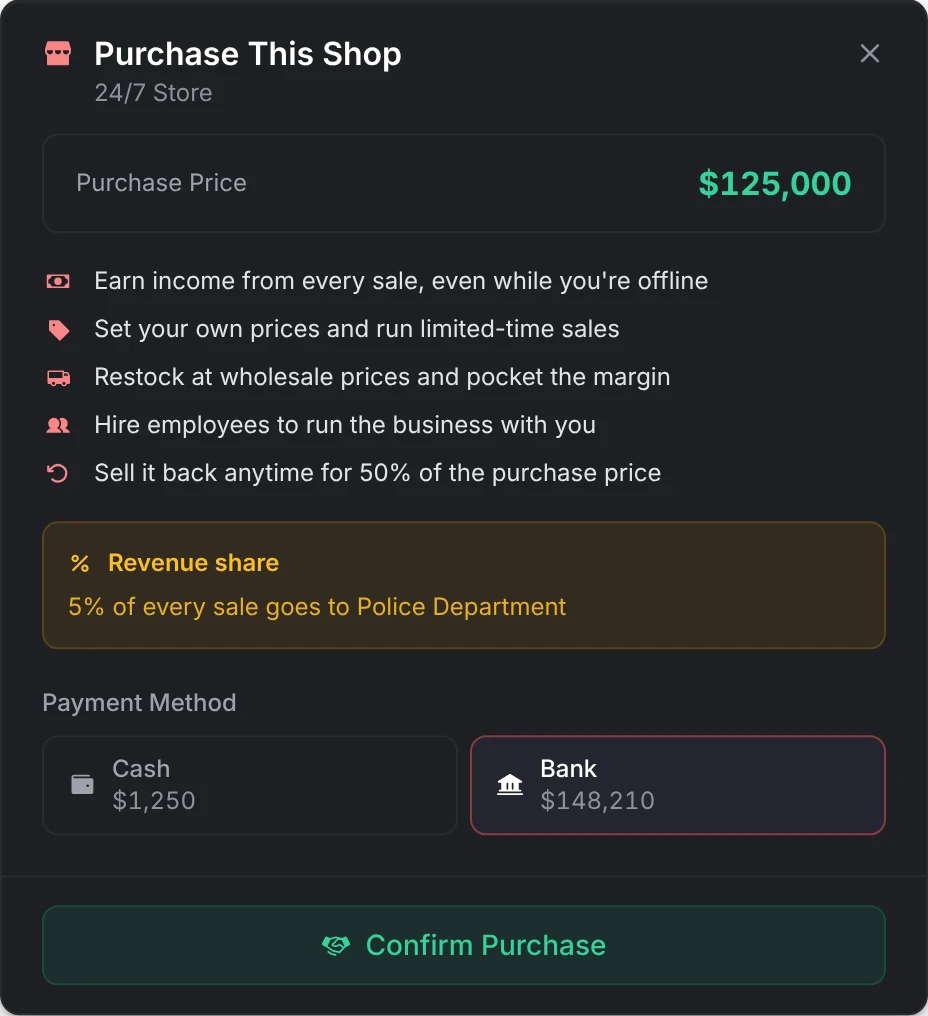
Confirm Purchase checks the player's shop count against Config > Ownership > Shops per player (2 by default) and their balance, then claims the shop and charges them. Two players buying at the same moment can't both pay: only one claims it, and a failed charge puts the shop back on sale.
What happens when a shop changes hands
| Bought | Transferred | Abandoned | Assigned by an admin | Repossessed by an admin | |
|---|---|---|---|---|---|
| Shop balance | Reset to 0, unless Keep balance when purchased is on | Kept | Kept by the shop | Kept | Kept by the shop |
| Staff | None | Kept | Paid their earnings, then removed | Kept | Paid their earnings, then removed |
| Pending stock orders | None | Kept | Cancelled and refunded into the balance at the cancel rate | Kept | Cancelled and refunded into the balance at the cancel rate |
| A running sale | None | Kept | Ended | Kept | Ended |
| Listings stocked from catalogs | Become the owner's, empty | Kept | Back to unlimited stock | Become the owner's, empty | Back to unlimited stock |
| Back on sale | No | No | Yes, at its sale price | No | Only with Relist shop for sale |
| Paid to the previous owner | There is none | Nothing | The abandon refund | Nothing | Nothing |
Each owner sees the shop's books from the day they took it: their dashboard and transaction list start there, so a new owner never sees the last one's figures. Admins keep the whole history. Every change fires lation_shops:ownerChanged.
Transferring a shop
The owner can give the shop to another player from Settings > Transfer Ownership in the management menu. The other player must stand within 15 metres and gets 30 seconds to accept or decline. Their shop count is checked against Shops per player both when the offer is made and when they accept.
The shop changes hands with its balance, stock, orders and staff; the new owner, if they worked there, is paid their unclaimed earnings and taken off the staff. A shop received this way refunds nothing if it is later abandoned, since its owner paid nothing.
Abandoning a shop
The owner can give the shop up from Settings > Abandon Shop. They get back Config > Ownership > Abandon refund (50% by default) of what they paid for it, into the first of Config > Finances > Balance accounts. A shop that was given to them, by an admin or a transfer, refunds nothing.
Abandoning doesn't hand over the shop balance: it stays with the shop. Withdraw it first.
Admin controls
On a shop's Ownership page, admins can:
- Assign Owner to an online player, or to anyone by their identifier (the
citizenidon Qbox and QBCore, the player identifier on ESX). An assigned owner paid nothing, so abandoning refunds nothing. - Remove Owner to repossess the shop. The owner is told if they are online, and their management menu closes. With Relist shop for sale it goes straight back on sale at its sale price; without it, the server runs it again.
- Delete Shop in the editor's header, which pays the staff their earnings and the owner the balance first. See delete a shop.
Bank accounts
With lation_banking 1.1.0 or newer as the society bank and Config > Finances > Bank accounts on (the default), every shop's balance is a business account at the bank, with the id shop:<shopId> and the shop's name.
- The shop's owner owns the account; a server-run shop's account has no owner. Staff with View Finances, Deposit Funds or Withdraw Funds are its members: Deposit Funds lets them deposit, and Withdraw Funds lets them withdraw and transfer.
- Customers can transfer money to it. Every sale, order, deposit and withdrawal is a line in the bank's ledger, and money moved at the bank (an ATM, a transfer) shows in the shop's own transactions.
- The owner, staff and name follow the shop, and every account is checked again whenever either resource starts.
- Deleting the shop pays its owner from the account, then closes it.
The balance in the management menu is the account's. Changing the setting applies at once, both ways, and nothing is lost or made either way:
- Off, or another bank picked under Config > General > Society banking: each account's money moves back to its shop's own balance, so it can't be spent at an ATM and in the management menu both. The account stays at the bank, empty.
- On again: what the shop earned or spent in between goes to the account, and anything paid into the account in between (a customer's transfer) lands on the shop.
An account frozen at the bank keeps its money when the setting goes off. Until it can move back, the shop still takes money in, but nothing can be taken out of its balance: withdrawals, bonuses, stock orders and sell-backs paid from the shop balance are refused. The money moves on the shop's next balance move after the account is unfrozen.
See lation banking.
Still stuck? Ask in our Discord: the people who write the scripts answer.
Last updated
Creating shops
How to build a shop in the lation shops admin panel (/shopadmin), from locations and items to payment methods, revenue shares, selling, access rules, catalogs and analytics.
Management menu
What the owner and staff of a player-owned shop do in the lation shops management menu, from prices, stock orders and deliveries to sales, staff and money, and which permission opens each tab.