Configuration
Every server-wide lation shops option with its default and range, edited live under /shopadmin > Config since the resource has no config file, plus language, theme, commands and open files.
lation shops has no config file. Every server-wide option lives in the database (the lation_shops_config table) and is edited in game under /shopadmin > Config, where a change applies to the server and every player the moment it saves. Settings for one shop are on creating shops.
On the very first start, each section is seeded from shared/defaults.lua. After that, editing that file changes nothing on your server except what Reset to default restores.
The Config page
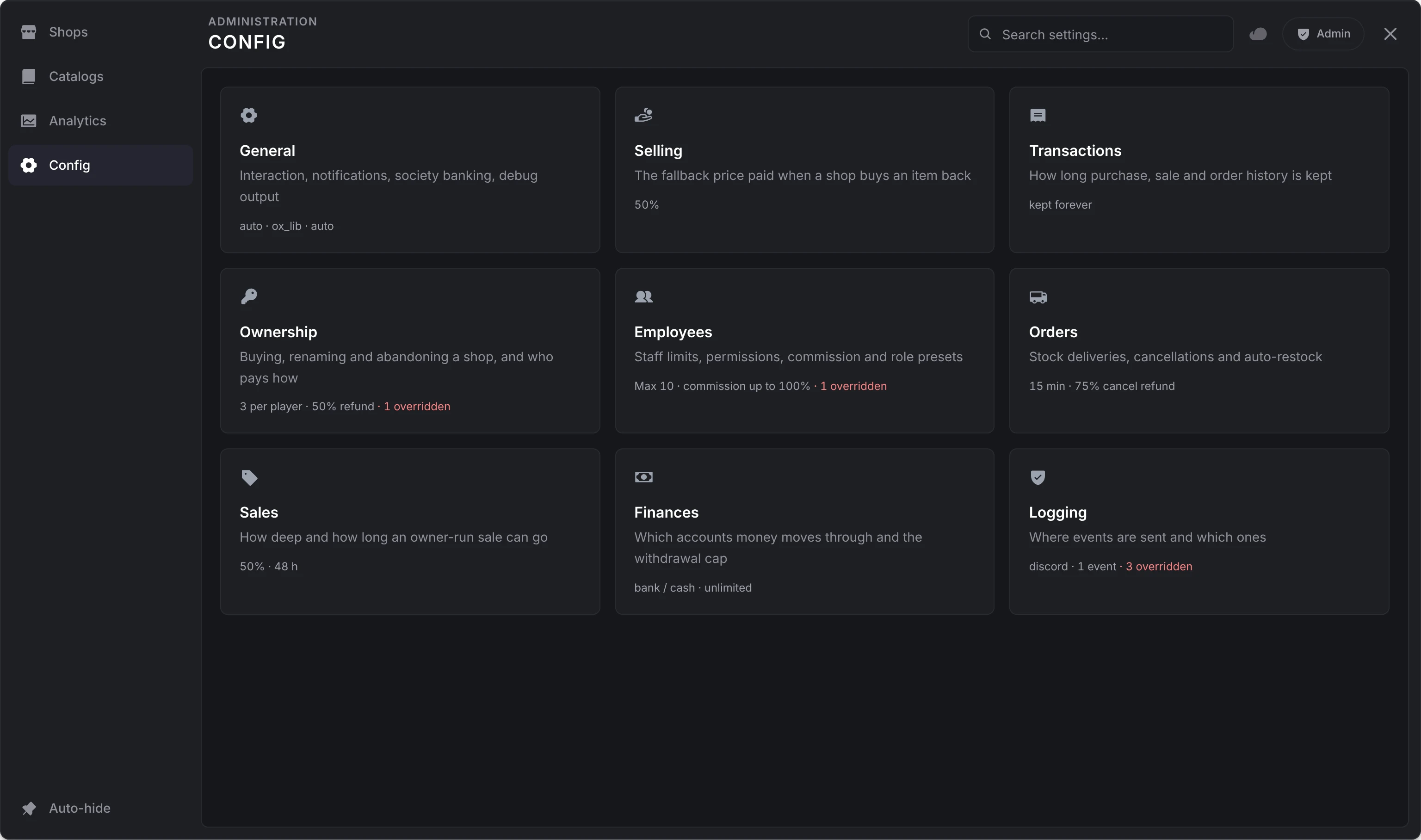
- Nine sections: General, Selling, Transactions, Ownership, Employees, Orders, Sales, Finances and Logging. Each card says how many options differ from their defaults.
- A row saves a moment after you change it; a number or text field saves when you leave it or press Enter.
- An option that differs from its default can be reset on its own, and Reset section resets them all.
- The search matches option names, words from their descriptions, an id such as
ownership.maxEmployees, and what an option holds: its choices, a permission, a pickup warehouse's name. A hit found that way says what matched (Includes Withdraw Funds), and the section name above each hit opens its section with the option lit. - Two options apply after a resource restart, and the page says so beside them: Update notifications and Trust client exports.
- Other admins with the panel open see your changes. The changes you make in one visit to a section are logged once, when you leave it.
The Id column below is the option's id: what the search, the database, the audit log and GetConfig use.
General
| Option | Id | Default | Notes |
|---|---|---|---|
| Interaction system | setup.interact | auto | auto picks lation_interact, ox_target or qb-target, in that order. Also each by name, or custom, wired in client/utils/interact.lua. |
| Interaction distance | setup.interactDistance | 2.0 m | 0.5 to 10. How close a player stands to a shop's ped, prop or point, or a management point, for its options to show. |
| Notification system | setup.notify | ox_lib | lation_ui, ox_lib, esx, qb, okok, wasabi_notify, or custom, wired in client/utils/notify.lua. |
| Society banking | setup.banking | auto | Where job accounts live. auto picks the first bank running, in the order on the overview. Also each by name, or custom, wired in server/utils/banking.lua. |
| Update notifications | setup.version | On | Restart. A console line when a newer version is out. |
| Debug messages | setup.debug | Off | Extra console output and the targets' debug shapes. Keep it off on a live server. |
| Trust client exports | setup.trustClientExports | Off | Restart. Read only in the panel. See trust client exports. |
Selling
| Option | Id | Default | Notes |
|---|---|---|---|
| Fallback sell-back price | setup.defaultSellPricePercentage | 50% | 0 to 100. Share of an item's price a buying shop pays when it has no Default Sell Price (%) and the item no Sell Price. 0 leaves such items off the sell tab. |
Transactions
| Option | Id | Default | Notes |
|---|---|---|---|
| Keep transactions for | setup.transactionRetentionDays | 0 days | 0 to 3650. Transaction rows and finished orders older than this are deleted once a day. 0 keeps everything. |
Ownership
| Option | Id | Default | Notes |
|---|---|---|---|
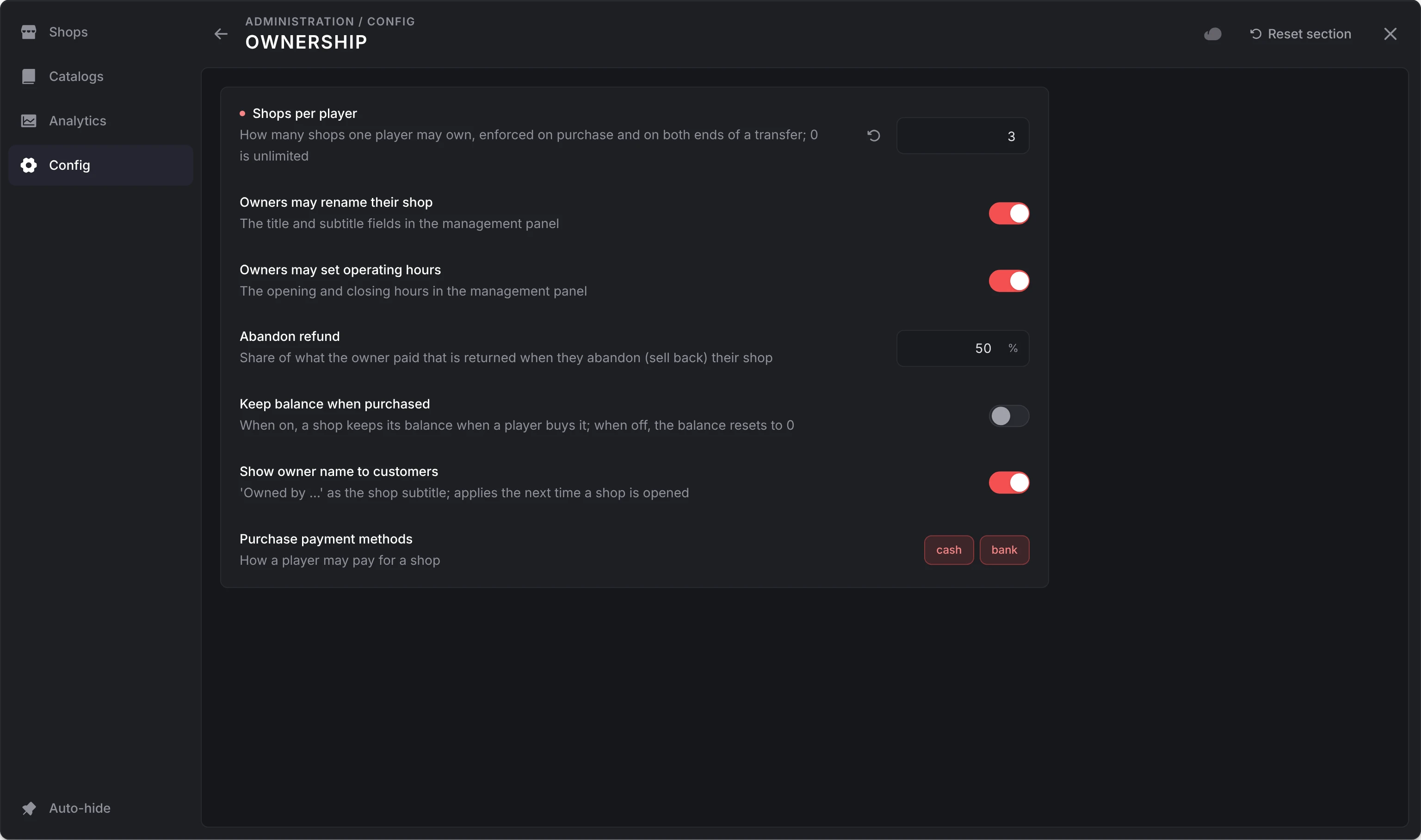
| Shops per player | ownership.maxShopsPerPlayer | 2 | 0 to 50. How many shops one player may own, checked on purchase and on both ends of a transfer. 0 is no limit. |
| Owners may rename their shop | ownership.allowRename | On | The name and subtitle fields in the management menu |
| Owners may set operating hours | ownership.allowOperatingHours | On | The opening hours in the management menu |
| Abandon refund | ownership.abandonRefundPercent | 50% | 0 to 100. Share of what the owner paid that comes back when they abandon the shop |
| Keep balance when purchased | ownership.keepBalanceOnPurchase | Off | On, a shop keeps its balance when a player buys it. Off, it resets to 0. |
| Show owner name to customers | ownership.showOwnerInShopUI | On | A player-owned shop's header reads Owned by and the owner's name, on the buy, sell and Buy & Sell screens. |
| Purchase payment methods | ownership.purchasePaymentMethods | cash, bank | How a player may pay for a shop. At least one. |
Employees
| Option | Id | Default | Notes |
|---|---|---|---|
| Max employees per shop | ownership.maxEmployees | 10 | 0 to 100, not counting the owner. 0 allows no staff. Shown on the purchase card. |
| Permission order | ownership.permissions | All 10 | Reorder only: the order the management menu lists permissions in |
| Default permissions for new hires | ownership.defaultEmployeePermissions | All off | Given at hire. Changing it never touches existing employees. |
| Max commission per employee | ownership.maxCommissionPercent | 100% | 0 to 100. The highest commission an owner may set. 0 removes the compensation editor from every shop; stored rules are kept and stop paying. |
| Commission requires the employee online | ownership.commissionRequiresOnline | On | The default for new employees: earn while online (on) or always (off). Owners can change it per employee. |
| Max role presets per shop | ownership.maxRolePresets | 10 | 0 to 50 |
The permissions and what each allows are on the management menu page.
Orders
| Option | Id | Default | Notes |
|---|---|---|---|
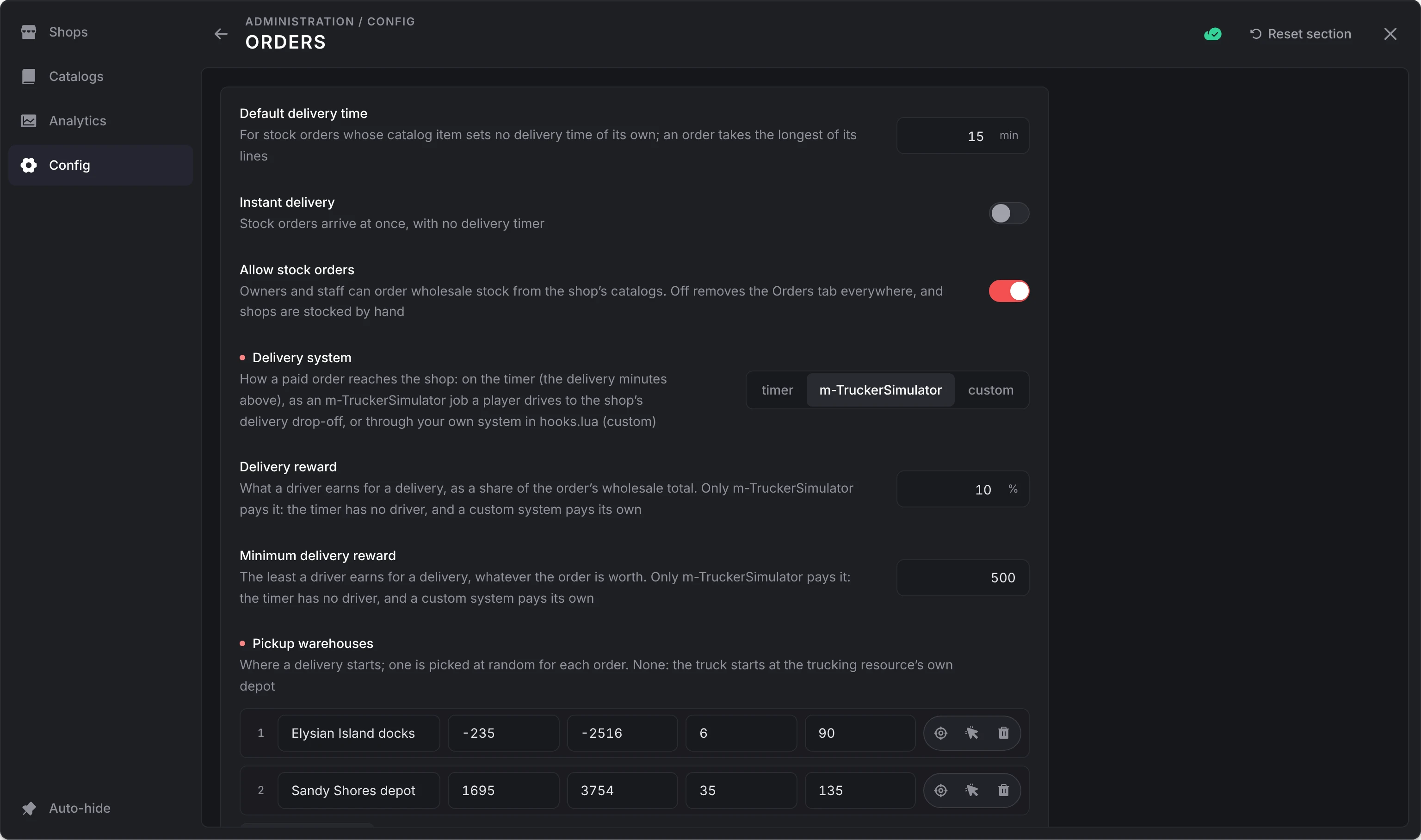
| Default delivery time | ownership.defaultDeliveryMinutes | 15 min | 0 to 1440. For catalog items with no delivery time of their own. An order takes its slowest line. |
| Instant delivery | ownership.instantDelivery | Off | Orders on the timer arrive at once |
| Allow stock orders | ownership.allowStockOrders | On | Off removes the Orders tab everywhere and stops auto-restock; shops are stocked by hand |
| Delivery system | ownership.deliverySystem | timer | timer, m-TruckerSimulator or custom. See delivery. |
| Delivery reward | ownership.deliveryRewardPercent | 10% | 0 to 100. A truck driver's pay, as a share of the order's wholesale total. m-TruckerSimulator only. |
| Minimum delivery reward | ownership.deliveryRewardMinimum | 500 | The least a truck driver earns. m-TruckerSimulator only. |
| Pickup warehouses | ownership.deliveryPickups | None | Up to 20 points, each with a label. A delivery starts at one picked at random; with none, at the trucking resource's own depot. A custom system gets the point too. |
| Order cancellation refund | ownership.orderCancelRefundPercent | 75% | 0 to 100. Share of an order's cost back to the shop when it is cancelled before delivery: by hand, by a delivery system, or when the shop is abandoned, repossessed or deleted |
| Allow auto-restock rules | ownership.allowAutoRestock | On | Off hides the editor; stored rules stop firing |
| Auto-restock warning cooldown | ownership.autoRestockNotifyCooldown | 300 s | 0 to 3600. The least time between "auto-restock skipped" notices per shop |
Delivery reward and Minimum delivery reward are greyed out unless the delivery system is m-TruckerSimulator, the only one that pays them (a custom system pays its own drivers). Pickup warehouses is greyed out unless it is m-TruckerSimulator or custom.
Sales
| Option | Id | Default | Notes |
|---|---|---|---|
| Max sale discount | ownership.maxSaleDiscountPercent | 50% | 0 to 100. The deepest discount an owner may run. 0 means no sales can start. |
| Max sale duration | ownership.maxSaleDurationHours | 48 h | 1 to 168. Also shapes the duration presets owners see. |
Finances
| Option | Id | Default | Notes |
|---|---|---|---|
| Bank accounts | ownership.bankAccounts | On | With lation_banking 1.1.0 or newer as the society bank, every shop's balance is a business account at the bank. Off, each account's money moves back to its shop at once; on again, it moves to the bank. See bank accounts. |
| Balance accounts | ownership.balanceAccounts | bank, cash | Where owners withdraw to and deposit from, in order. The first also receives every automatic payout: abandon refunds, settled staff earnings, pay queued for an offline employee, earnings claimed from the dashboard, and a deleted shop's balance paid to its owner. |
| Max withdrawal per transaction | ownership.maxWithdrawPerTransaction | 0 | The most an owner may withdraw at once. 0 is no limit. |
Logging
Never sent to clients, and not returned by GetConfig.
| Option | Id | Default | Notes |
|---|---|---|---|
| Logging service | logs.service | none | none, discord or fivemanage. Fivemanage needs fmsdk, started before lation_shops. |
| Include screenshots | logs.screenshots | Off | Fivemanage only: a screenshot of the player who caused the event |
| Webhook name | logs.discord.name | Shops | The name Discord posts under |
| Webhook URL | logs.discord.link | Empty | Write only: it never leaves the server, so the field shows only whether one is set |
| Webhook profile image | logs.discord.image | https://i.imgur.com/ILTkWBh.png | The picture beside the webhook's name |
| Webhook footer image | logs.discord.footer | https://i.imgur.com/ILTkWBh.png | The small picture in each message's footer |
Each event has its own switch, all off by default:
| Event | Id | Logs |
|---|---|---|
| Player purchases | logs.events.purchase | Items bought from a shop |
| Player sales | logs.events.sale | Items sold to a shop |
| Shop creation | logs.events.shopCreated | A shop created in the admin panel |
| Shop edits | logs.events.shopEdited | A shop saved in the admin panel |
| Shop deletions | logs.events.shopDeleted | A shop deleted in the admin panel, and what its owner was paid |
| Catalog changes | logs.events.catalogs | Catalogs saved or deleted |
| Ownership | logs.events.ownership | Shops bought, abandoned, transferred, or assigned and repossessed by an admin |
| Staff | logs.events.employees | Employees hired, fired, or given a new role, permissions or commission |
| Stock orders | logs.events.orders | Orders placed, cancelled and delivered |
| Sale events | logs.events.sales | Owner sales started and ended |
| Shop finances | logs.events.finances | Deposits and withdrawals, bonuses paid, earnings claimed |
| Stock movements | logs.events.stock | Items staff put into or take out of stock |
| Configuration changes | logs.events.configEdited | Everything changed on the Config page, one entry per visit to a section |
Trust client exports
setup.trustClientExports is a security switch. On, the client openShop export skips the server's distance check, and so can a cheater calling it. Leave it off and open shops from the server with exports.lation_shops:openShop(source, shopId) instead.
The panel shows it but won't change it. It is stored in lation_shops_config, in the general row under the key setup.trustClientExports, and applies after a restart.
Language
English and Spanish ship in locales/. Pick one with a replicated convar, so clients read it too:
setr lation:locale "es"A string a translation lacks reads in English. The locale files ship open, so you can edit the text or add a language.
Theme
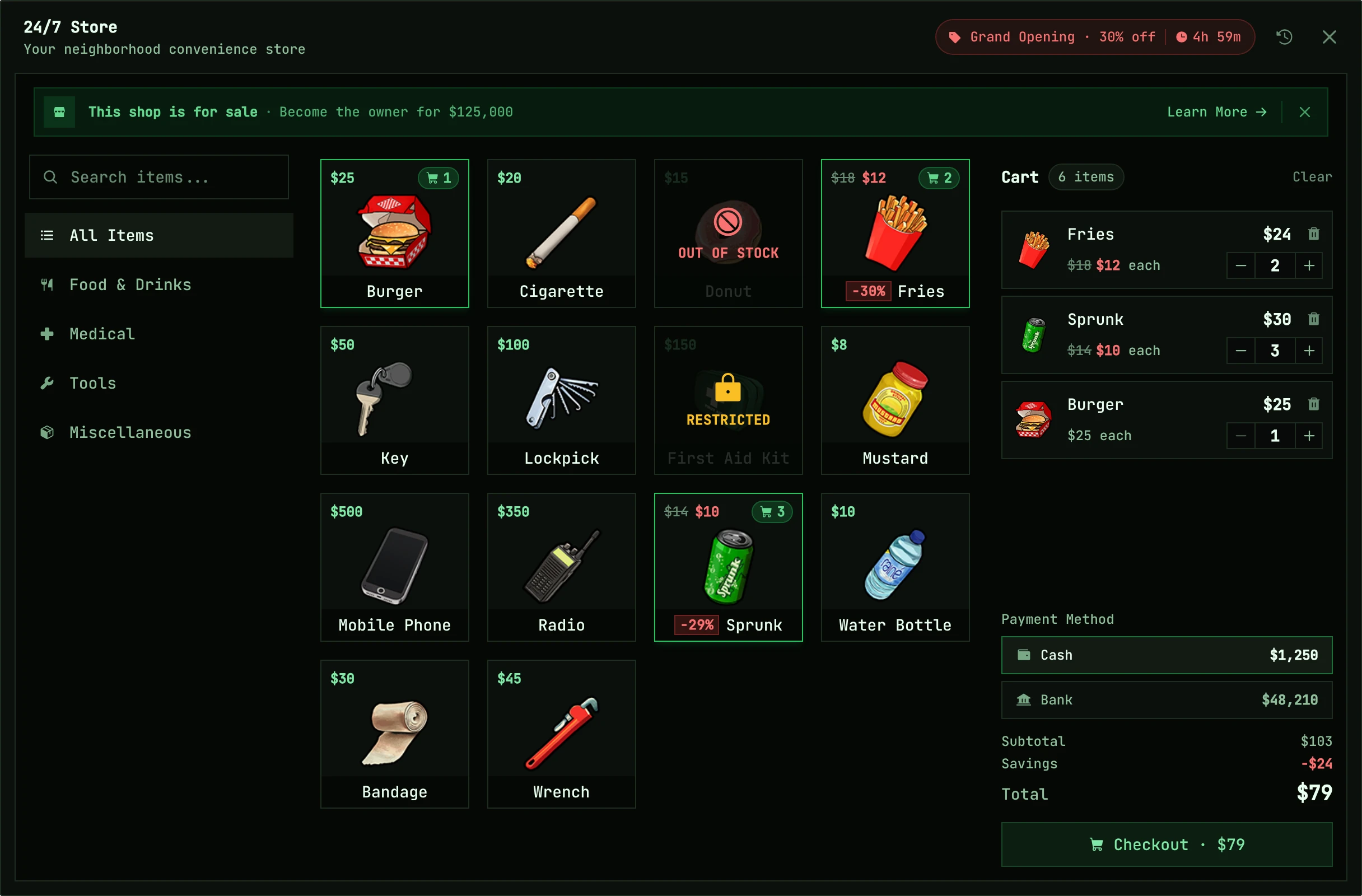
While lation_ui runs, the shop, admin and management screens take the theme lation ui gives each player when they join, and follow the server theme live whenever an admin saves it with /uitheme. A change a player makes to their own theme shows the next time they join. Without lation ui they use the built-in look, which is lation ui's default. See lation ui theming.
Commands
| Command | Who | Does |
|---|---|---|
/shopadmin | ACE lation_shops.admin | Opens the admin panel |
Owners and staff open their management menu from the shop itself; there is no command for it.
Open files
These ship unescrowed, so you can change them:
| File | Use it for |
|---|---|
server/utils/perms.lua | Who counts as an admin. The default is the ACE permission lation_shops.admin. |
server/utils/hooks.lua | Your own logic at fixed points in every flow. See hooks. |
server/utils/banking.lua | A bank of your own, and how custom payment methods are charged and paid |
server/utils/logging.lua | How logs are sent |
server/database/queries.lua | Every query |
bridge/client.lua, bridge/server.lua | The framework, inventory, licenses, jobs and money calls, each with a slot for a custom one |
client/utils/interact.lua | The interaction system, with a Custom slot |
client/utils/notify.lua | Notifications, with a Custom slot |
client/utils/peds.lua, client/utils/blips.lua | How peds and blips are made |
client/utils/theme.lua | How the screens take the lation ui theme |
locales/*.json | Every string players and admins read |
Still stuck? Ask in our Discord: the people who write the scripts answer.
Last updated
Storefront
What players see at a lation shops shop (buying with a cart, selling items back, purchase history, sales, a shop for sale) and what the server checks at checkout.
Developers
The lation shops server and client exports, the server events it fires, its hooks and custom stock deliveries, with parameters, return shapes and Lua examples.