Configuration
Every option in lation interact's config.lua with its default value, plus the theme it takes from lation ui, the language convar and the open files you can edit.
All settings live in config.lua at the root of the resource. The file ships unescrowed, along with the framework bridge, the vehicle door code and the language files.
Changes apply on the next full server restart. Restarting only lation_interact clears everything other scripts registered with it, and most scripts register only when they start.
Update check
| Option | Default | What it does |
|---|---|---|
Config.version | true | Checks for a newer release on start and prints a notice in the server console when there is one. |
Reveal distances
Config.Stages = {
    grain = 8.0,
    name = 4.5,
    reach = 2.4,
    exitMargin = 0.4
}| Option | Default | What it does |
|---|---|---|
grain | 8.0 | Meters at which a point of light marks a point or zone. |
name | 4.5 | Meters at which the name appears on the thing the player looks at. |
reach | 2.4 | Meters at which the options open and keys go live. |
exitMargin | 0.4 | How far the player must back out past a threshold before that stage lets go, so standing on a boundary never flickers. |
A registration can set its own stages. Sphere and box zones work out their stages from their size unless they set them, and the ox_target and qb-target bridges work theirs out from each option's distance.
How lists open
| Option | Default | What it does |
|---|---|---|
Config.ExpandMode | 'smart' | 'smart' opens a single option on its own and makes a list of several wait for the confirm key. 'auto' always opens on its own. 'manual' always waits for the confirm key. |
'smart' counts the options the player can actually see, so a list checked down to one row opens on its own. A waiting list also opens on a left click while the interact key is held. A registration can override this with expand.
In 'manual' mode, and for lists in 'smart' mode, a list folds back after the player picks an option (0.85 s after the option answers, 1.5 s after a refusal), unless that option sets keepOpen.
What shows before focus
Config.Reveal = {
    point = 'ambient',
    bridged = 'focus'
}| Option | Default | What it does |
|---|---|---|
point | 'ambient' | Points and zones registered through the native API. 'ambient' shows a point of light from the grain distance; 'focus' shows nothing until the player looks at it. |
bridged | 'focus' | Zones registered through the ox_target and qb-target bridges. Set 'ambient' to give every bridged zone a point of light. |
Vehicles, peds and objects always reveal on focus, whatever this is set to. A point or zone can override this with reveal.
Keys
| Option | Default | What it does |
|---|---|---|
Config.ConfirmKey | 'E' | Runs the highlighted option when it has no key of its own, and opens lists that wait. Takes a name from the key names list. An unknown name prints a warning and turns keyboard confirm off. |
Config.InteractKey | 'LMENU' | The keyboard default for the interact key (Left Alt). Registered as a FiveM key binding, so each player can change it under Settings > Key Bindings > FiveM, where it is listed as Interact (hold). Takes FiveM keyboard mapper names, such as LMENU, LSHIFT, LCONTROL, F, G, X or NUMPAD0. Set false to turn it off. |
Config.InteractControl | 19 | The controller side of the interact key, as a control id (19 is D-pad down). Only read while a controller is in use. Set false to turn it off. |
On a controller, confirm also answers to control 38 (INPUT_PICKUP). Rows are highlighted only with the mouse, and keys of their own are read from the keyboard, so a controller runs only the first row of a list, and only when that row has no key of its own.
While the interact key is held, attack, aim and melee are off, so clicks go to the card instead of the weapon.
Key names
Config.ConfirmKey and an option's key take these names. They are not case sensitive.
| Group | Names |
|---|---|
| Letters and digits | A to Z, 0 to 9 |
| Function keys | F1 to F24 |
| Numpad | NUMPAD0 to NUMPAD9, NUMPADADD, NUMPADSUB, NUMPADMUL, NUMPADDIV, NUMPADDOT |
| Modifiers | SHIFT, LSHIFT, RSHIFT, CONTROL, LCONTROL, RCONTROL, ALT, LALT, RALT, CAPSLOCK |
| Editing and navigation | SPACE, TAB, ENTER, BACKSPACE, INSERT, DELETE, HOME, END, PAGEUP, PAGEDOWN, UP, DOWN, LEFT, RIGHT |
| Punctuation | MINUS, EQUALS, COMMA, PERIOD, SLASH, SEMICOLON, APOSTROPHE, GRAVE, LBRACKET, RBRACKET, BACKSLASH |
| Aliases | RETURN (ENTER), CTRL (CONTROL), PGUP (PAGEUP), PGDN (PAGEDOWN), TILDE (GRAVE), QUOTE (APOSTROPHE) |
Config.InteractKey uses FiveM's own key binding names (LMENU for Left Alt), not this list.
Focus
| Option | Default | What it does |
|---|---|---|
Config.Focus | true | Shows a soft vignette around the screen while the interact key is held. Set false to turn it off. |
Passive mode
Passive interactions are hidden until the player holds the interact key, like a classic target. Hidden ones have no point of light, no name and no input. When the key is released, a passive list closes right away.
Config.Passive = false
Config.PassiveResources = {}| Option | Default | What it does |
|---|---|---|
Config.Passive | false | true makes every interaction on the server passive. |
Config.PassiveResources | {} | Resource names whose registrations are passive, as a list like { 'qb-garages' } or a set like { ['qb-garages'] = true }. Works for escrowed scripts and for scripts that register through the ox_target or qb-target bridges. |
A single registration can set passive = true or passive = false, which wins over both options. The built-in vehicle doors have their own setting, under vehicles.
If passive mode is on but both Config.InteractKey and Config.InteractControl are false, the console warns that passive interactions can never be revealed.
Look
Config.AccentIcons = false
Config.Hint = true
Config.Grain = {
    size = 0.02,
    alpha = 180,
    breathe = true
}| Option | Default | What it does |
|---|---|---|
Config.AccentIcons | false | Header icons are light by default. true tints them with the theme accent and follows theme changes. |
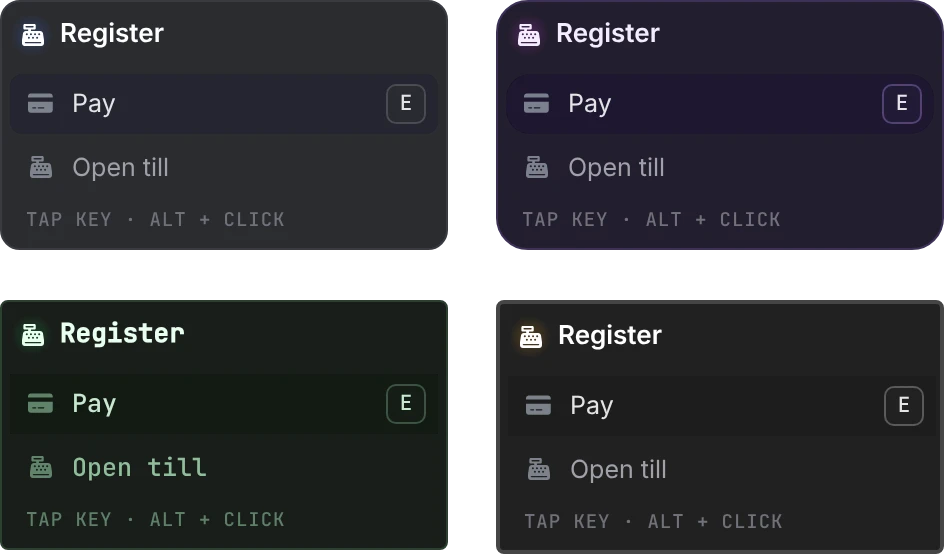
Config.Hint | true | The hint line under an open list ("tap key · alt + click"). It only shows on lists of more than one option. Set false once your players know the controls. |
Config.Grain.size | 0.02 | Width of the point of light, as a fraction of the screen width. |
Config.Grain.alpha | 180 | Opacity of the point of light, 0 to 255. |
Config.Grain.breathe | true | Makes the point of light pulse gently. |
The hint's text comes from ui.hint in the language files and names Alt whatever the interact key is. If you move Config.InteractKey off Left Alt, change the text there too.
Up to 20 points of light are drawn at once; past that, the nearest win.
Theme
There is nothing to set. While lation_ui runs, the cards take its theme: colors, opacity, corners, border width, shadow, font, UI scale and reduced motion, and the point of light takes the accent. A server theme saved with /uitheme reaches them right away; a player's personal theme, the next time that player joins. Without lation ui, the default look applies. See theming.
Vehicles
Config.IncludeOwnVehicle = false
Config.VehicleDoors = true
Config.InVehicle = {
    entities = false,
    points = true
}| Option | Default | What it does |
|---|---|---|
Config.IncludeOwnVehicle | false | Shows options on the vehicle the player is sitting in. Off by default, since they would stay focusable the whole drive. |
Config.VehicleDoors | true | Built-in door toggles: one per door, plus the hood and trunk, from outside the vehicle. true shows them like everything else, 'passive' hides them until the interact key is held, false turns them off for scripts that bring their own door handling. |
Config.InVehicle.entities | false | From a seat, interactions on other vehicles, peds, players and objects hide. Set true to keep them. |
Config.InVehicle.points | true | From a seat, points and zones stay live, for garages, drive-thrus and car washes. Set false to hide them. |
A registration can set inVehicle = true or false to override Config.InVehicle. An option bridged from ox_target or qb-target that sets allowInVehicle = true keeps its interaction live from a seat.
The door toggles sit on the door handle, or in the middle of the hood or trunk lid. They don't show while the player is seated, while the vehicle is locked, or for a door the model lacks or that is damaged. A toggle on a vehicle another player's game controls is passed to that player through the server. setr ox_target:defaults 0 in server.cfg also turns them off.
Suppression
When any of these states is true, the whole layer goes quiet: no points of light, no focus, no input.
Config.Suppress = {
    dead = true,
    cuffed = true,
    pauseMenu = true,
    nuiFocus = true,
    progress = true
}| Option | Default | What it does |
|---|---|---|
dead | true | Hides while the player is dead or downed. Death is detected on every framework; Qbox and QBCore also count the isdead and inlaststand metadata, and ESX counts PlayerData.dead. |
cuffed | true | Hides while the player is cuffed. Qbox and QBCore read the ishandcuffed metadata; every framework also checks for the standard restrained animations. |
pauseMenu | true | Hides while the pause menu is open. |
nuiFocus | true | Hides while another resource holds NUI focus, such as an inventory, phone or dialog. |
progress | true | Hides while an ox_lib progress bar or a progressbar (QBCore) bar is running. Neither is a dependency. |
Dead and cuffed detection lives in bridge/client.lua, in IsPlayerDead and IsPlayerCuffed, so you can adapt it to your scripts. A cuff script can also hide the layer itself with the suppress export. See hiding the layer.
Language
lation interact reads its language from the lation:locale convar and falls back to English when there is no file for it. Set it in server.cfg with setr, since the text is shown on the client:
setr lation:locale "de"Included languages: cs, da, de, en, es, fr, it, nl, no, pl, pt, sv and zh. The files in locales/ hold the hint line, the key binding's name in FiveM settings and the vehicle door labels; every other label on a card is the registering script's own text. To add a language, copy locales/en.json to a new file named after its code and translate it. Keep every key: a key missing from the file shows as its name, such as ui.hint.
Open files
These files ship unescrowed so you can adapt them to your server:
| File | What it holds |
|---|---|
config.lua | Everything on this page. |
bridge/client.lua | Framework and inventory detection, plus GetPlayerGroups (job and gang checks), HasItem (item checks), IsPlayerDead and IsPlayerCuffed. Each has a marked spot for a custom framework or inventory. |
client/defaults.lua | The built-in vehicle door toggles. |
server/defaults.lua | The server relay that passes a door toggle to the vehicle's network owner. |
locales/*.json | The language files. |
Still stuck? Ask in our Discord: the people who write the scripts answer.
Last updated
Switching from a target script
How to move a server from ox_target, qb-target or qtarget to lation interact, what each of the three bridges supports, and where bridged scripts behave differently.
Developers
The lation interact client exports for points, zones, entities, models and entity classes, every registration and option field, the checks, the onSelect and canInteract callbacks, events and feedback.