Players
What players see with lation interact, from the point of light to the open list, and how they use it, by looking and pressing a key or by holding Alt and clicking.
Everything a player does through lation interact happens on one card at a time, on the thing in the middle of their screen. There are two ways to use it, and players can switch between them at any moment:
- Look and press. Look at something in reach and press its key. The confirm key is E.
- Hold Alt. Hold the interact key to frame the screen, click a row with the mouse, and see anything the server keeps hidden until the key is held.
The keys and distances on this page are the defaults; each is set in config.lua.
How a place reveals itself
A place reveals itself in stages as the player gets closer:
| Stage | From | What the player sees |
|---|---|---|
| Point of light | 8 m | A small point of light marks the spot, whether the player looks at it or not. Only places a script put down (points and zones) can have one; vehicles, peds and props never do. |
| Name | 4.5 m | The name appears on the thing the player looks at. |
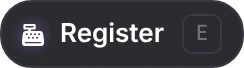
| In reach | 2.4 m | The options open. A list of several waits for E. |
Backing out of a stage takes 0.4 m more than stepping into it, so a player standing on a boundary doesn't see the card flicker.
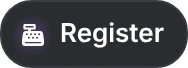
Whether a place has a point of light is up to the server and the script: places from the native API have one by default, zones from ox_target and qb-target scripts don't, and either can be changed under what shows before focus.
A single option opens by itself when the player steps into reach. A list of several shows its name and E, and opens when the player presses E (or clicks it while holding Alt). After an option runs, a list that waited folds back after a moment.
What answers
Only one card shows at a time, for the thing in the middle of the screen:
- What counts as looking at it. The line straight out of the middle of the screen passes through the thing: a vehicle's or a prop's box, a ped's body, a zone's own shape, or within 0.4 m of a spot a script put down. Standing inside a zone counts too.
- Several on that line. The one nearest the line takes the card, and of two on the same line, the nearer. A neighbour has to be clearly nearer the line to take over, so the card doesn't jump between things side by side.
- Line of sight. A card opens only once the thing is in view. Walls and objects in between hide it; glass and see-through collision don't, so a clerk behind a window still answers. From a seat, other vehicles don't block the view.
- Where the card sits. On the part it is about: door options on the door handle, hood and trunk options in the middle of the lid, a ped's at the chest, a prop's in the middle of the prop, and options about a whole vehicle on top of it.
- Moving things. A vehicle or ped moving faster than 3 m/s shows nothing until it slows down.
The card
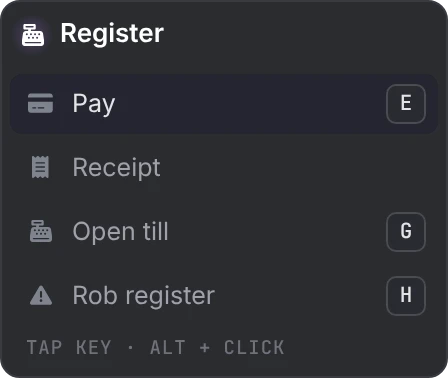
A card takes one of three shapes, from what the script registered:
| Shape | When | What it looks like |
|---|---|---|
| Titled card | The script named the thing | A header with the name and icon, then a row per option |
| List without a title | No name, or one that only repeats the first option | The first option is the header line, the rest follow |
| Single chip | One option and no name | The option and its key on one line |
Scripts written for ox_target, qb-target or qtarget never name the thing, so their options show as a list without a title or a single chip.
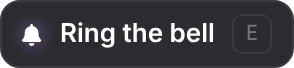
Each row has an icon, a label, and a keycap when the option has a key of its own. Under a list of several, a hint line reads "tap key · alt + click".
Using an option
Keys
- E runs the highlighted row. The highlight starts on the first row.
- A row with its own keycap answers to that key, or a click, and not to E. When a row claims E itself, E always runs that row.
- The other rows without a key are reached with the mouse: hold Alt, left click to free the cursor, then click the row.
- While a list is open, the game's own action on each key the list uses is off, so pressing F on a row doesn't also climb into the car. This covers E, F, Q, R, G, H, Tab and Space.
- One press runs one option: the card ignores another press while a script is still answering, and for a moment after.
Holds
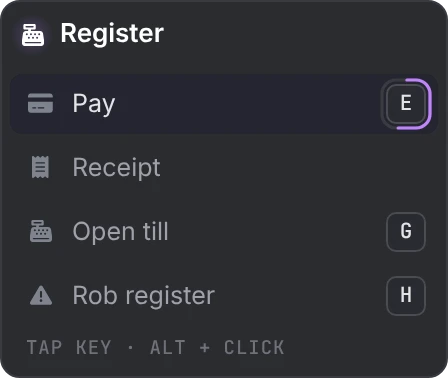
Some options ask the player to hold the key. A ring around the keycap fills while it is held, and the option runs when the ring closes. Letting go early cancels it. With the mouse, holding the button down on the row does the same.
Answers on the row
When an option runs, its row answers in place:
| The row shows | Meaning |
|---|---|
| A check | Done |
| A check and a short note | Done, with a word from the script ("Paid") |
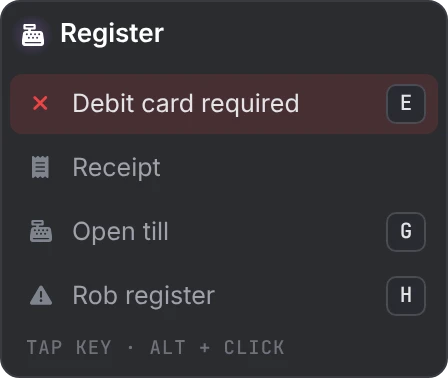
| A shake, a cross, and a reason in place of the label | Refused ("Debit card required") |
| A small spinner | The script is still deciding |
A reason stays for 1.5 seconds. Notes and reasons come only from scripts written for lation interact; rows from ox_target and qb-target scripts show the check.
Holding Alt
The interact key is Left Alt by default, and each player can rebind it under Settings > Key Bindings > FiveM, where it is listed as Interact (hold). While it is held:
- A soft vignette frames the screen.
- The camera stays with the player. With a card on screen, a left click frees the cursor at the middle of the screen to click a row, and a right click hands the camera back.
- A left click on a list waiting for E opens it.
- Interactions the server keeps hidden until the key is held (passive interactions) show, and close again when it is let go.
- Attack, aim and melee are off, so a click goes to the card and not the weapon.
From a vehicle
From a seat, places a script put down stay usable, for garages, drive-thrus and car washes. Other vehicles, peds, players and props hide, and so do the options on the vehicle the player is sitting in. A script can keep a single interaction usable from a seat, and the server can change the rest under vehicles.
Vehicle doors
On an unlocked vehicle, each door, the hood and the trunk have their own toggle, on the door handle or the middle of the lid. They don't show from a seat, on a locked vehicle, or for a door the model lacks or that is damaged. A toggle works on any player's vehicle: when another player's game controls the vehicle, the toggle is passed to it through the server. The server can turn the toggles off or keep them hidden until Alt is held.

When it goes quiet
The whole layer hides, with no points of light, no card and no keys, while the player:
- is dead or downed,
- is cuffed,
- has the pause menu open,
- is in another script's screen, such as an inventory, a phone or a dialog,
- has an
ox_liborprogressbarprogress bar running,
or while a script hides it, for a minigame or a cutscene. It comes back as soon as the state ends. Each automatic reason can be turned off under suppression.
Controllers
On a controller, D-pad down is the interact key and the pick-up control confirms. Rows can only be highlighted with the mouse, and keys of their own are read from the keyboard, so a controller runs only the first row of a list, and only when that row has no key of its own.
Still stuck? Ask in our Discord: the people who write the scripts answer.
Last updated
lation interact
lation interact shows the options for whatever a player looks at once it is in reach, and answers the ox_target, qb-target and qtarget exports so the scripts written for them keep working.
Switching from a target script
How to move a server from ox_target, qb-target or qtarget to lation interact, what each of the three bridges supports, and where bridged scripts behave differently.