Developers
The lation interact client exports for points, zones, entities, models and entity classes, every registration and option field, the checks, the onSelect and canInteract callbacks, events and feedback.
The native API is client-side: call these exports from a client script. Each registration belongs to the resource that made it and is removed when that resource stops.
Scripts written for ox_target, qb-target or qtarget don't need any of this. They keep working through the bridges. The native API adds what the bridges can't: a title on the card, a key per option, holds, and an answer on the row.
Quick example
local id = exports.lation_interact:addPoint({
    coords = vec3(24.1, -1345.9, 29.5),
    label = 'Register',
    icon = 'cash-register',
    options = {
        {
            label = 'Pay',
            icon = 'credit-card',
            key = 'E',
            hold = 700,
            onSelect = function(data)
                -- false shakes the row and shows the message in its place
                return false, 'Debit card required'
            end
        },
        {
            label = 'Open till',
            icon = 'cash-register',
            groups = 'cashier',
            serverEvent = 'shop:till'
        }
    }
})
Exports
| Export | Returns |
|---|---|
addPoint(data) | Registration id, or nil |
addSphere(data) | Registration id, or nil |
addBox(data) | Registration id, or nil |
addEntity(entity, data) | Registration id, or nil |
addModel(models, data) | Registration id, or nil |
addGlobalVehicle(data), addGlobalPed(data), addGlobalPlayer(data), addGlobalObject(data) | Registration id, or nil |
remove(id) | Nothing |
removePoint(id) | Nothing. Same as remove. |
removeEntity(id) | Nothing. Same as remove for a lation interact id. |
suppress(tag), release(tag) | Nothing |
isSuppressed() | boolean |
An add export that gets invalid data prints a message in the F8 console and returns nil. The troubleshooting page lists each message.
The ox_target and qb-target exports can also be called on lation_interact. See compatibility.
Registration fields
Every add export takes a registration table: the card, its options, and how it reveals. What each kind adds (coordinates, a radius, a size, a placement on an entity) is under its export.
Registration table
{
    label = 'Register',          -- the card's title
    icon = 'cash-register',
    iconColor = '#22c55e',
    options = { --[[ at least one option ]] },
    stages = { grain = 8.0, name = 4.5, reach = 2.4 },
    expand = 'smart',
    reveal = 'ambient',          -- points and zones only
    passive = false,
    inVehicle = false,
    debug = false
}
Fields
optionstable- The list of options, at least one. See options.
labelstringoptional- The card's title. Without one, or when it only repeats the first visible option's label, the card shows without a header and the first option leads. Must not be empty when given.
iconstringoptional- A Font Awesome solid icon name, such as
'cash-register'. Without one, the header shows a dot, or the first option's icon on a card without a title. iconColorstringoptional- A CSS color for the header icon, such as
'#22c55e'. The theme's icon color otherwise. stagestableoptionaldefaultConfig.Stages{ grain, name, reach }in meters. Any you leave out fall back to the config. Zones work theirs out from their size.expandstringoptionaldefaultConfig.ExpandMode'smart','auto'or'manual'.revealstringoptionaldefaultConfig.Reveal.point- Points and zones only.
'ambient'shows a point of light from the grain distance,'focus'shows nothing until the player looks at it. passivebooleanoptionaltruehides it until the interact key is held.falsekeeps it visible even whenConfig.PassiveorConfig.PassiveResourceswould hide it. Unset, those decide.inVehiclebooleanoptionaldefaultConfig.InVehicle- Whether it stays live while the player is in a vehicle.
debugbooleanoptionaldefaultfalse- Draws the shape in the world: a box zone as its faces and edges, a sphere zone as its radius, anything else as a sphere of its reach distance. Debug points and zones draw at any distance.
Points and zones
A point is a spot in the world. Its card is looked at when the middle of the screen passes within 0.4 m of the spot. A zone is a sphere or a box: looking at any part of it counts, and so does standing in it.
addPoint
Client export
local id = exports.lation_interact:addPoint(data)Parameters
datatable- The registration fields, plus:
data.coordsvector3- Where it sits. A
vector4or a table such as{ x = 1.0, y = 2.0, z = 3.0 }or{ 1.0, 2.0, 3.0 }also works.
Returns
number | nil- The registration id, or
nilwhen the data is invalid
The quick example is a point.
addSphere
Client export
local id = exports.lation_interact:addSphere(data)Parameters
datatable- The registration fields, plus:
data.coordsvector3- The center. Takes the same shapes as
addPoint. data.radiusnumber- Radius in meters, greater than 0
data.reachMarginnumberoptionaldefault0- Puts the options live this far outside the radius
Returns
number | nil- The registration id, or
nilwhen the data is invalid
A sphere zone goes live when the player walks inside its radius. Unless you set stages, they come from the radius: reach is the radius plus reachMargin, name is the larger of reach plus 1.8 and 1.3 times reach, and grain is the larger of reach plus 5.0 and 1.8 times reach.
exports.lation_interact:addSphere({
    coords = vec3(441.2, -981.9, 30.7),
    radius = 1.5,
    label = 'Front desk',
    options = {
        { label = 'Ring the bell', icon = 'bell', event = 'police:ringBell' }
    }
})
addBox
Client export
local id = exports.lation_interact:addBox(data)Parameters
datatable- The registration fields, plus:
data.coordsvector3- The center of the box. Takes the same shapes as
addPoint. data.sizevector3- Width, length and height in meters. A table
{ x, y, z }also works. data.rotationnumberoptionaldefault0- Heading in degrees. A
vector3rotation (its z is used) or avector4quaternion also works. data.reachMarginnumberoptional- Grows the box by this much for the inside test, so the options go live just outside it
Returns
number | nil- The registration id, or
nilwhen the data is invalid
A box zone goes live while the player is inside the box. Unless you set stages, name and grain are measured from the box's horizontal bounding radius: the radius plus 2.0, and the radius plus 5.0.
exports.lation_interact:addBox({
    coords = vec3(-1196.3, -890.6, 13.9),
    size = vec3(2.0, 1.0, 2.0),
    rotation = 35.0,
    label = 'Counter',
    options = {
        { label = 'Order food', icon = 'burger', onSelect = function(data) end }
    }
})
Entities
Vehicles, peds and props are looked at when the middle of the screen passes through them: a vehicle's or a prop's box, a ped's body.
addEntity
Client export
local id = exports.lation_interact:addEntity(entity, data)Parameters
entitynumber- An entity handle that exists now
datatable- The registration fields, plus the placement fields
Returns
number | nil- The registration id, or
nilwhen the entity doesn't exist or the data is invalid
Attaches options to one entity. Register the same entity more than once to give it options in several places, such as the trunk, the hood and a door. The registration is removed when the entity stops existing. Death does not remove it, so a body can still be searched.
exports.lation_interact:addEntity(vehicle, {
    label = 'Trunk',
    bone = 'boot',
    options = {
        { label = 'Search trunk', icon = 'box-open', onSelect = function(data) end }
    }
})
addModel
Client export
local id = exports.lation_interact:addModel(models, data)Parameters
modelsstring | number | table- A model name, a model hash, or a list of them
datatable- The registration fields, plus the placement fields
Returns
number | nil- The registration id, or
nilwhen no model is valid or the data is invalid. The id removes the whole registration.
Attaches options to every instance of the models.
exports.lation_interact:addModel({ 'prop_vend_soda_01', 'prop_vend_soda_02' }, {
    label = 'Vending machine',
    options = {
        { label = 'Buy a drink', icon = 'bottle-water', serverEvent = 'shop:vend' }
    }
})
addGlobalVehicle, addGlobalPed, addGlobalPlayer, addGlobalObject
Client export
local id = exports.lation_interact:addGlobalVehicle(data)
local id = exports.lation_interact:addGlobalPed(data)
local id = exports.lation_interact:addGlobalPlayer(data)
local id = exports.lation_interact:addGlobalObject(data)
Parameters
datatable- The registration fields, plus the placement fields
Returns
number | nil- The registration id, or
nilwhen the data is invalid
Attach options to every entity of a class. addGlobalPed covers peds that are not players; addGlobalPlayer covers other players.
exports.lation_interact:addGlobalPlayer({
    options = {
        { label = 'Give ID', icon = 'id-card', groups = 'police', serverEvent = 'police:showId' }
    }
})
Model and global registrations are found by looking: they apply to the entity the player aims at, so entities nobody looks at cost nothing. addModel and addGlobalObject also match static props that are part of the map, as long as the registration sets no bone, offset or boundsOffset.
Placement
Entity registrations (addEntity, addModel and the globals) take these fields, and use the first one set.
Fields
bonestring | tableoptional- A bone name, or a list of candidates where the first one the entity has is used. An entity with none of them gets nothing from this registration.
offsetvector3optional- An offset in the entity's own space
boundsOffsetvector3optional- A fraction of the model's bounding box on each axis.
vec3(0.5, 1.0, 0.5)is the front, centered, at mid height, on any model.
With no placement, a ped's options sit at its chest, an object's at the middle of its model, and a vehicle's on top of its body, with distance measured to the bodywork rather than the center.
On vehicles, a door bone (door_dside_f, door_pside_f, door_dside_r, door_pside_r) draws on the door handle when the model has one, and bonnet and boot draw in the middle of the lid. A handle bone such as handle_dside_f shares one list with its door.
reveal doesn't apply to entities: they always reveal when looked at, and setting it prints a warning once per resource. Since entities never show a point of light, only the name and reach stages matter for them.
Entities moving faster than 3 m/s show nothing until they slow down.
How registrations combine
Registrations on the same entity at the same spot (the same bone, the same offset, or no placement) merge into one list. addEntity options come first, then addModel, then the globals, each in the order they were registered.
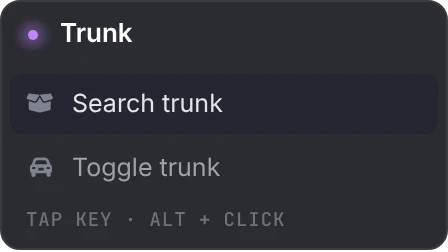
Options with no placement are about the whole entity, so they also appear on every other spot on that entity, after that spot's own options. A vehicle's door list can then hold both the door's options and the vehicle's.
The card's title comes from the registration whose option leads the visible list. If that one has no label, or one that only repeats its option, the next registration down the list with a label of its own titles the card. A merged list is passive only when every registration in it is.
Options
Option table
{
    label = 'Pay',
    icon = 'credit-card',
    iconColor = '#22c55e',
    key = 'E',
    hold = 700,
    keepOpen = false,
    groups = 'cashier',
    items = 'debit_card',
    state = 'locked',            -- entity registrations only
    canInteract = function(data) return true end,
    onSelect = function(data) end,
    event = 'shop:paid',
    serverEvent = 'shop:pay',
    args = { price = 25 },
    allowInVehicle = false
}
Fields
labelstring- The row's text
iconstringoptional- A Font Awesome solid icon name
iconColorstringoptional- A CSS color for the row's icon. The theme's icon color otherwise.
keystringoptional- Its own key, shown as a keycap. Any name from the key names list. See keys and holds.
holdnumberoptionaldefault0- Milliseconds the key must be held while a ring fills.
0runs it on press. keepOpenbooleanoptionaldefaultfalse- Keeps a list open after this option runs, for actions players repeat
groupsstring | tableoptional- Job and gang check. See gates.
itemsstring | tableoptional- Inventory check. See gates.
statestring | tableoptional- Entity statebag check. See gates.
canInteractfunctionoptional- Return
trueto show the option. See canInteract. onSelectfunctionoptional- Called when the option runs; its return value answers on the row. See onSelect.
eventstringoptional- A client event triggered when the option runs. See event.
serverEventstringoptional- A server event triggered when the option runs. See serverEvent.
argsanyoptional- Passed to
canInteract,onSelectand both events allowInVehiclebooleanoptional- Keeps the registration live from inside a vehicle, like
inVehicle = true
Keys and holds
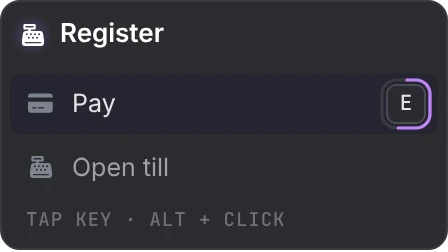
An option without a key is run by the confirm key while its row is highlighted, or by a click. The highlight starts on the first row and moves only with the mouse cursor, so on a list of several, give each option a key, or players reach the rows after the first only by holding Alt and clicking. An option with a key answers to that key or a click, not to the confirm key. If two visible options claim the same key, the first one gets it. An option that claims the confirm key itself takes every press of it, so the rows without a key can then only be clicked.
While a list is open, the game controls behind the keys it claims are turned off so one press doesn't do two things: E (pick up), F (enter vehicle), Q (cover), R (reload and light melee), G (detonate), H (headlight), TAB (weapon wheel) and SPACE (jump). Only keys used by the visible options or the confirm key are affected.
Binding W, A, S or D works, but prints a warning, since the option would fire while the player walks.
A hold option fills a ring while the key, or the mouse button on its row, stays down. Letting go early cancels it. A hold with no key of its own fills a ring around its icon and is held with the confirm key.
Gates
groups, items and state are checked by lation interact itself. An option that fails one is hidden.
{
    label = 'Open armory',
    icon = 'gun',
    groups = { police = 2, sheriff = 2 },
    items = { 'keycard' },
    state = { key = 'locked', value = false },
    serverEvent = 'police:armory'
}| Gate | Shapes |
|---|---|
groups | 'police' for one group. { 'police', 'sheriff' } for any of them. { police = 2 } for any of them at that minimum grade. |
items | 'lockpick' for one. { 'lockpick', 'screwdriver' } for all of them. { lockpick = 2 } for at least that many of each. |
state | 'locked' passes when the entity's statebag value is truthy. { key = 'locked', value = false } passes when it equals value. |
Groups are the player's job on every framework, plus the gang and citizen id on Qbox and QBCore. They are read through bridge/client.lua at most once a second. Items are read through the detected inventory; ox_inventory counts update live, others are cached for a second.
state only works on entity registrations. On a point or zone it prints a warning and the option stays hidden.
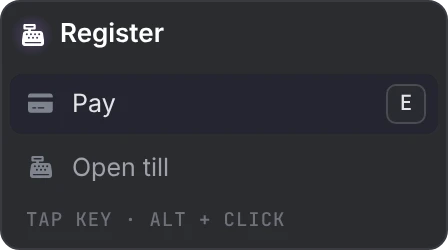
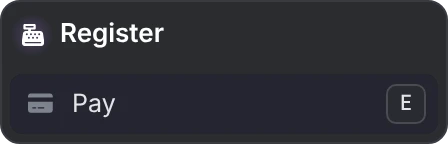
With the quick example, a player with the cashier job sees both rows, and anyone else sees Pay alone:
canInteract
Callback
canInteract = function(data)
    return true
end
Parameters
data.idnumber- The registration's id
data.entitynumber | nil- The entity, for entity registrations
data.argsany- The option's
args data.distancenumber- Distance from the player in meters: to the point, to the zone's center, or to the entity's spot (for a whole vehicle, to its bodywork)
data.aliveboolean | niltrueon entity registrations, meaning the entity was confirmed to exist this passdata.hitvector3 | nil- Where the player's aim last met the entity
Returns
boolean- Truthy shows the option, anything else hides it
It runs on lation interact's think loop, never on the frame: about 12 times a second for the card in focus, and every 0.16 s to 0.24 s for the others in range, to know whether they have anything to show. Functions from another resource work.
Keep it quick and don't wait in it. The think loop calls it directly, so a canInteract that waits holds up every interaction's update until it returns. The card on screen stays in place and keys keep working, since those run on the frame.
canInteract is not run again when the player presses the key; only groups, items, state and passive mode are checked again then. If it raises an error, the option is hidden.
{
    label = 'Refuel',
    icon = 'gas-pump',
    canInteract = function(data)
        return GetVehicleFuelLevel(data.entity) < 90.0
    end,
    onSelect = function(data) end
}
Handling a selection
When an option runs, onSelect, then event, then serverEvent fire, each one that is set. They run in their own thread, so they can wait. The row answers once all three have fired.
onSelect
Callback
onSelect = function(data)
    return ok, message
end
Parameters
data.idnumber- The id of the interaction that was used
data.indexnumber- The position of the option in that interaction's list. In a merged list it counts every registration's options.
data.argsany- The option's
args data.entitynumber | nil- The entity, for entity registrations
data.netIdnumber | nil- The entity's network id, when it is networked
data.coordsvector3- The point or zone's coordinates, or the entity's position
data.hitvector3 | nil- Where the player's aim last met the entity
Returns
boolean, string- Optional. An answer on the row; see feedback.
For addModel and global registrations, id identifies the interaction on that one entity, not the id the export returned. Use args to tell your options apart.
If onSelect raises an error, the console prints onSelect error with the resource and option label, and the row settles as done.
event
Client event
AddEventHandler(name, function(data) end)Parameters
datatable- The same table
onSelectreceives
A local client event, triggered on the player's client.
serverEvent
Server event
RegisterNetEvent(name, function(data) end)Parameters
data.idnumber- The id of the interaction that was used
data.indexnumber- The position of the option in that interaction's list
data.argsany- The option's
args data.netIdnumber | nil- The entity's network id, when it is networked
data.coordsvector3- The point or zone's coordinates, or the entity's position
Entity handles don't cross the network, so use netId on the server. It is a network event: source is the player who used the option. Any client can trigger a network event, so check on the server that the player may do what it asks.
exports.lation_interact:addModel('prop_vend_soda_01', {
    label = 'Vending machine',
    options = {
        { label = 'Buy a drink', icon = 'bottle-water', serverEvent = 'shop:vend', args = { price = 5 } }
    }
})
Feedback
onSelect can answer in place, on the row the player used:
| Return | What the player sees |
|---|---|
return false, 'message' | The row shakes and the message replaces its label. |
return false | The row shakes. |
return true, 'message' | A check with the message. |
Nothing, or true alone | A check. |
onSelect = function(data)
    if not HasEnoughCash(data.args) then -- your own check
        return false, 'Not enough cash'
    end
    TriggerServerEvent('shop:pay', data.args)
    return true, 'Paid'
end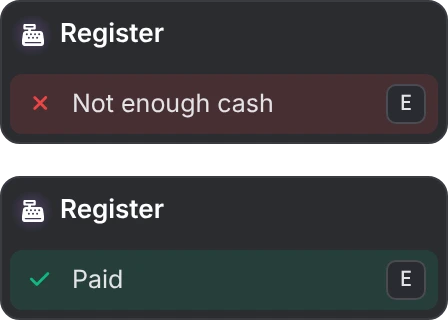
A message shows for 1.5 seconds and a check alone for 0.8 seconds. If onSelect hasn't returned after 0.1 seconds, a spinner shows on the row, and the card ignores another press until it answers. After 8 seconds without an answer it settles as done. The card also ignores a press for 0.35 seconds after an option runs.
Removing
Client export
exports.lation_interact:remove(id)Parameters
idnumber- Any id an
addexport returned, whatever its kind
removePoint and removeEntity do the same for a lation interact id. An id that is already gone does nothing.
You rarely need it for cleanup: everything a resource registered is removed when it stops, and addEntity registrations go when their entity stops existing.
Hiding the layer
suppress and release
Client export
exports.lation_interact:suppress(tag)
exports.lation_interact:release(tag)
Parameters
tagstring- A name of your own for the reason, not empty
Any script can hide every interaction, for a minigame or a cutscene, under its own tag. Tags are independent: releasing one leaves the others in place, and the layer stays hidden until every tag is released. Use a tag unique to your script. The debug report shows the tag as the reason the layer is hidden.
exports.lation_interact:suppress('my_minigame')
-- ...
exports.lation_interact:release('my_minigame')
isSuppressed
Client export
local hidden = exports.lation_interact:isSuppressed()Returns
booleantruewhile anything hides the layer
That covers every tag and the states in Config.Suppress. The answer is updated on lation interact's own loop, so right after a suppress call it can still read false for about a tenth of a second.
Events
lation interact fires no events of its own for scripts to listen to. Selections reach your script through onSelect, event and serverEvent.
lation_interact:toggleVehicleDoor
Server event
TriggerServerEvent('lation_interact:toggleVehicleDoor', netId, door)Parameters
netIdnumber- The vehicle's network id
doornumber- 0 front driver door, 1 front passenger, 2 rear driver, 3 rear passenger, 4 hood, 5 trunk
What the built-in door toggles use. The server passes the toggle to the client that controls the vehicle, which opens a shut door or shuts an open one; a locked vehicle's doors don't move. ox_target:toggleEntityDoor does the same under ox_target's name.
It also listens to these:
| Event | Side | What it does |
|---|---|---|
ox_target:toggleEntityDoor | Client and server | Toggles a vehicle door. See compatibility. |
ox_target:removeEntity | Client | Removes ox_target-style entity options. See compatibility. |
lation_ui:themeSync | Client | Reads the lation ui theme again after it changes. |
ox_inventory:itemCount | Client | Keeps item counts current for item checks. |
QBCore:Client:OnPlayerLoaded, QBCore:Client:OnPlayerUnload | Client | Spawns and deletes qb-target's spawned peds. |
Commands
Command
/interact_debug [seconds]Parameters
secondsnumberoptionaldefault20- How long to record, 5 to 120
Records while the player tries the interaction, then prints a support report in the F8 console. Run it again to stop early. Anyone can run it, in chat or as interact_debug in F8. See troubleshooting.
Still stuck? Ask in our Discord: the people who write the scripts answer.
Last updated
Configuration
Every option in lation interact's config.lua with its default value, plus the theme it takes from lation ui, the language convar and the open files you can edit.
Troubleshooting
How to capture the lation interact debug report, answers to common problems, and what each console message from lation interact means.