Bills and requests
How lation banking bills, player requests, business-to-business bills, repeating bills, the /bill card and ongoing payments work, who can send them, and how they are paid, declined or cancelled.
| Sent by | Paid into | Can be declined | |
|---|---|---|---|
| Bill | A society the admin listed | The society | Only while Players can decline bills is on |
| Bill to a business | A society the admin listed, to another account | The society | Always. See Business to business |
| Request | Any player | The sender's personal account | Always |
| Sale | A register | The business | Always. See Register |
Every one waits on the recipient's Bills page, with a badge on the side rail, until it is paid, declined, cancelled or, for a request, expired. A bill sent to an account waits there for everyone who may pay from that account. The recipient is told when one arrives, and the sender when it is paid or declined.
Setting up bills
Only the societies listed under Config > Bills > Businesses that bill can send bills. A job without a business behind it has nothing to invoice, so nothing is listed by default.
In /bankadmin > Config > Bills, pick the society under Add a society.
Set its Employee cut %, 0 to 50: the share of each paid bill that goes to the employee who wrote it, paid into their personal account.
Add up to 24 presets with Add a preset: a reason and an amount, such as Speeding for 250, picked when writing a bill.
Bosses of a listed society can bill from it. With Every employee can bill on (the default), everyone in that job or gang can.
The cut is fixed when the bill is written, so a later change to the setting never touches a bill already sent. On a register sale the cut is taken from the price before tax.
Switching bills off
Config > Bills > Bills turns bills off everywhere, and Config > Requests > Requests does the same for requests. While one is off, nothing of that kind is shown, written, paid, declined, cancelled or collected. What is already waiting is kept and shows again once it is back on; a request still expires on its date.
- With bills off and requests on, the page and the rail read Requests. With both off, the page is gone.
- Bills off also takes away the register, ongoing payments and the
/billcard's To pay tab. - Open banks, ATMs and registers change the moment you save.
Sending
Bills and requests go out from three places:
- Bills > Send a bill or Request money in the full bank;
- the request mode on the Transfer page;
- the
/billcard, which lists the players standing nearby and also takes an account number or citizen ID.
Pick the society to bill from (or yourself, for a request), the recipient, the amount, a note, and whether it repeats. The recipient is another player, or, for a bill, another business's account (below). A bill is capped by Config > Transfers > Maximum transfer when one is set.
On the Bills page and the /bill card, the amount buttons are the list under Config > Quick amounts > Bills and requests: 100, 250, 500, 1,000 and 5,000 by default. The Transfer page's request mode uses its Send money list. See Quick amounts.
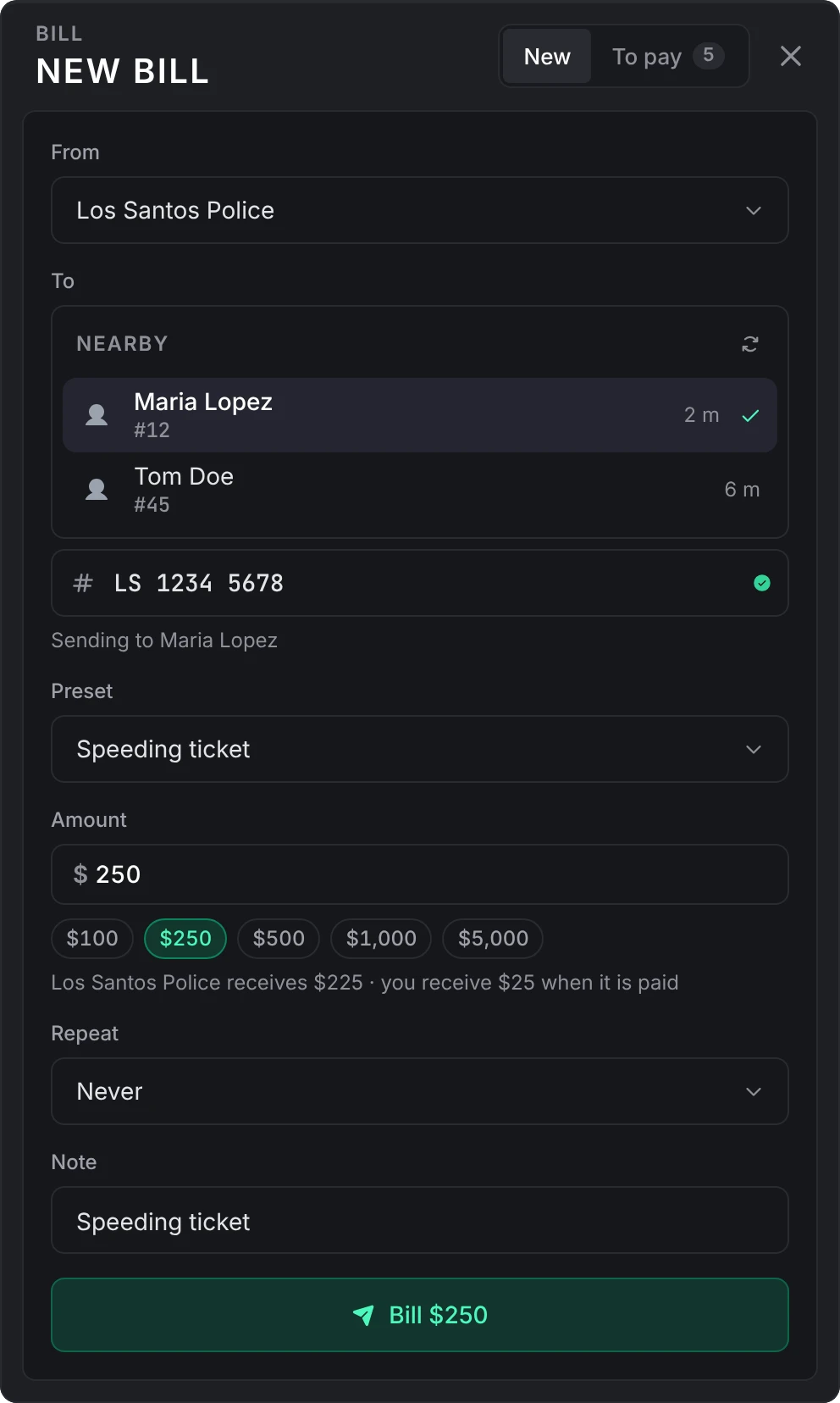
A request needs Config > Requests > Requests on. It expires after 3 days by default if nobody answers it.
Business to business
A society that sends bills can also bill another business: a society, a shared account or a business account, but never a savings account. Type that account's number as the recipient, on the Bills page, the /bill card or the register's Send as a bill; the field says which account it is and that it is paid from there. Requests only go to people.
- Everyone who may send money from that account sees the bill on their Bills > To pay, under the account's name: a society's bosses, and the owner and members with Transfer on a shared or business account. Each of them is told when it arrives.
- It is paid from that account and nothing else, so nobody pays a business's bill out of their own pocket. A frozen account can't pay it.
- It can always be declined, whatever Players can decline bills says, and it is never collected automatically.
- It can repeat, like any bill. Anyone who may pay it can Stop repeating.
- One society can have up to 10 unpaid bills waiting on the same account.
- When the account is closed, what was billed to it is cancelled and its repeating bills stop.

Other resources can send one with CreateBill and pay it with PayBill, with nobody online.
Paying
The recipient pays from Bills > To pay in the full bank, from their personal account or any account they may transfer from. A bill sent to an account is paid from that account. Bills can't be paid at an ATM.
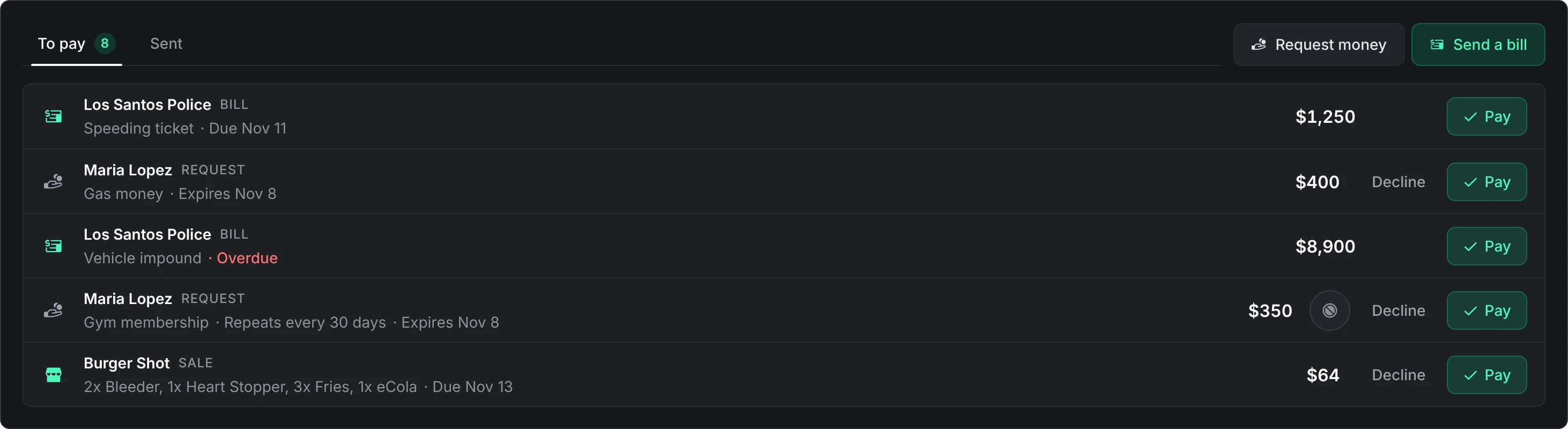
A bill is due 7 days after it is sent by default and shows as overdue after that. With Config > Bills > Collect overdue bills automatically on, overdue bills are taken from the player's personal account while they are online and can cover it: every 5 minutes, and 15 seconds after they join. A bill sent to an account is never collected this way.
With Config > Bills > Pay bills from /bill on, the /bill card gets a To pay tab with the player's own bills, so a fine written at the roadside or a sale sent as a bill can be paid on the spot.
Declining and cancelling
- The recipient can decline a request, a sale or a bill sent to an account at any time, and any other bill only while Players can decline bills is on.
- The sender can cancel an unpaid bill or request, and so can a boss of the society it pays into. Nothing is collected and it leaves the recipient's bills.
Bills > Sent lists what the player sent and what pays into a society they run, so a boss can cancel an employee's bill, even after the society is taken off the billing list.
Declining or cancelling one of a repeating series ends the series; the dialog says so first.
Repeating bills
A bill or request can repeat every day, week, two weeks or month (30 days), until stopped or for a set number of payments (2 to 120).

- The first one goes out now. Each next one is written only once the previous one is paid, an interval after it, and waits to be paid like any other.
- If any one of them is declined, cancelled or expires unpaid, the series ends there. The sender is told when the other side declines it or a request runs out.
- One player can have 10 repeating bills and requests running at once: the ones their Sent tab lists.
- The sender, the recipient or a boss of the society can Stop repeating. The open one stays as it is. An admin can also stop one from the player's account in
/bankadmin. - While a society is taken off the billing list, no new ones are written; the series picks up again once it is back. While bills are switched off (requests, for a repeating request), the series is paused and hidden: nobody sees or stops it, and it doesn't count towards the 10.
Ongoing payments
Under the bills, while bills are on, the Bills page lists what a player owes other resources: vehicle finance, rent, insurance, a payment plan. The bank stores none of it. The rows come from Hooks.ongoingPayments in server/utils/hooks.lua, which ships open; see Developers.

JG Dealerships (jg-dealerships) ships wired in. While it runs, each financed vehicle shows with its next payment, what is left, the due date and a progress meter, and a Pay button when that finance is paid from the bank. JG Dealerships makes the payment and keeps its own record; with Track other scripts' bank moves on, the line in the player's history reads Vehicle finance · and the vehicle's name.
Still stuck? Ask in our Discord: the people who write the scripts answer.
Last updated