Growing
How players get supplies, place pots, care for plants, harvest, roll, bag and smoke in lation weed, and how levels work.
This page follows a plant from supplies to smoke, as players see it. The values are the defaults; change them in the admin panel.
Supplies
Supply shop
The vendor stands at the Smoke on the Water blip. Target them and choose Browse Supplies to buy watering cans, fertilizers, soils, plant pots, plant revives, rolling papers, empty baggies and the weed table. Pick an item, then a quantity, and pay with cash. You have to be within 10 m of the vendor.
When the server turns on shop hours, the vendor is only there between opening and closing time; the blip stays.
Seed dealer
The seed dealer turns up as soon as the server has loaded its settings, stays at one spot for 60 minutes, leaves for 90, then turns up somewhere else. While they are out, a Seed Dealer blip shows where, except to players whose job the server hides it from; a job change shows or hides it at once. Target them and choose Talk to see every seed with its price, the level it needs and how many you can still buy.
Each visit you can buy up to the stock shown, which grows with your level, and it starts over when the dealer moves. You have to be within 10 m of the dealer to buy.
Farms
The Weed Farm blip marks a wild plot. Walk into it, target a plant and choose Search. After a few seconds you find seeds or nothing. Better strains only drop once you reach their level, and each plant can be searched again after 45 seconds.
Place a pot
Use a plant pot from your inventory. You can't start if you already own 12 plants, if you stand in a no-planting zone, or, when the server uses planting zones, if you stand outside them.
A see-through pot appears with the controls on screen:
| Key | Control | Does |
|---|---|---|
| W, S, A, D | Move Forward, Move Backward, Move Left, Move Right | Moves the pot |
| Q, E | Rotate Left, Rotate Right | Turns it |
| B | Toggle Freeform or Toggle Grid | Switches between grid and freeform |
| Space | Confirm | Puts it down |
| X | Cancel | Gives up and keeps the pot |
Grid mode is the default. It draws cells on the ground around you: green cells are on soil you can plant in, red cells are not. Cells on walls, steep slopes or inside objects aren't drawn. Each key press moves the pot one cell.
Freeform mode moves the pot smoothly while you hold a key. Its outline turns green where it can go down and red where it can't.
The pot goes down only on allowed ground, not inside objects, and not too close to another plant when the server sets a minimum distance. Keep it within 5 m of you: the preview can move up to 7.5 m from where you started, but the server refuses a spot more than 5 m away and you keep the pot. As it goes down, the script checks for a roof, a tree or anything else above it. A plant under cover gets no water from rain.
Soil and seed
Target the pot and choose Interact.
Empty pot (stage 1). Pick a soil from your inventory. Each soil shows its growth and yield bonus. Cancel gives you the pot back.
Pot with soil (stage 2). Pick a seed. Strains above your level show as locked. Cancel gives you the pot and the soil back.
Once the seed is in, the plant is at stage 3 and starts growing. It changes model as it grows, up to stage 8.
Plant status
Stand within 1.7 m of a plant to see its status panel above it: the strain, the stage, and one of these.
| Panel | Means |
|---|---|
| Needs soil | An empty pot, stage 1 |
| Needs seed | A pot with soil, stage 2 |
| Health, Growth, Water, Fert | Growing. The four rings update every few seconds. |
| Complete | Fully grown, ready to harvest |
| Currently dying | Health is at 0% and the death timer is running |
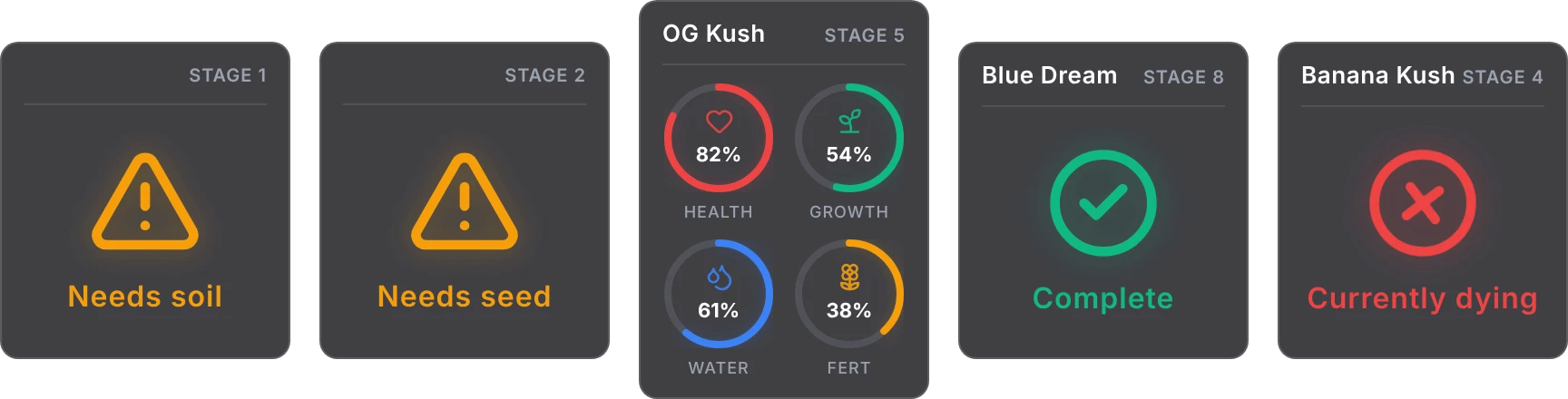
The server can turn the panels off, or show them only on the closest plants.
Caring for a plant
Target a growing plant and choose Interact to open its menu: the stage, the soil and fertilizer bonuses in effect, health, growth, water and fertilizer, and a line when the perfect-health bonus is on.
- Water. A watering can fills water to 100%. Water drains at a rate set by the strain.
- Fertilize. Pick a fertilizer from the list. It fills fertilizer to 100% and becomes the plant's fertilizer, which sets the bonus. You can only fertilize again once the level is at or below 20%, so you can't swap to a yield fertilizer right before harvest.
- Rain. While the weather is rain, thunder or clearing, plants outside and not under cover gain water on every update. This needs one of the weather scripts in the requirements, which is found even when it starts after lation weed.
Water and fertilizer can't be added once a plant is full or fully grown.
Health and dying
When water or fertilizer reaches 0%, health starts dropping. Health doesn't come back on its own, and every 10% lost costs buds at harvest. At 0% health the plant starts dying, and after 30 minutes it is destroyed.
While a plant is dying, its menu shows Revive. A plant revive gives it 25 health and stops the death timer. Watering a dying plant doesn't stop the timer.
A fully grown plant stops using water and fertilizer and waits for harvest.
Harvest
When growth reaches 100%, the menu shows Harvest. The harvest takes about 25 seconds and gives buds of the strain:
- 1 or 2 buds (by strain) for every 10% of health,
- more with yield soils and fertilizers,
- a bonus when the plant is at 100% health.
You need room in your inventory for the buds. The server may also give your pot back, or some seeds of the strain. See strains for the formula.
Destroy a plant
Before a plant is fully grown, its menu shows Destroy. Confirm, and the plant is gone with nothing returned.
Plants aren't locked to their owner: anyone at a plant can water, fertilize, harvest or destroy it. Only the owner sees a map blip for their plants, and plants inside a lab are seen only by players inside that lab.
Roll and bag
Buds become joints and bags at a weed table, or at the packaging stations inside a lab.
Weed tables
Buy a weed table at the supply shop and use it from your inventory. Place it with the same keys as a pot; tables have no grid mode. You can have one table out at a time, and it stays through restarts.
Target the table and choose Use Table. Its menu has Roll Joints, Bag Weed and Pick Up Table.
Choose Roll Joints or Bag Weed.
Pick a strain. Only strains you have reached the level for are listed.
Enter how many, up to 15 at a time.
Each roll uses 1 bud and 1 rolling paper and gives 1 joint. Each bag uses 1 bud and 1 empty baggy and gives 1 bag. Each takes 2.5 seconds. Pick Up Table asks you to confirm, then puts the table back in your inventory. When the server locks tables to their owners, only you can pick yours up.
Lab packaging stations
Every lab has four packaging stations. Target one and choose Start packaging to roll or bag the same way. See labs.
Smoke a joint
Use a joint from your inventory. You smoke it for 10 seconds and can walk while you do. When you finish, the effects apply: by default 50 health, 20 armor, 50 stress relief, a screen effect, a drunk walk and camera shake for 30 seconds. The server can set a level a joint needs.
Levels
Players earn XP for growing. Each reward is multiplied by the XP multiplier of the strain it comes from, which is 1 for every default strain, so a server can make rarer strains pay more (see strains).
| Action | XP |
|---|---|
| Finding seeds at a farm | 5 |
| Harvesting a plant | 50 |
| Each bud from a harvest | 5 |
| Each joint rolled | 3 |
| Each bag packed | 3 |
The six levels start at 0, 2,500, 10,000, 20,000, 50,000 and 100,000 XP. Your level decides which seeds you can plant and buy, how many seeds the dealer sells you, what you can find at farms and which labs you can buy. A notification shows when you level up. When an admin edits the levels, everyone's level follows at once, and players moved up are told.
XP is saved when a player leaves or switches character, and every 3 minutes, so a crash loses a few minutes at most.
Run /weedstats to see your level, the XP to the next level, and lifetime counts of plants harvested, buds produced, joints rolled, weed bagged and farms searched.
Still stuck? Ask in our Discord: the people who write the scripts answer.
Last updated
Admin panel
How to open /weedadmin in lation weed, read the overview, manage every live plant, change the live configuration, move it between servers and put it back to its defaults.
Labs
How players buy, enter, run, staff, raid and sell private weed labs in lation weed, from the lab marketplace to the Manage Lab panel.