Boss menu
What the lation jobs boss menu lets a job's bosses do, how it opens, and which grade permission unlocks each tab.
The boss menu is where a job is run day to day: staff, payroll, money, places, applications, forms, notices and leave. It opens for any grade that holds at least one permission, and each tab is there only for the grades that hold what it needs. The boss grade holds every permission.
Opening it
/boss, or/boss <job>to pick one of the jobs you run. Without a name it opens the first.- An office place.
- The Work panel's Boss menu button on a job card.
exports.lation_jobs:openBoss(job?)from another script.- The open events of the boss menus it replaces (below).
A member whose grade holds no permission who uses an office gets their Work panel on that job instead. A player who runs more than one job switches between them at the foot of the menu's rail.
Job scripts that open another boss menu
Job scripts written for qb-management, qbx_management or esx_society open this menu with no changes. Each open is checked on the server the same way /boss is.
| Replaces | Answered |
|---|---|
qb-management | Client events qb-bossmenu:client:OpenMenu and qb-gangmenu:client:OpenMenu; server events qb-bossmenu:server:openMenu and qb-gangmenu:server:openMenu (Qbox and QBCore) |
qbx_management | Client event qbx_management:client:openMenu and the client export OpenBossMenu; server event qbx_management:server:openMenu (Qbox). The manifest provides qbx_management, so scripts that check for it find lation jobs. |
esx_society | Client event esx_society:openBossMenu, which opens on the society it names and, when the menu closes, runs the script's own close so its prompt comes back; the server event of the same name (ESX). The manifest provides esx_society, so scripts that depend on it start. |
An open that names a job lation jobs doesn't manage yet opens nothing, and the console names the job once so you know to adopt it in /jobadmin. From esx_society:openBossMenu, the player is told that the job's boss menu isn't set up yet.
On Qbox and QBCore only the boss menu is answered here: society money is the bank's, and lation banking answers qb-management's money exports itself. On ESX, lation jobs stands in for the rest of esx_society as well.
esx_society on ESX
On ESX, lation jobs answers everything other scripts ask of esx_society, so its folder can go with nothing to set. A job script that registers its society, reads its money or parks in its garage keeps working.
| Part | Answered |
|---|---|
| The society list | The events esx_society:registerSociety, esx_society:getSociety and esx_society:getSocieties, and the exports registerSociety and GetSociety. Every job managed here is a society, as is every job a script registers. es_extended asks for it when ESX's society paychecks are on. |
| Society money | esx_society:getSocietyMoney, esx_society:checkSocietyBalance, esx_society:depositMoney and esx_society:withdrawMoney. For a job managed here, money moves between the player's bank account and the society as the boss menu's Deposit and Withdraw move it, under the same permissions (view_finances, deposit_funds, withdraw_funds). Any other job moves its society_<job> account in esx_addonaccount the stock way, in cash: its boss takes out, anyone at the job pays in. |
| Staff | esx_society:getEmployees, esx_society:getJob, esx_society:getOnlinePlayers and esx_society:isBoss. esx_society:setJob hires, regrades and fires through lation jobs, with the same permissions and grade limits, for jobs managed here only. |
| The society garage | esx_society:getVehiclesInGarage, esx_society:putVehicleInGarage and esx_society:removeVehicleFromGarage, kept in esx_datastore. They work at the stock mechanic and taxi garages and within 12 metres of the job's own garage places. |
| Refused, with a message | esx_society:setJobSalary, esx_society:setJobLabel and esx_society:setJobUniform: salaries, grade names and outfits are set in lation jobs, and writing them to ESX would pay twice. esx_society:washMoney: there is no money washing. |
While an esx_society folder is on the server, it answers all of this itself, its boss menu opens beside this one, and the console says to delete it.
Tabs
| Tab | Shown to grades with | What it holds |
|---|---|---|
| Dashboard | Any permission | Your shift, who is in, the week's figures, notices, latest activity, what waits on you |
| Staff | hire, fire, promote or set_duty | The roster, hiring, offers, each person's file |
| Payroll | manage_salaries, view_finances or withdraw_funds | Salaries, the next run, the last run, bonuses |
| Finances | view_finances | The society account at the bank |
| Analytics | hire, fire, promote, view_finances or manage_salaries | The job over 7 days, 30 days or all time |
| Places | manage_places | The job's places |
| Applications | manage_applications | Applications from the job board, and the application form |
| Forms | manage_forms, while forms are on | The job's own forms and what comes back |
| Settings | manage_settings or manage_grades | The job board listing and the grade names |
What each permission does is on the admin page. An admin sets them per grade in the job's editor under Access.
Dashboard
The front desk of the job:
- Your shift: whether you are on duty and for how long, with Clock on and Clock off, and everyone who is in beside it.
- Figures: the society balance with the week's money in and out, what payroll paid this week and when it last ran, the hours on duty this week, and the next run. The money figures need a grade that may see it.
- Notices: the job's notice board (below).
- Latest activity: the newest rows of the job's activity log.
- Waiting on you: applications to answer, form responses nobody has read, a payroll that left people unpaid, the bank being down, and leave requests. Each row opens its tab, and leave is answered in place. When nothing waits, it says so.
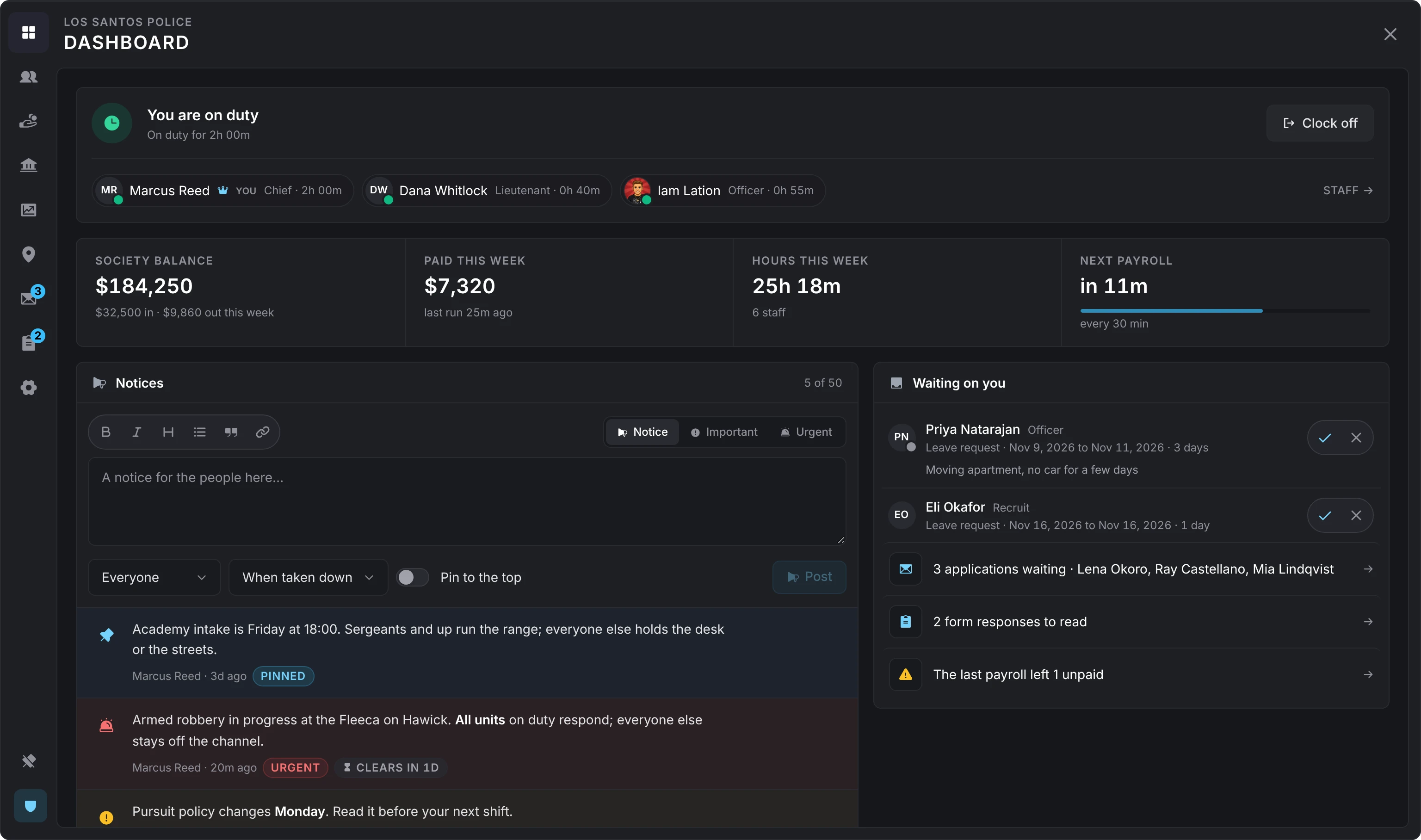
Staff
The roster, with each person's grade, whether they are on duty or online, when they were last seen, and a chip while they are on leave. Narrow it by a search, by presence and by grade.
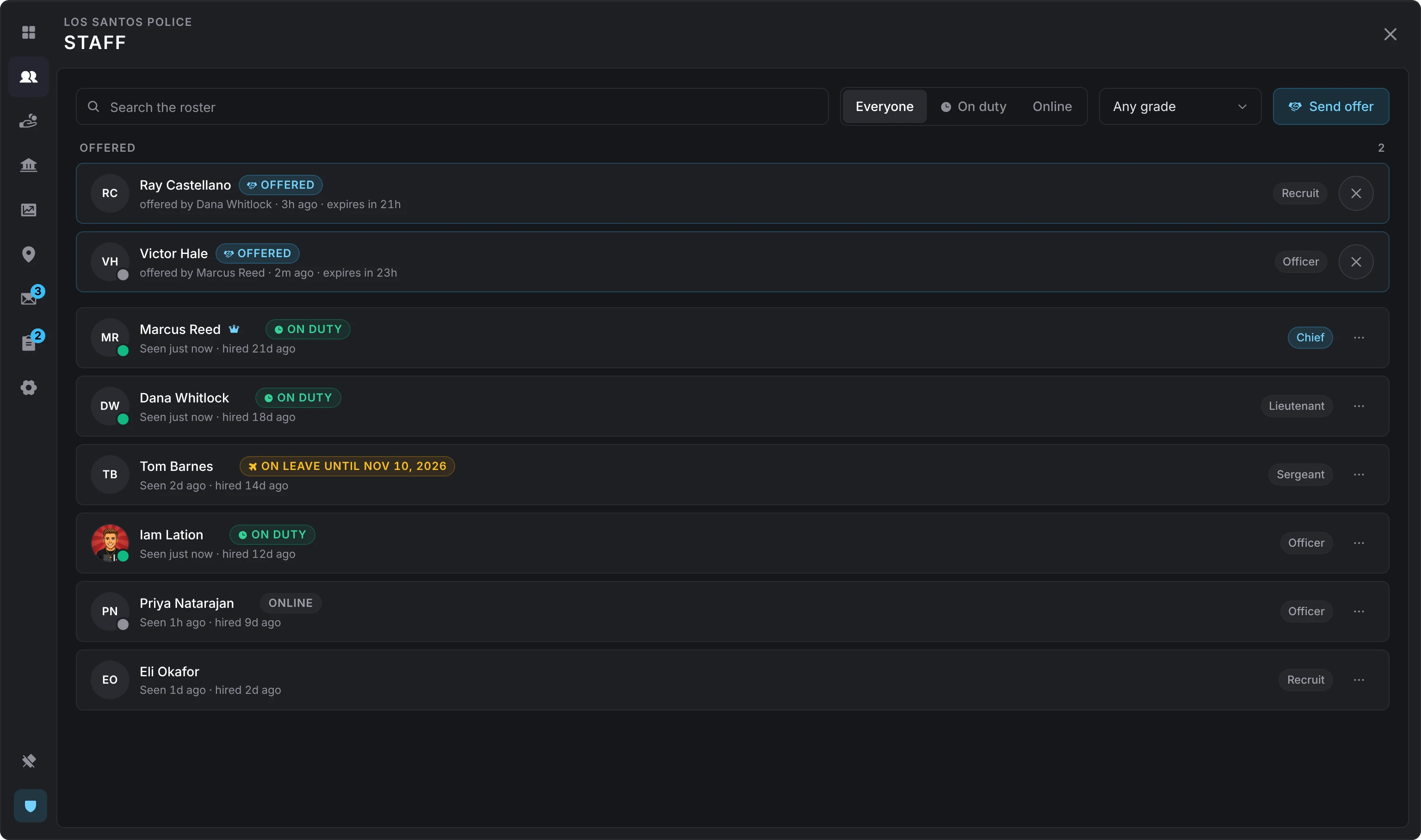
Hire adds someone at a grade you pick: a player standing within reach (Config > General > Nearby distance, 10 metres by default) or anyone by identifier, online or not. An offline hire takes effect on their next load.
Every row has a menu:
- Set grade (
promote) - Clock off (
set_duty) - Open their file
- Fire (
fire), on a second click. Their shift ends, they lose access to the society account, and the framework moves them to their next job or to unemployed.
The boss grade can set any grade. Any other grade only assigns grades below its own, and cannot fire or regrade someone at its own grade or above. Nobody fires themselves.
Hiring by offer
When the job hires by offer (Config > Hiring, or the job's own Setup), Hire becomes Send offer. The offer opens in front of the person when they stand within reach of you, and otherwise waits in their Work panel. It shows the job, the grade, the pay and who pays it, and the forms that would follow. They accept or decline before it expires (24 hours by default). The offers waiting are listed on Staff, and a grade with hire can withdraw one.
The employee file
A person on the roster opens as a page:
- Who they are at the job, since when, and who hired them
- Hours, pay, shifts and bonuses over the last 7 days, the last 30 or all time
- Their latest shifts and payroll lines
- The activity they were part of
- Their application, the forms they sent and their leave
- Their record
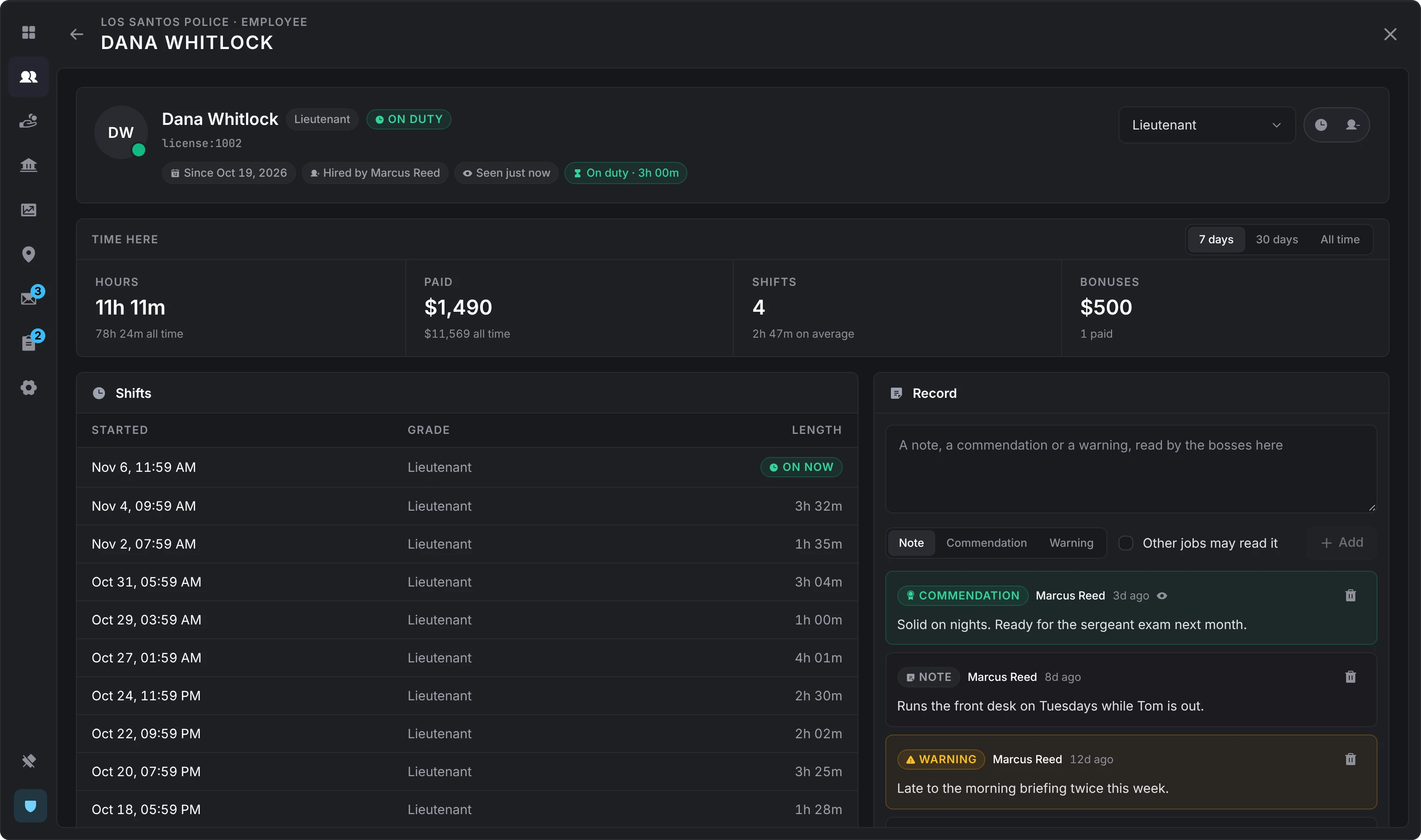
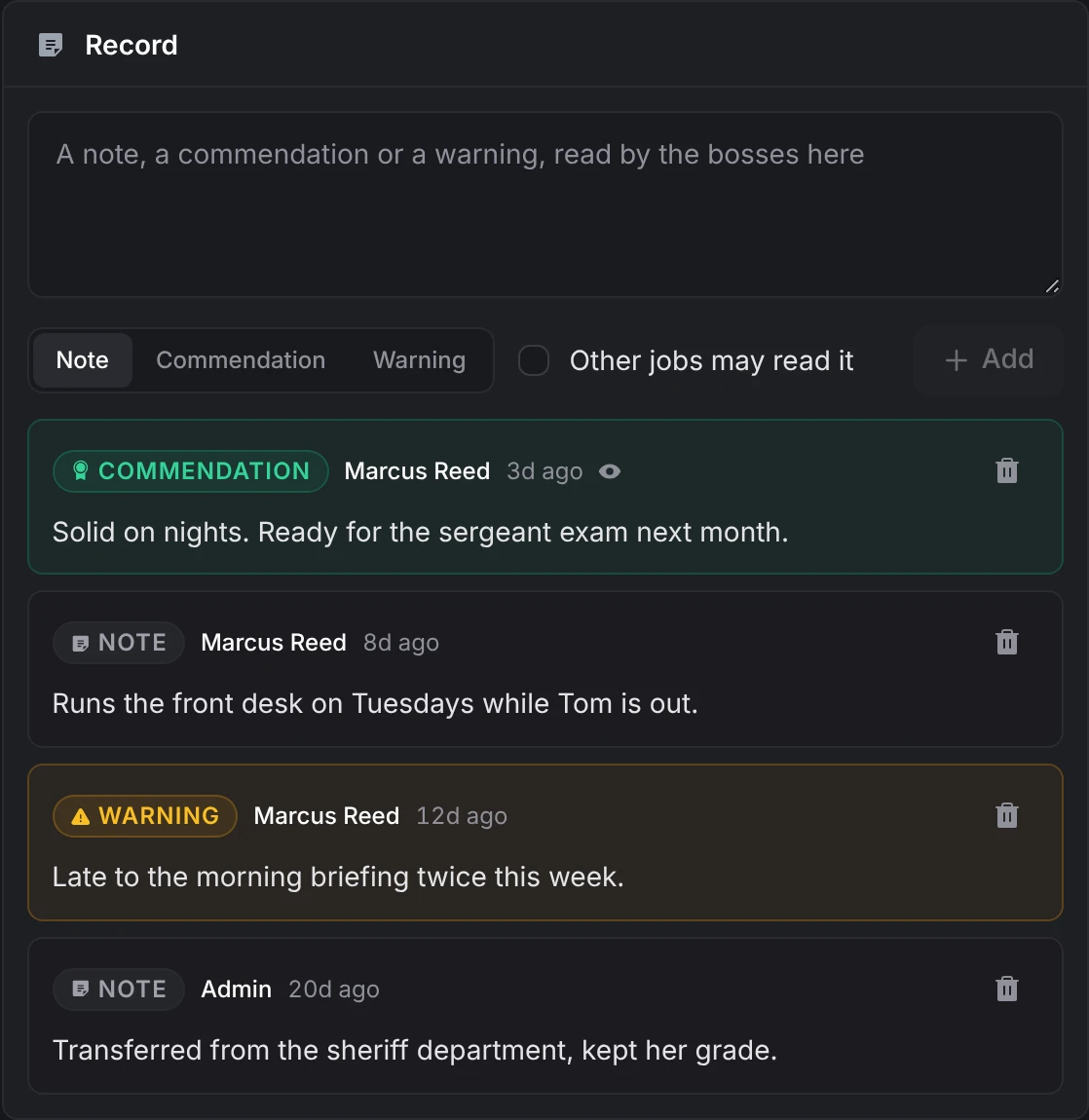
The record is notes, commendations and warnings the bosses keep, up to 500 characters each. Grades with hire write them, and the author or the boss grade removes one. Each is private to the job unless its writer lets other jobs read it. A commendation or a warning tells the person and shows in their Updates; a note is never shown to them.
Payroll
Each grade's salary per hour on duty, the next run with what it will cost against the balance, the last run, and Pay a bonus.
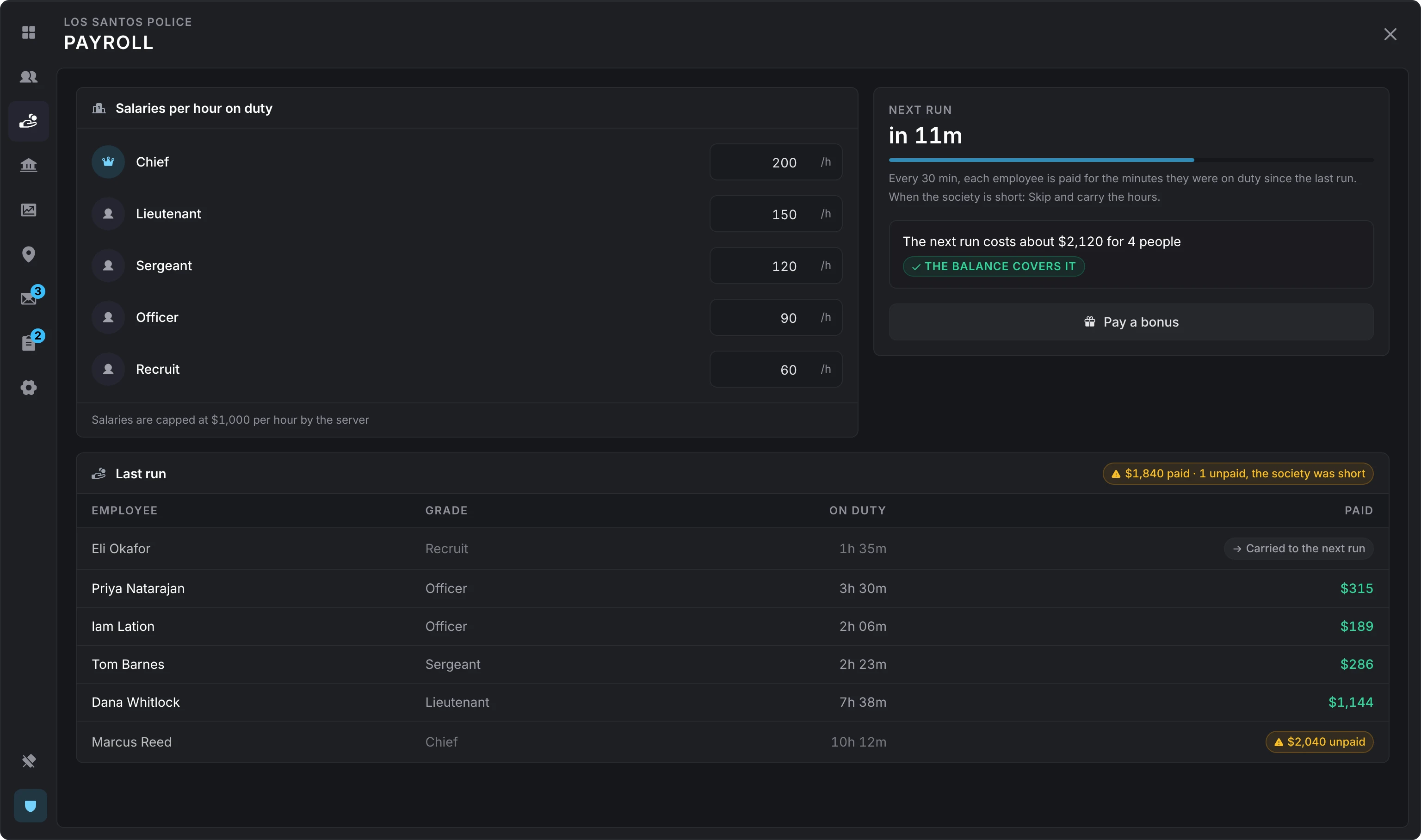
A grade with manage_salaries sets salaries here while Config > Jobs > Bosses edit salaries is on, under the salary cap. A bonus (withdraw_funds) goes out of the society account to anyone on the roster, with an optional note, and needs a bank.
How payroll pays
Every interval (30 minutes by default), payroll pays each employee for the minutes they were on duty since the last run, at the salary per hour of the grade they hold now, in whole units. A closed shift shorter than the shortest paid shift (5 minutes by default) earns nothing, and the hours of someone who no longer works here are settled unpaid. Minutes that don't yet come to one whole unit carry over to the next run, as do minutes the payrollAmount hook holds back; the last run lists them as Carried to the next run.
A job paid by its society makes one bank transfer per employee, lowest grades first, each with a note like Payroll · LSPD · 2h 15m. When the account cannot cover a transfer, the shortfall rule decides:
- Carry over (
skip, the default): the run stops there and everyone left carries their hours to the next run. - Pay what it holds (
partial): the run keeps paying whoever still fits.
Online members of the boss grade are told when a run fell short, while Config > Payroll > Tell the bosses is on. The last run's rows say who went unpaid.
A job paid by the server pays each employee straight into their own bank account. Nothing leaves the society, so it never falls short.
Finances
A window onto the society account at the bank: the balance, the last 7 days in and out, and the latest ledger rows.
- Deposit (
deposit_funds) moves money from your own bank account into the society. - Withdraw (
withdraw_funds) moves it from the society into your own bank account. - Open in bank opens lation banking on the job's account. lation banking only.
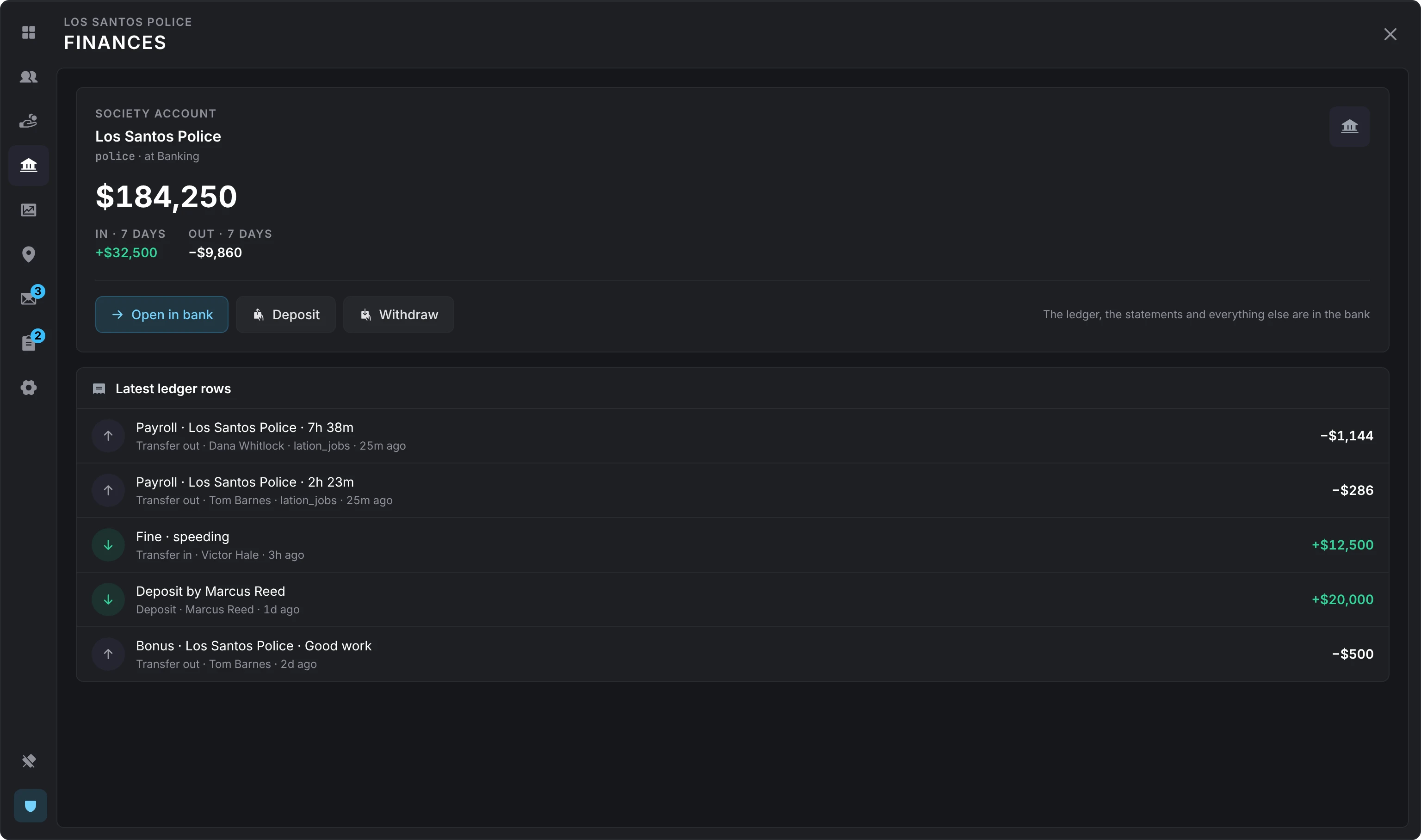
When the money isn't there, the boss is told which side is short: a deposit says you don't hold that much in the bank, a withdrawal or a bonus that the society doesn't hold that much. An account lation banking has frozen says so.
With lation banking, Renewed-Banking or okokBanking, the rows are the bank's own history. With the other banks, they are the moves lation jobs made itself, and moves made at the bank directly are not listed. Without a bank, the tab says so.
Analytics
The job over the last 7 days, the last 30, or all time: hours on duty by day beside what was paid, the busiest hours of the week, who worked the most, and who was in on which day. The money is shown only to grades with view_finances, manage_salaries or withdraw_funds.
Places
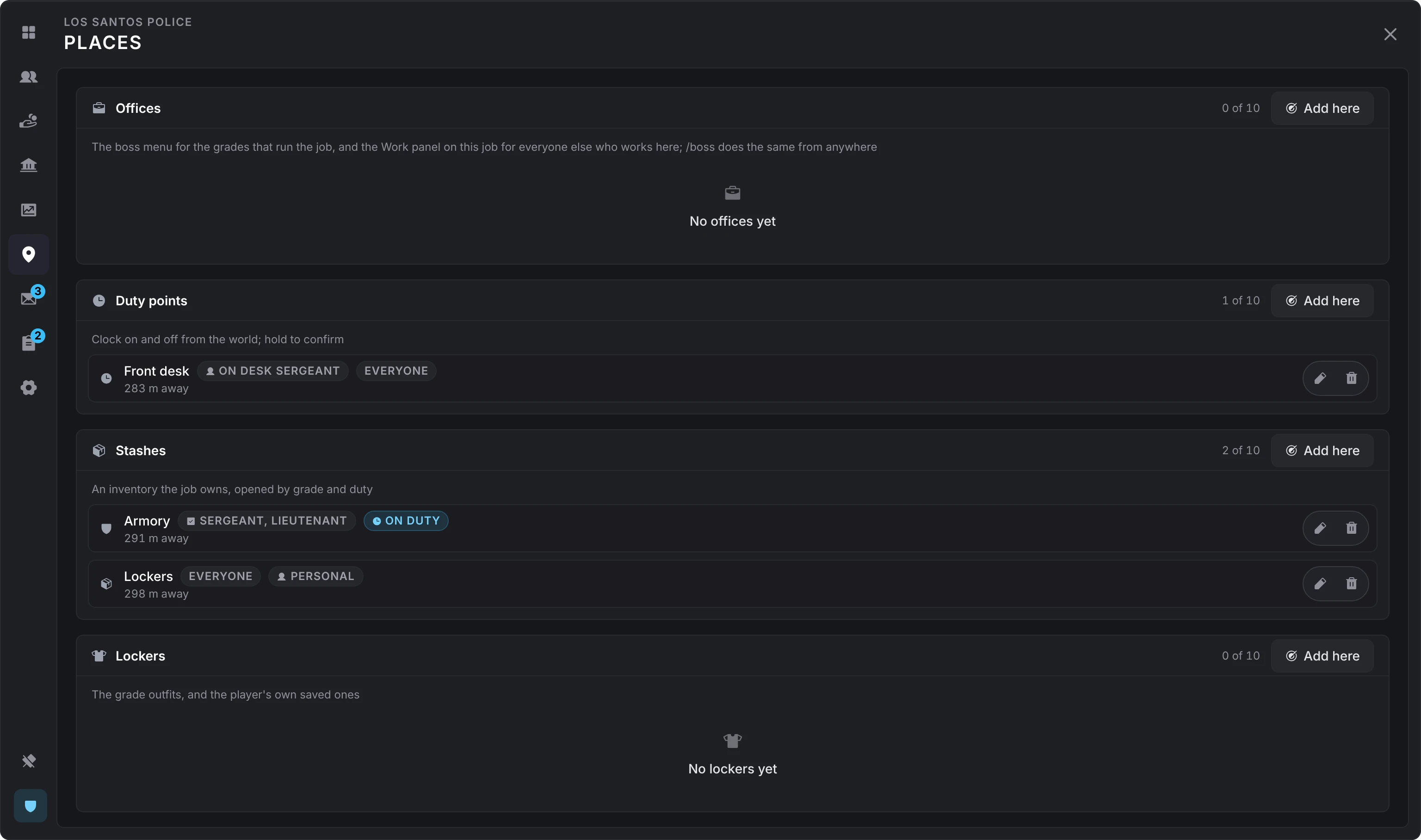
The job's places by kind, each with how far it is from you. While Config > Jobs > Bosses place places is on, a grade with manage_places adds, edits and removes places the same way an admin does, within 60 metres of where they stand and within the cap per kind. Script places are set by an admin only. See places.
Applications
The open applications from the job board, each with the applicant's answers (or their line to the boss when the job asks no questions) and their background. Accept hires them at the lowest grade or one you pick; Decline answers them and starts the cooldown before they may apply again (1 day by default). Both tell the applicant. When the job hires by offer, Accept sends an offer and the application reads Offered until they answer it.
What a boss sees of an applicant's background follows Config > Applications > Applicant background: nothing, the jobs they held and the grades they reached (the default), or those and what other jobs wrote about them for all to read.
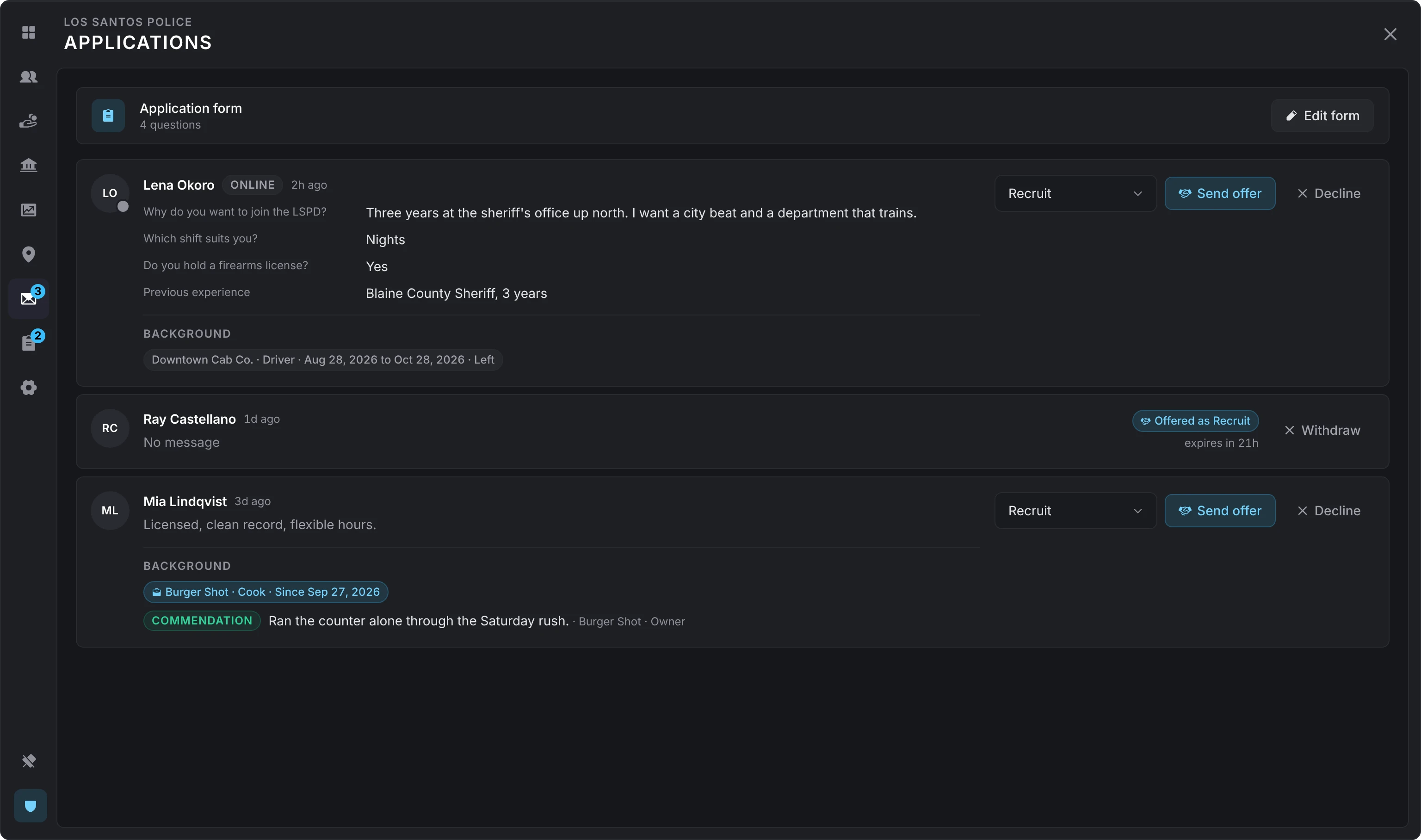
Edit form writes the questions applicants answer, up to Config > Applications > Questions per form (8 by default). Each question is a short answer, a paragraph, one of a list, yes or no, or a signature, and is required or optional. With no questions, an applicant sends a line to the boss. Setting the cap to 0 turns custom forms off for every job.
Forms
The job's own forms: an employment agreement to sign on hiring, an incident report, a vehicle checkout, an equipment sign-out, or anything else.
New form starts blank or from one of four starters (employment agreement, incident report, vehicle checkout, equipment sign-out). A form has a title, a line under it, the lowest grade it is for, whether it is Required on hire, whether it takes responses, and its questions in the same kinds as an application.
A required form shows as a task in the Work panel of everyone it is for until they fill it in, and a new hire is told about it. Responses are read here, form by form, and each is marked reviewed, approved or declined, or reopened. The person is told.
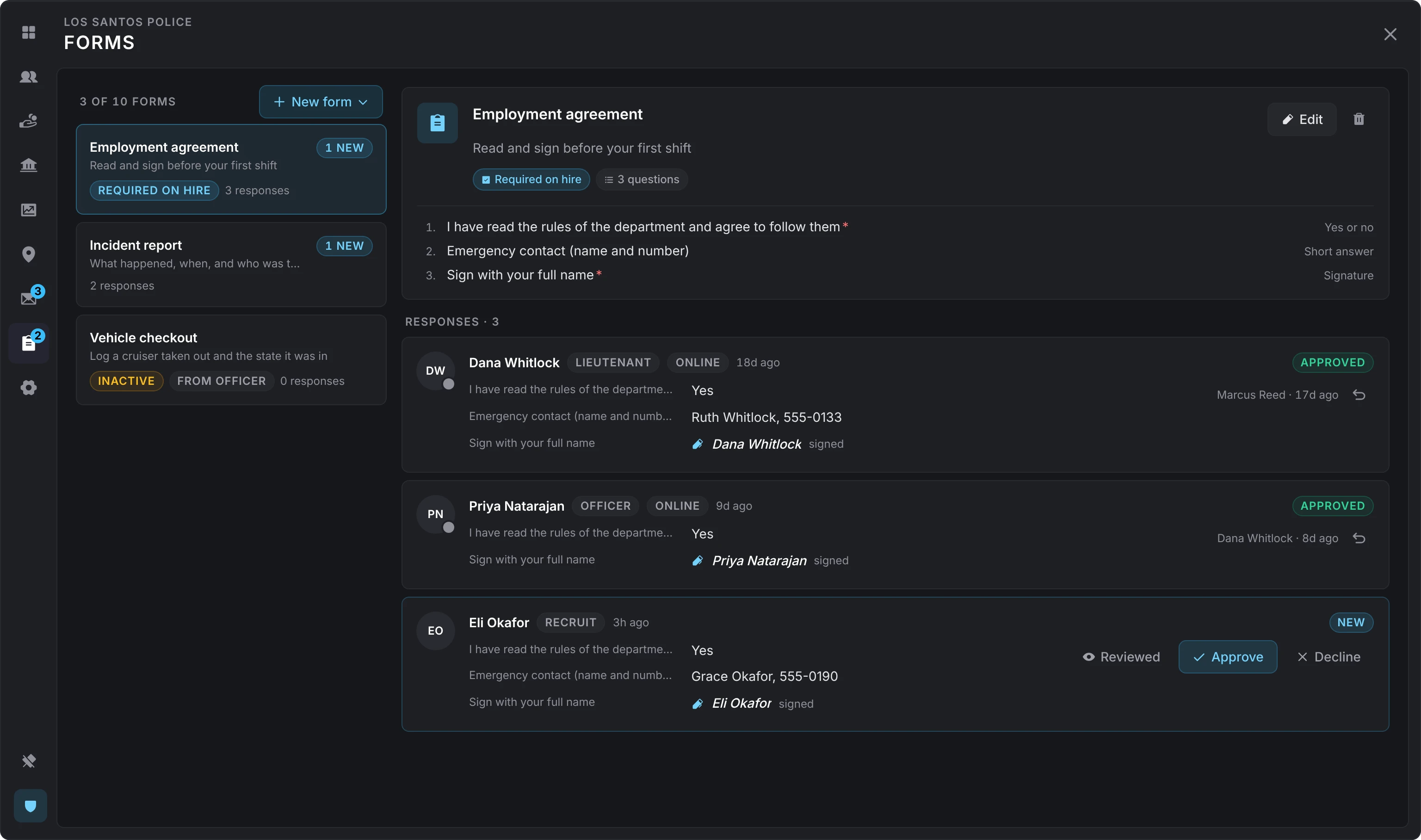
Forms are capped by Config > Forms (10 per job, 12 questions each) and turned off there.
Notices
The board on the dashboard. A grade with manage_notices posts one:
- The text, in Markdown: bold, italics, headings, lists, quotes and links (which open outside the game). Raw HTML and images are never rendered. Up to 2,000 characters by default.
- Its tone: a notice, important or urgent. The tone sets the icon and color it reads in, and the toast each employee gets.
- Who it is for: everyone at the job, or a grade and up.
- Pinned to the top or not.
- When it clears: after a number of days (1 to 365), or when it is taken down. A pinned notice stays until it is taken down.
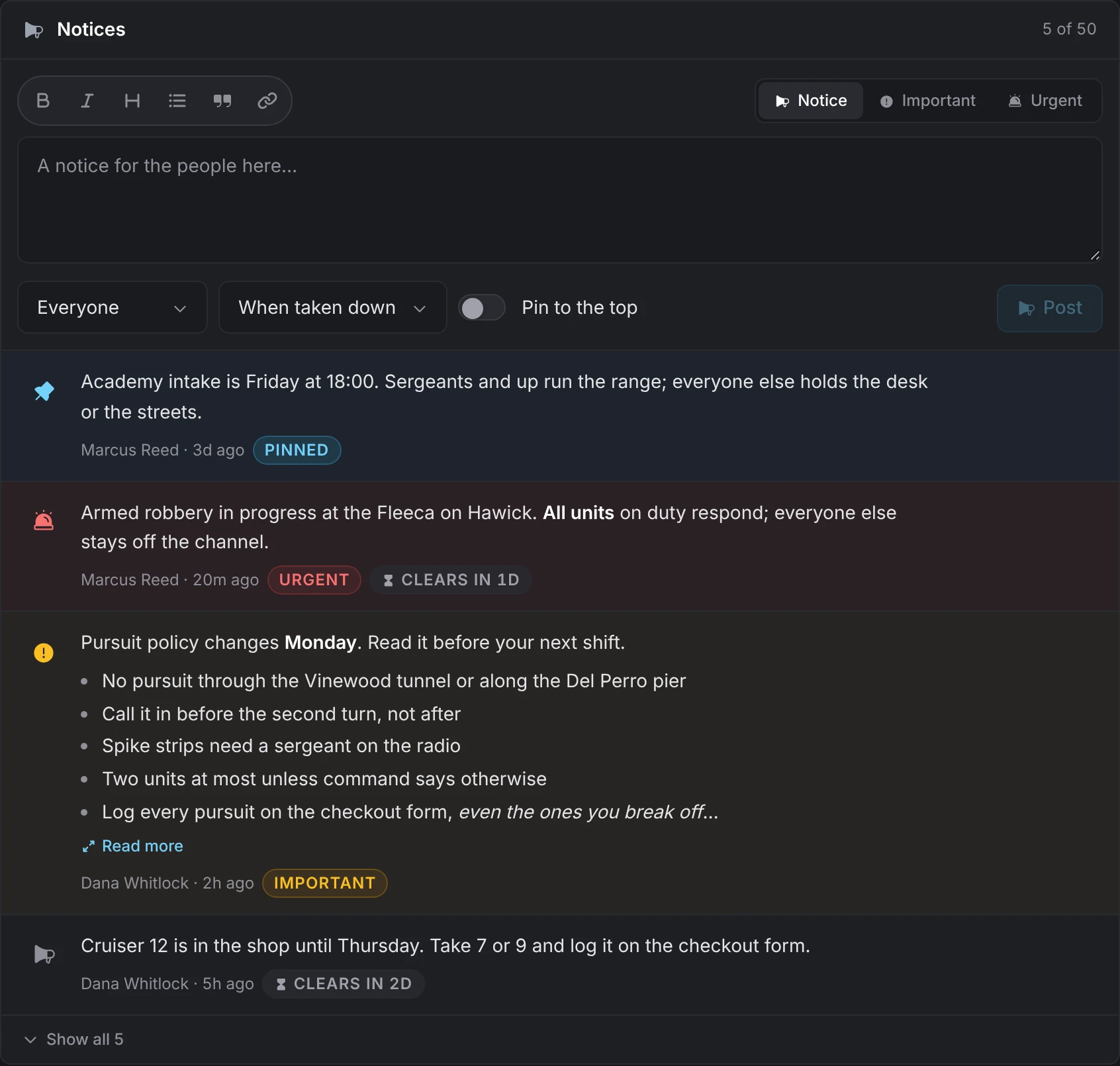
A notice can be edited afterwards; it keeps its place and reads as edited, and nobody is told again. Employees read notices in the Work panel. Config > Notices caps how many a job keeps (50) and turns them off.
Leave
Leave requests from employees land in Waiting on you for grades with manage_leave. Approve answers at once; Decline takes a line for the person. Either answer lands in their Updates. The roster shows who is away until when, and the file keeps the list.
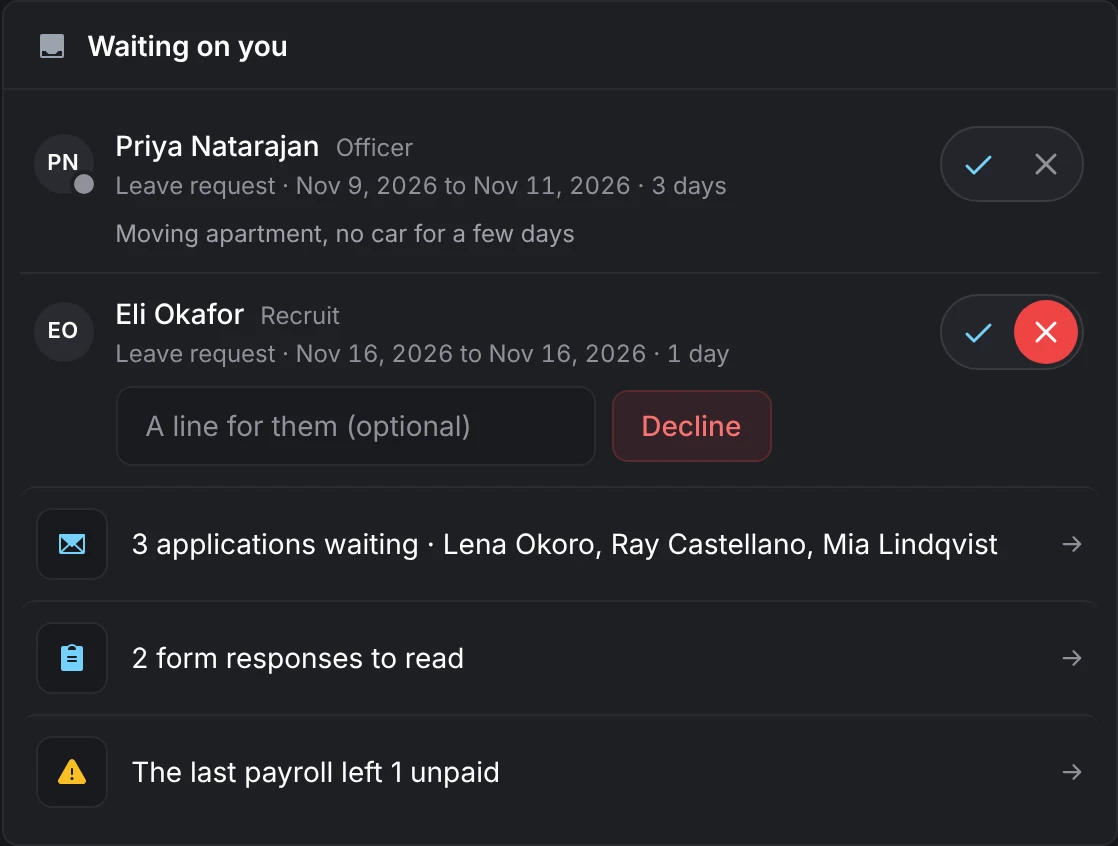
While Config > Leave > No duty while away is on, someone on approved leave cannot clock on. Payroll is not touched: it pays hours on duty.
Settings
- Job board (
manage_settings): whether the job is listed, whether it is hiring, and the sentence the board shows. - Grade names: the boss grade renames grades here while Config > Jobs > Bosses edit grades is on. Salaries are set under Payroll, and permissions by an admin.
Still stuck? Ask in our Discord: the people who write the scripts answer.
Last updated
Admin panel
How to open /jobadmin, create or adopt jobs and gangs, set grades, pay and permissions, put down places, and edit the live configuration.
Players
How players use lation jobs: the Work panel, clocking on and off, holding several jobs, the job board and applying, offers, leave, notices and forms.