Contracts and chopping
How players take a lation chop shop contract, jack a car up, take its wheels, doors and engine bay apart, get paid, work a car together and trade parts in.
This page follows a player through one job with the default settings. Everything named here can be changed under /chopadmin > Config; see configuration.
The broker
Players talk to the broker to open the chop shop menu. It shows:
- Their level, their XP and how much is left to the next level.
- Statistics: lifetime vehicles chopped and parts received.
- The Leaderboards: the top 10 players by XP, with level, XP and vehicles chopped.
- Tool Shop and Swap Shop.
- Request Contract, or View Contract while they hold one.
Players with a blacklisted job can't open the menu.
Taking a contract
Request Contract hands the player a contract paper (ls_chop_contract). The contract asks for one vehicle class, has a time limit, and pays a bonus if the car is finished in time.
The tier is drawn at random, with equal odds, from every tier the player's level reaches, then one of that tier's classes is picked. With Highest tier only on, only the highest tier they have reached is in the draw.
A request is refused when the player:
- has a blacklisted job,
- is still on a completion cooldown,
- already has a contract running, or holds a contract paper,
- asks while fewer police are on duty than Police required,
- has no tier open at their level,
- can't carry the paper.
The timer runs on real time: it keeps going while the player is logged out, and the contract survives a relog and a server restart. A contract that ran out more than 7 days before a restart is dropped on that restart.
The contract paper
Using the paper opens the contract: the tier, the time left as a countdown with a bar under it, the vehicle class and the bonus. The countdown turns amber under 10 minutes and red under 2. While Allow cancelling is on, it has Cancel contract, which asks in place and names the cooldown if there is one.
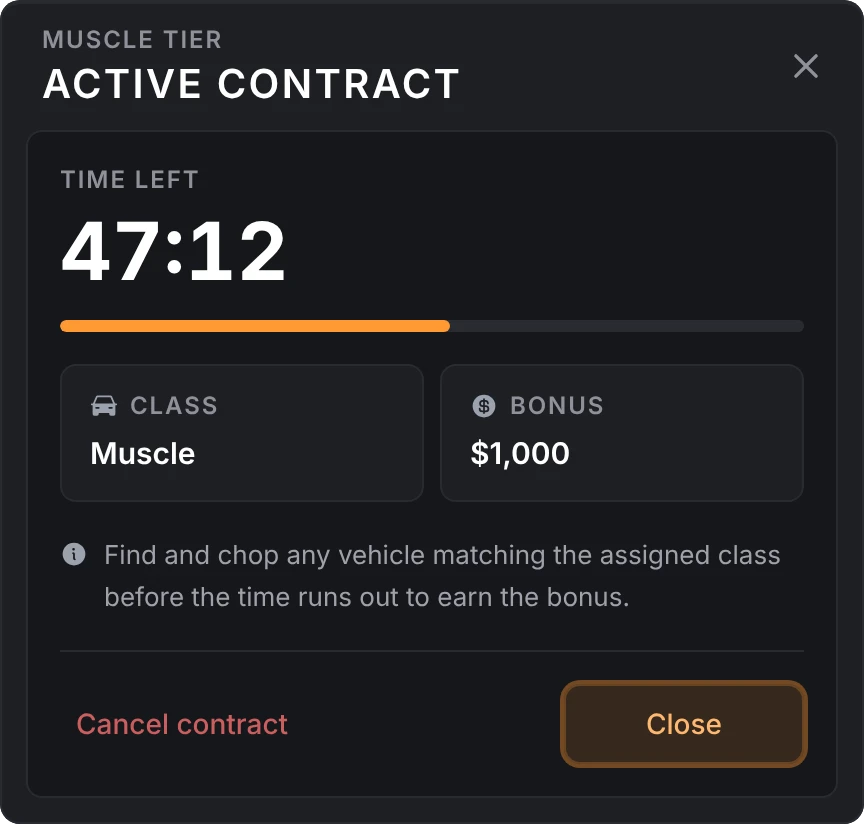
- Lost paper. The contract lives on the server, so View Contract at the broker prints a new copy when the player no longer has one.
- Time ran out. The bonus is gone. Just after the deadline, or the next time the player loads in, the contract is cleared and its paper taken. An old paper opened later reads Contract Expired or Invalid Contract, and closing it throws it away.
- Cancelling. The paper is removed and the completion cooldown starts. A car already started on that contract can still be stripped for parts, with no bonus.
Starting a chop
The player finds any vehicle of the contract's class and aims at it. Start chopping appears when:
- the vehicle's class matches the contract and the contract still has time left,
- nobody is sitting in it,
- it isn't already being chopped.
The class is the one the contract was issued with, even if it has since been taken off the allowed classes.
Picking it is refused when the model is on the blacklisted models, when the player has an unfinished chop on another car that is still in the world, or when they are outside a chop location (while locations are restricted). While owned vehicles aren't allowed, a car whose plate is in the owned vehicles table is refused too; the server checks the plate itself. A car with nothing left to take off (no wheels, no usable doors and no hood) is refused, and your own check can refuse more in CanChopVehicle. A contract holder who takes the wheel of a blacklisted model of their class is told right away.
Once started, the car is kept from despawning while it is worked on. If nobody comes within 424 m of it for 5 minutes, it is deleted. A car spawned by another script, such as a garage, is left as that script set it.
If a model is blacklisted while it is being chopped, nothing more comes off that car. Its stands can still be taken off, and the contract is free for another car.
Jacking it up
The car has to be on jack stands before anything comes off.
The player stands beside the car, within 2.5 m of its body, and uses the car jack item. The stand goes under the nearest car being chopped, at the next corner, after a short progress bar. Walking away cancels it and nothing is used up.
While Stands use up jacks is on (the default), each stand takes one car jack, so 4 corners take 4 jacks. Off, a jack in hand places every stand and none is used up.
When the last stand is in, the car lifts, freezes in place and its engine shuts off.
Remove jack stands on the car takes them all off and lowers it. Each jack goes back to the player who paid it: the one removing the stands gets theirs at once (and needs room for them, or the stands stay on), and anyone else's go to them wherever they are. Taking the stands off before the car is finished puts it back on the ground, and nothing comes off until it is jacked up again.
Taking it apart
The player uses the impact drill item to take it out, and again to put it away. Other players see it in their hand. With the drill out and the car up, each part gets its own prompt.
| Part | Prompt | How it comes off |
|---|---|---|
| Each wheel | Dismantle front left wheel, and so on | A close-up of the wheel. Hold the drill on each of the 5 lug nuts until it comes off. |
| Each door | Dismantle front left door, and so on | The door swings open. Hold the drill on each of the 4 hinge bolts until the door drops. |
| Engine bay | Dismantle engine, at the hood | The hood opens on a view of the bay with a spot for each part left. Each part takes a few steps. |
The drill minigame draws the fasteners over the part, with Hold each lug nut to drill it off (or Hold each hinge bolt to drill it out) under them. A ring fills while one is held, and a fastener that is out shows a tick.
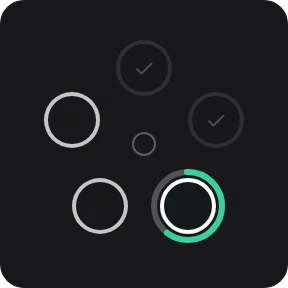
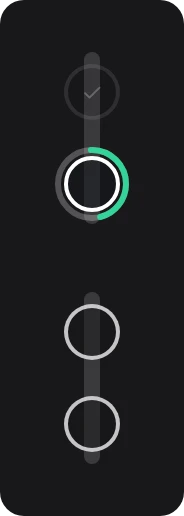
The engine bay is a drawing of the bay over the screen, with every part still in it and a spot to pick on each, and Click a part to take it out under it:
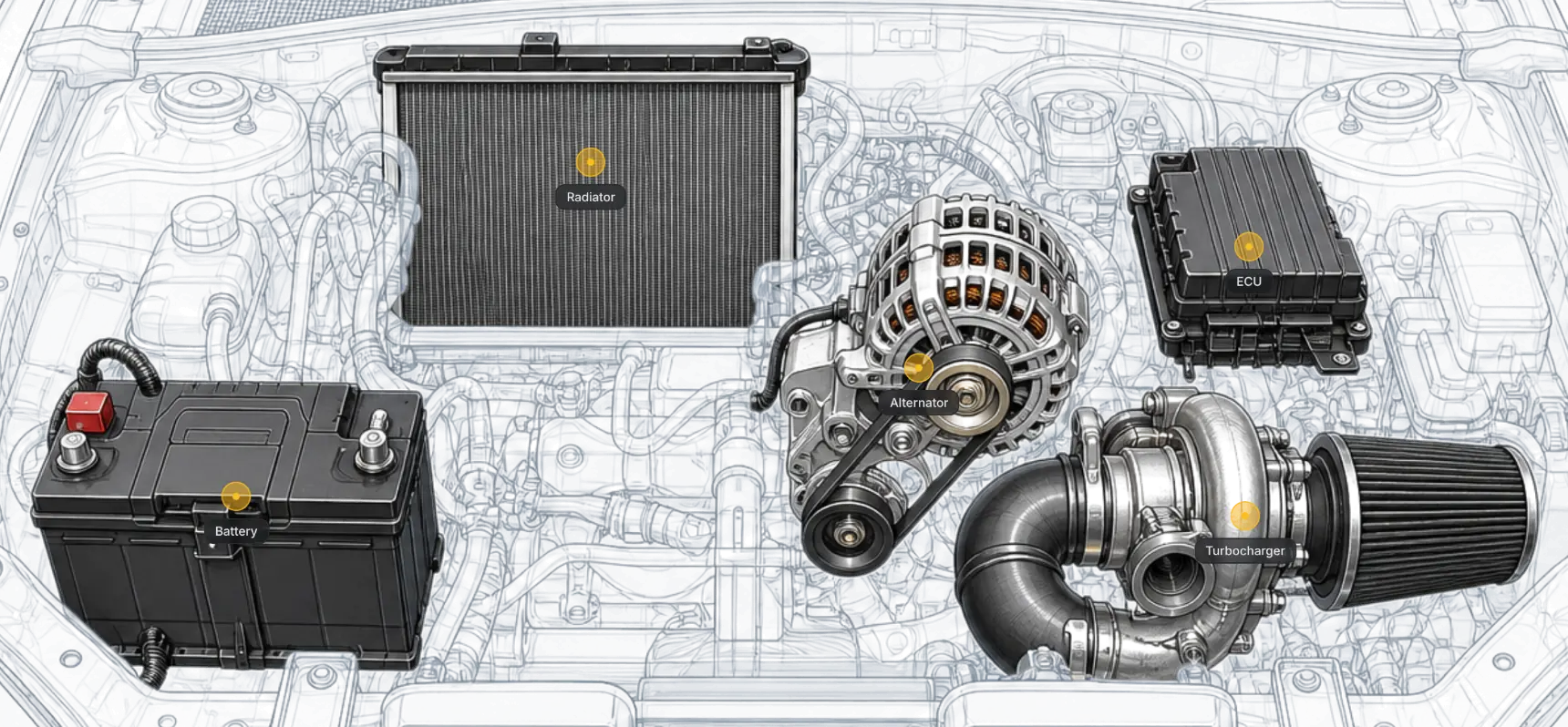
Picking a part dims the rest and opens its steps beside it:
| Part | Steps |
|---|---|
| Battery | Unclip the terminals (connector, 2 clips), then spin off the hold-down bracket (torque) |
| Radiator | Release the inlet hose clamp (tap), the outlet hose clamp (tap), then spin off the mounting bolts (torque) |
| Alternator | Spin the belt tensioner loose (torque), unplug the wiring (connector, 1 clip), then spin off the mounting bolts (torque) |
| ECU | Unclip the wiring harness (connector, 4 clips), then spin off the mounting screws (torque) |
| Turbocharger | Release the oil line clamp (tap), then spin off the flange bolts (torque) |
- Torque: click, hold and spin the mouse in a circle.
- Connector: watch the order the clips light up in, then click them in the same order.
- Tap: click fast to fill the bar.
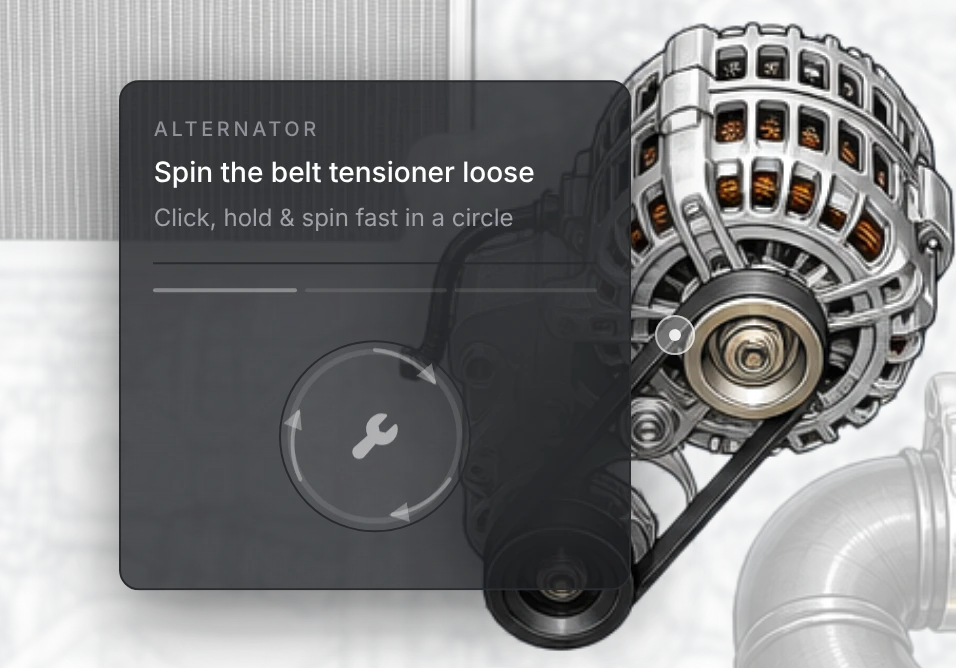
Esc cancels a wheel or a door. In the engine bay, Esc or clicking away cancels the current step, and Esc with no step open closes the bay.
Parts the car turned up without, such as a wheel already broken off, a door that's gone or no hood on that model, count as already taken. Once anything is out of the engine bay, the car can't be driven.
After each part there is a 10% chance the drill breaks. A broken drill is taken from the inventory, and the player needs another.
Rewards
For every part, the player who took it off gets:
- the part's item,
- one more on their parts received,
- XP rolled from their level's range (doors pay half), with a notification each time,
- a notice when they reach a new level.
If the player can't carry the part, it stays on the car and they can try again.
When the last part comes off, the contract holder:
- gets one more on their vehicles chopped,
- gets the contract's bonus in the payout account if it was finished in time, or a notice that it finished late and pays parts only,
- has the contract and its paper cleared, and the completion cooldown starts.
The holder doesn't have to be there. If they are away (a crash, a disconnect) when a helper finishes the car, the contract still closes with its cooldown, and the bonus, the vehicle count and the paper are settled the next time they load in. When the bonus is paid as an item and they have no room for it, the chop shop holds it for them, tells them so, and hands it over once there is room, checking every minute and at each login. The same goes for jacks coming back.
Afterwards, removing the stands gives the jacks back. The stripped shell stays, or is deleted 3 seconds after its stands come off while Remove the vehicle when finished is on.
With Allow owned vehicles and Delete owned vehicles both on, an owned car is deleted from the database when its last part comes off, if it belongs to the player who took that part. See the Start settings.
Co-op
Anyone within 30 m of the car whose job isn't blacklisted can help. Helpers don't need a contract.
- Helpers put stands down with their own car jacks and take parts with their own drill out.
- Each player gets the items and XP for the parts they take, rolled from their own level.
- Only the contract holder gets the bonus and the vehicle count.
- Several players can work different parts at once. If two go for the same part, the first to finish gets it.
- When the stands come off, each car jack goes back to the player who paid it, whoever removes them. A player who has left gets theirs the next time they load in.
Selling parts
At the broker:
- Tool Shop sells impact drills and car jacks. The player picks an item and how many.
- Swap Shop takes salvaged parts for cash, an item, or both. The player picks a part and how many swaps to make; each swap takes the set number of parts.
Both need the player within 15 m of an active broker, and an entry can ask for a level. Each entry shows the item's label from your inventory, or its spawn name when the inventory doesn't know it.
Restarts
Contracts, cooldowns, levels, stats and whatever the chop shop is holding for a player survive a restart. A car that was mid-chop when lation_chopshop restarted can't be finished, and the stands on it can't be taken back. The contract is still there, so the player can start on another car.
Still stuck? Ask in our Discord: the people who write the scripts answer.
Last updated
Admin panel
How to open /chopadmin in lation chop shop, read the overview, change, search and reset settings, and move a whole setup between servers with export and import.
Configuration
Every lation chop shop option in /chopadmin > Config, with its config key, default value, limits and what it changes.