> ## Documentation Index
> Fetch the complete documentation index at: https://lationscripts.com/docs/llms.txt
> Use this file to discover all available pages before exploring further.
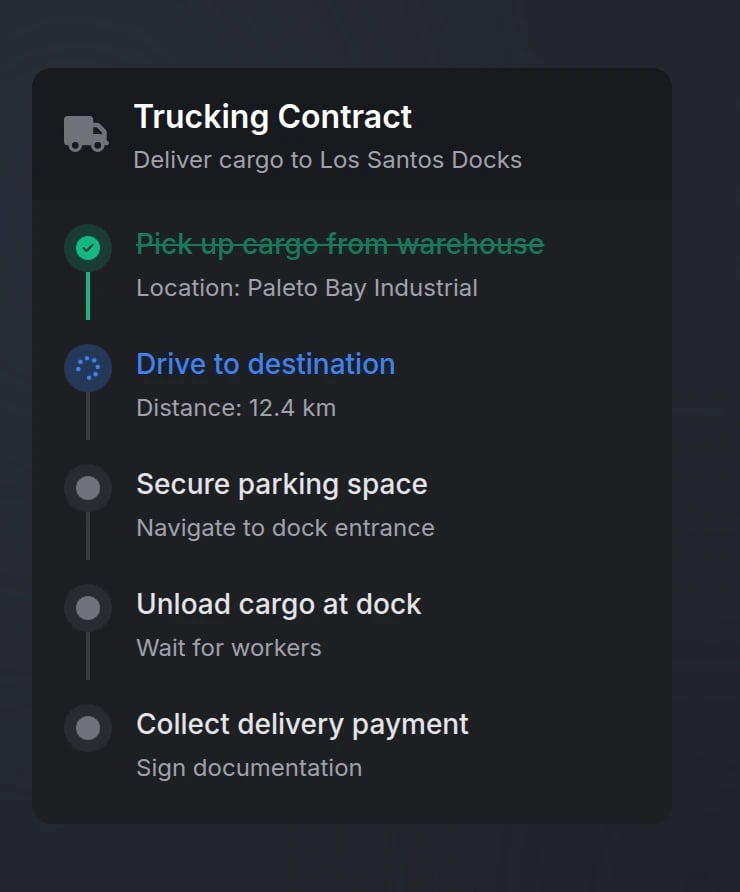
# Modern UI - Timeline
> Dynamic timeline for tracking mission progress and task completion
## Quick Start
```lua theme={null}
exports.lation_ui:showTimeline({
id = 'my_mission',
title = 'Mission Objectives',
tasks = {
{ id = 'task1', label = 'First objective', status = 'completed' },
{ id = 'task2', label = 'Current objective', status = 'active' },
{ id = 'task3', label = 'Next objective', status = 'pending' }
}
})
```
## Functions
Display a timeline with tasks to the player.
```lua theme={null}
exports.lation_ui:showTimeline(data)
```
**Parameters:**
* `data` (table) - Timeline configuration object (see [Options](#options))
Only one timeline can be active at a time. Showing a new timeline will automatically hide any existing timeline.
Hide a specific timeline.
```lua theme={null}
exports.lation_ui:hideTimeline(id)
```
**Parameters:**
* `id` (string) - Unique identifier of the timeline to hide
Timeline state is not preserved when hidden. You must pass the full configuration when showing again.
Update one or multiple task statuses.
```lua theme={null}
-- Single task update
exports.lation_ui:updateTimelineTask(timelineId, taskId, status)
-- Multiple tasks update (recommended for sequential progression)
exports.lation_ui:updateTimelineTask(timelineId, tasksArray)
```
**Parameters (Single Task):**
* `timelineId` (string) - Unique identifier of the timeline
* `taskId` (string) - Unique identifier of the task to update
* `status` (string) - New status: `'pending'`, `'active'`, `'completed'`, `'failed'`
**Parameters (Multiple Tasks):**
* `timelineId` (string) - Unique identifier of the timeline
* `tasksArray` (table) - Array of task objects with `id` and `status` properties
Add a new task to an existing timeline.
```lua theme={null}
exports.lation_ui:addTimelineTask(timelineId, task)
```
**Parameters:**
* `timelineId` (string) - Unique identifier of the timeline
* `task` (table) - Task object (see [Tasks](#tasks))
Update timeline properties (title, description, icon, etc.).
```lua theme={null}
exports.lation_ui:updateTimeline(timelineId, updates)
```
**Parameters:**
* `timelineId` (string) - Unique identifier of the timeline
* `updates` (table) - Object containing properties to update (see [Options](#options))
Get the ID of the currently active timeline.
```lua theme={null}
local timelineId = exports.lation_ui:getActiveTimeline()
```
**Returns:**
* `timelineId` (string | nil) - The ID of the active timeline, or nil if none is active
## Configuration
### Options
Unique timeline identifier
Timeline title (supports markdown)
Timeline description (supports markdown)
Timeline position on screen
Available options: `'top-left'`, `'top-center'`, `'top-right'`, `'left-center'`, `'center'`, `'right-center'`, `'bottom-left'`, `'bottom-center'`, `'bottom-right'`
FontAwesome icon class
Icon color (hex or [CSS color name](https://htmlcolorcodes.com/color-names/))
Icon animation type
Available options: `'spin'`, `'spinPulse'`, `'spinReverse'`, `'pulse'`, `'beat'`, `'fade'`, `'beatFade'`, `'bounce'`, `'shake'`
Array of task objects (see [Tasks](#tasks))
Background opacity (0.0-1.0)
### Tasks
Each task object in the `tasks` array supports:
Unique task identifier
Task display text (supports markdown)
Task description (supports markdown)
Task status
Available options: `'pending'`, `'active'`, `'completed'`, `'failed'`
FontAwesome icon class
Overrides default status icon
Icon color (hex or [CSS color name](https://htmlcolorcodes.com/color-names/))
Automatically determined by task status if not specified
Icon animation type
Custom task icons do not auto-animate unless `iconAnimation` is explicitly set
## Examples
```lua Basic Timeline theme={null}
-- Show a timeline with mission tasks
exports.lation_ui:showTimeline({
id = 'heist_mission',
title = 'Bank Heist',
description = 'Complete all objectives to finish the heist',
position = 'right-center',
icon = 'fas fa-mask',
iconColor = '#EF4444',
opacity = 0.95,
tasks = {
{
id = 'gear',
label = 'Acquire equipment',
description = 'Get supplies from the warehouse',
status = 'completed'
},
{
id = 'hack',
label = 'Hack security system',
description = 'Disable cameras and alarms',
status = 'active'
},
{
id = 'vault',
label = 'Access the vault',
status = 'pending'
},
{
id = 'escape',
label = 'Escape the area',
status = 'pending'
}
}
})
```
```lua Update Single Task theme={null}
-- Update one task when objective is completed
exports.lation_ui:updateTimelineTask('heist_mission', 'hack', 'completed')
```
```lua Update Multiple Tasks theme={null}
-- Update multiple tasks at once (recommended for sequential progression)
exports.lation_ui:updateTimelineTask('heist_mission', {
{ id = 'hack', status = 'completed' },
{ id = 'vault', status = 'active' }
})
```
```lua Add Task theme={null}
-- Add a new task dynamically
exports.lation_ui:addTimelineTask('heist_mission', {
id = 'bonus',
label = 'Bonus objective',
description = 'Collect additional loot',
status = 'pending',
icon = 'fas fa-star',
iconColor = '#F59E0B'
})
```
```lua Update Timeline theme={null}
-- Update timeline properties (e.g., completion message)
exports.lation_ui:updateTimeline('heist_mission', {
description = 'Heist Complete! +$50,000'
})
```
```lua Hide Timeline theme={null}
-- Hide timeline when mission ends
exports.lation_ui:hideTimeline('heist_mission')
```
## Preview