> ## Documentation Index
> Fetch the complete documentation index at: https://lationscripts.com/docs/llms.txt
> Use this file to discover all available pages before exploring further.
# Modern UI - Drawer
> Slide-in panel for rich informational content with optional footer actions
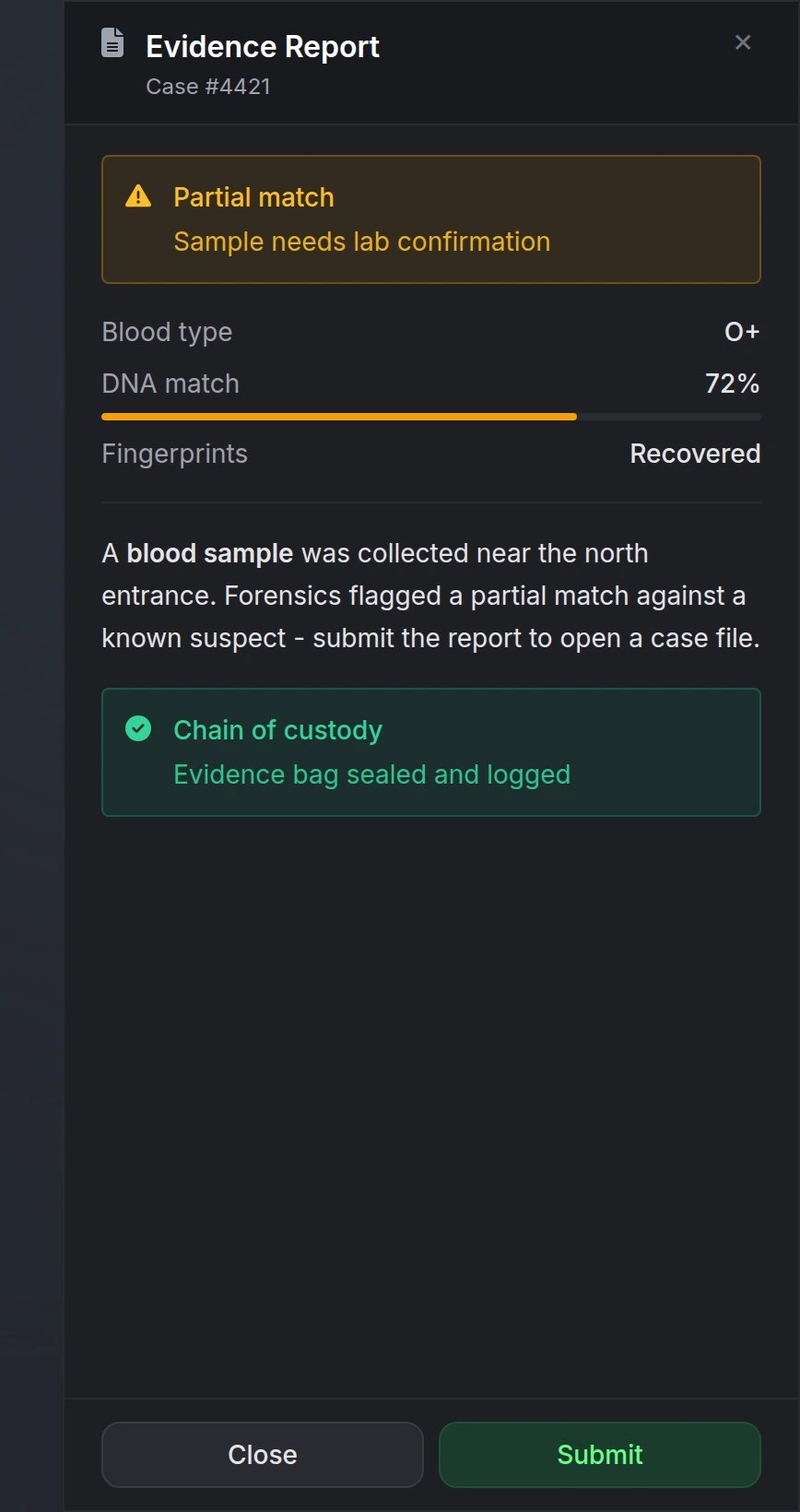
Drawers provide a slide-in panel for displaying markdown content, structured sections, and optional footer actions. Ideal for evidence reports, quest details, intel briefings, and other read-only UI with optional confirm or submit buttons.
The drawer body is **read-only** — it does not include text inputs or form fields. Use [Input](/docs/modern-ui/components/input) for player-entered data.
## Quick Start
```lua theme={null}
exports.lation_ui:showDrawer({
id = 'evidence_report',
title = 'Evidence Report',
subtitle = 'Case #4421',
icon = 'fas fa-file-lines',
position = 'right',
backdrop = true,
content = '**Blood sample** collected at scene.',
actions = {
{
label = 'Submit',
variant = 'primary',
serverEvent = 'police:submitEvidence',
args = { caseId = 4421 },
},
}
})
```
## Functions
Open a drawer panel.
```lua theme={null}
local opened = exports.lation_ui:showDrawer(data)
```
**Parameters:**
* `data` (table) - Drawer configuration object (see [Options](#options))
**Returns:**
* `opened` (boolean) - `true` if the drawer was shown, `false` if validation failed
Close the currently open drawer.
```lua theme={null}
local closed = exports.lation_ui:hideDrawer(id)
```
**Parameters:**
* `id` (string, optional) - Drawer ID to close. If omitted, closes whichever drawer is open. If provided, only closes when the active drawer matches.
**Returns:**
* `closed` (boolean) - `true` if a drawer was closed, `false` otherwise
Partially update an open drawer without closing it.
```lua theme={null}
local updated = exports.lation_ui:updateDrawer(id, data)
```
**Parameters:**
* `id` (string, required) - ID of the open drawer to update
* `data` (table, required) - Partial drawer data to merge (e.g. new `content`, `sections`, or `actions`)
**Returns:**
* `updated` (boolean) - `true` if the drawer was updated, `false` if no matching drawer is open
Check if a drawer is currently open.
```lua theme={null}
local isOpen = exports.lation_ui:isDrawerOpen(id)
```
**Parameters:**
* `id` (string, optional) - If provided, checks whether that specific drawer is open
**Returns:**
* `isOpen` (boolean) - `true` if a drawer is open (or the specified drawer is open), `false` otherwise
## Configuration
### Options
Unique drawer identifier
Header title (supports markdown)
At least one of `title`, `subtitle`, `content`, or `sections` must be provided.
Header subtitle (supports markdown)
Simple markdown body text
Structured content blocks
See [Sections](#sections) for available types.
FontAwesome icon class (e.g. `'fas fa-file-lines'`)
Icon color using hex code or [CSS color name](https://htmlcolorcodes.com/color-names/)
Icon animation type
Available options: `'spin'`, `'spinPulse'`, `'spinReverse'`, `'pulse'`, `'beat'`, `'fade'`, `'beatFade'`, `'bounce'`, `'shake'`
Slide-in position
**Options:** `'left'`, `'right'`, `'bottom'`
Panel width (left/right positions only)
**Options:** `'sm'` (320px), `'md'` (400px), `'lg'` (480px)
Dim the background behind the drawer
Visual only - the backdrop is not clickable. Players dismiss via X, Escape, footer actions, or `hideDrawer()`.
Whether the player can dismiss the drawer interactively
When `true` (default):
* Shows X button, footer actions, and Escape-to-close
* Enables cursor focus while keeping WASD movement
* Disables camera look while open
When `false`:
* Display-only overlay (no X, no footer buttons, no cursor lock)
* Must be closed programmatically with `hideDrawer()`
Footer action buttons
Pass one or more buttons — you are not required to include both Close and Submit.
See [Actions](#actions) for button options.
### Sections
Structured content blocks for the drawer body. Use `sections` instead of or alongside `content`.
Must be `'text'`
Markdown paragraph(s)
Must be `'callout'`
Callout title (supports markdown)
Callout body text (supports markdown)
**Options:** `'info'`, `'success'`, `'warning'`, `'error'`
Optional FontAwesome icon
Must be `'keyValue'`
Array of rows with `label`, `value`, and optional `progress`, `progressColor`, or `colorScheme`
Must be `'image'`
Image URL
Alt text
Optional caption (supports markdown)
Must be `'divider'`
**Example:**
```lua theme={null}
sections = {
{
type = 'callout',
calloutType = 'warning',
label = 'Partial match',
description = 'Sample needs lab confirmation',
},
{
type = 'keyValue',
items = {
{ label = 'Blood type', value = 'O+' },
{ label = 'DNA match', value = '72%', progress = 72, progressColor = '#F59E0B' },
},
},
{ type = 'divider' },
{
type = 'text',
content = 'Found near the **north entrance**.',
},
}
```
### Actions
Footer buttons for player interaction. Each button can fire a client or server event with optional data.
Button text (e.g. `'Close'`, `'Submit'`, `'Confirm'`)
Optional FontAwesome icon
Button style
**Options:** `'default'`, `'primary'`, `'destructive'`
Client event to trigger on click
Server event to trigger on click
Data passed to `event` or `serverEvent`
```lua theme={null}
args = { caseId = 4421, evidenceId = 'blood_01' }
```
Close the drawer after the button is clicked
Set to `false` to fire the event and keep the drawer open (e.g. a refresh action)
Footer `args` are defined by your script when opening the drawer - the player does not type new data into the panel. Closing via X or Escape only notifies Lua that the drawer closed; no custom args are returned.
## Preview